Contents:
Course: "Cybersecurity Specialist Profession"
Learn MoreThe correct term is "firewall," also known as a "firewall" or "firewall." Using the correct terminology will help you get more accurate results in search engines, including this article. A firewall plays a key role in ensuring the security of your network, protecting it from unauthorized access and malicious attacks. It is important to use the correct terminology when searching for information to find relevant and useful materials.
In this article, we will take a detailed look at this concept and answer the most common questions related to this topic.
Firewalls, network firewalls, and firewalls play a key role in ensuring the security of a network infrastructure. These tools protect computer networks from unauthorized access and threats by filtering incoming and outgoing traffic. Firewalls can be either hardware or software-based, providing flexibility in choosing a security solution. Firewalls analyze data packets based on preset rules, allowing them to block potentially dangerous connections. Firewalls, as a component of a security system, help prevent attacks and data leaks by providing protection against viruses and malware. Understanding how these technologies work is essential for effectively managing network security and protecting information.
- What is it and how is it different from everything else?
- What are they for?
- How they work and how they block unwanted connections?
- Top 5 popular firewalls: a comparison of their functions and capabilities
- Configuring a firewall in Windows: a step-by-step guide
- Summary
What is a firewall?
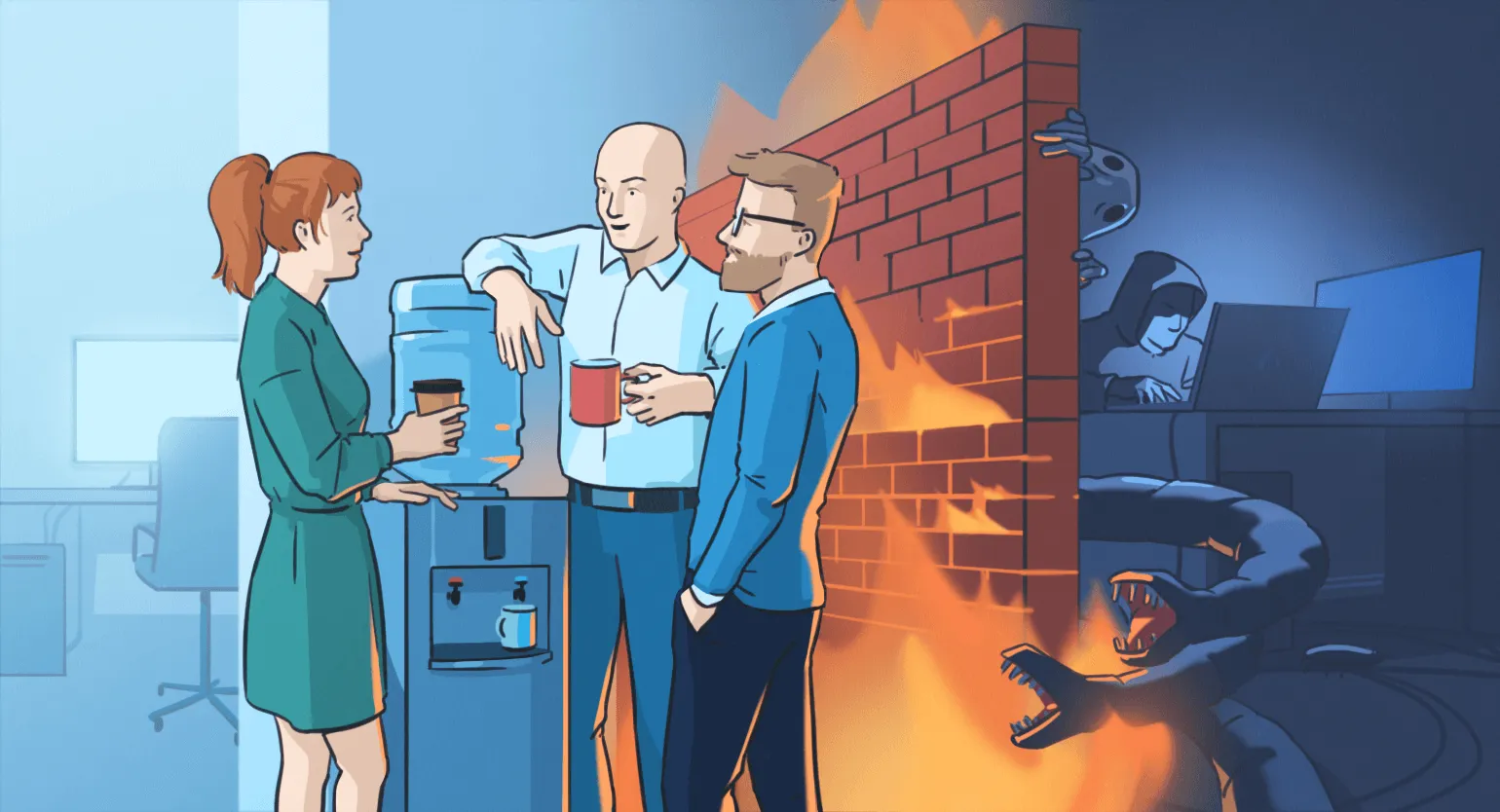
A firewall, also known as a firewall or network screen, is an important element of network security. The name "firewall" comes from the field of fire safety, where it refers to a wall made of non-combustible materials designed to prevent the spread of fire to more valuable parts of a building. In the context of network technologies, a firewall performs a similar function, protecting computer networks from unauthorized access and threats. It monitors incoming and outgoing network connections, analyzing data and deciding which information packets to allow and which to block. Proper firewall configuration is critical to protecting data and maintaining network security.
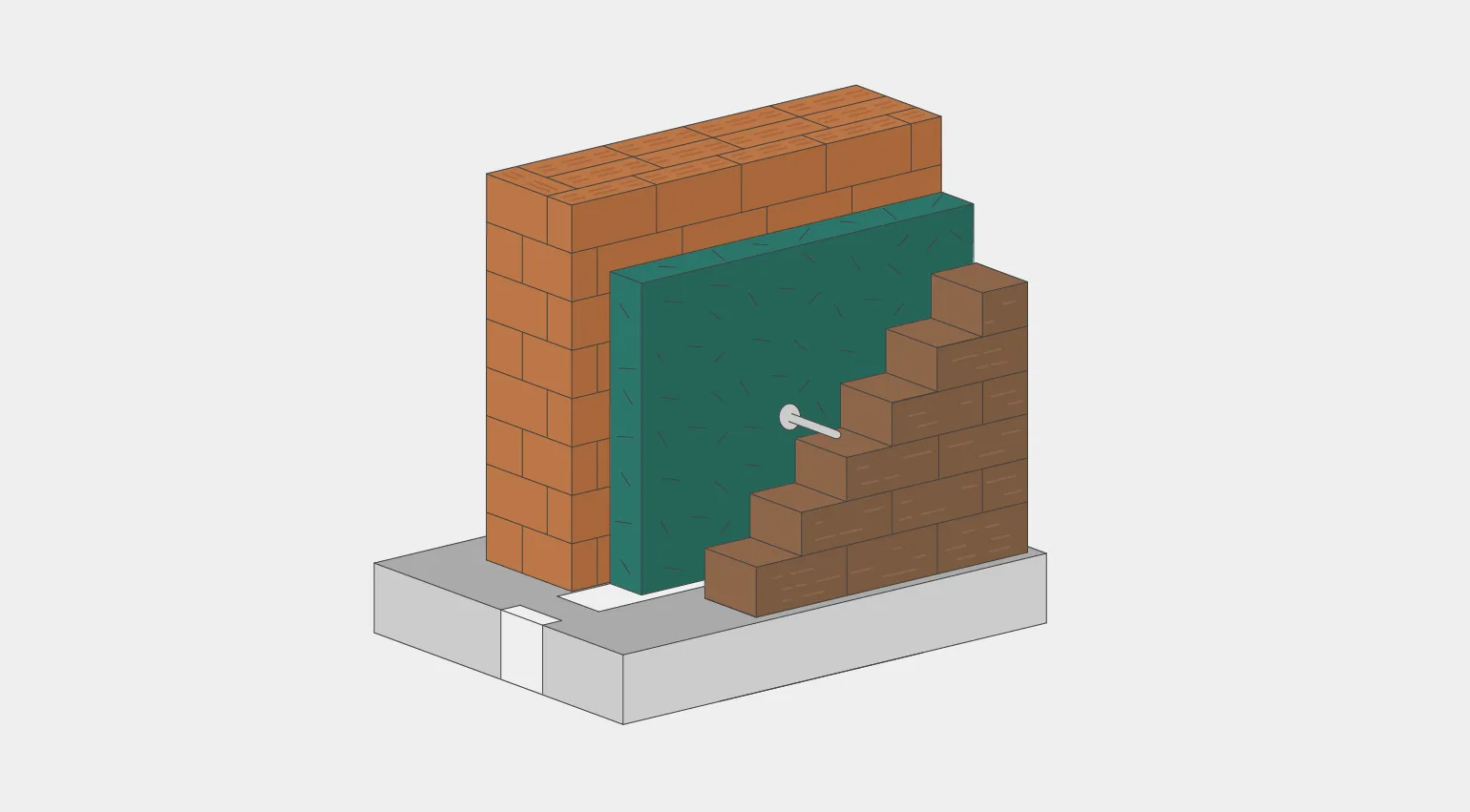
In the world of information technology, a firewall is a key element in protecting a user's computer from internet threats. A firewall can be software, a hardware device, or a server that monitors incoming and outgoing traffic. Like a security guard monitoring who can enter your home, a firewall analyzes the data coming to your computer and decides which connections to allow and which to block. This provides protection against malware, hacker attacks, and other threats that could harm your device and personal information. Implementing a reliable firewall is an important step to ensuring security in the digital world.
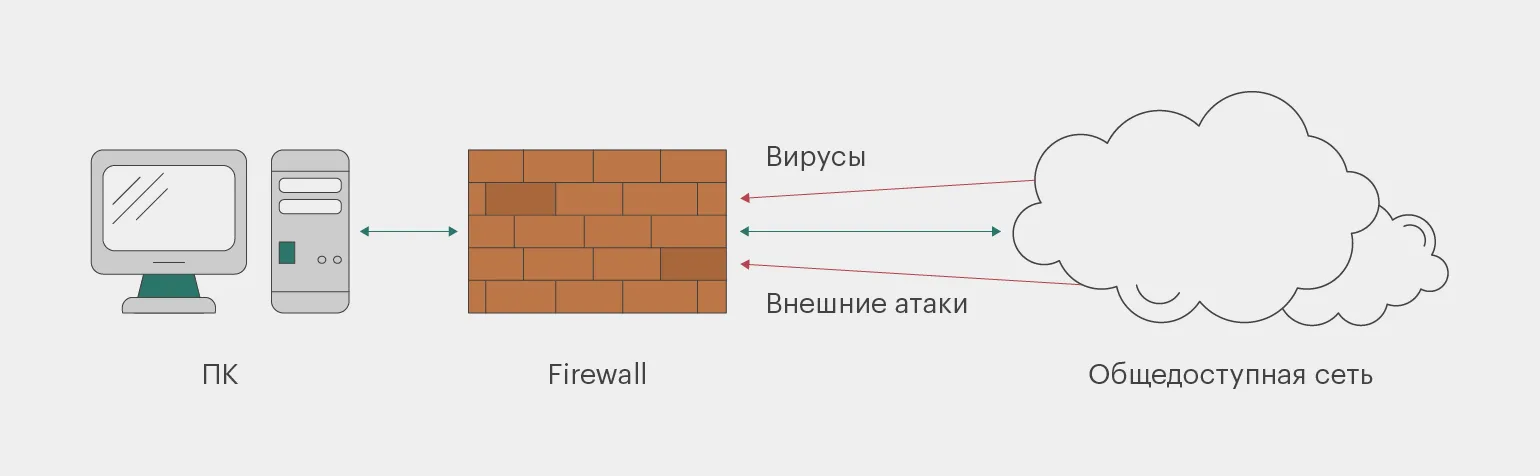
A firewall analyzes all network traffic, including incoming, outgoing, and intranet traffic. The German word "brandmauer" has a similar meaning. A firewall is often referred to as a "screen" because it scans for internet threats, protecting users from potential risks. This security system plays a key role in protecting data and preventing unauthorized access, providing reliable protection for devices and networks.
Let's take a closer look at the specifics to clear up any confusion about the terms.
Firewall is a general term for various types of devices and programs designed to protect computers and networks from external threats. The primary function of a firewall is to block unwanted traffic and control access, ensuring data security and preventing unauthorized access. Firewalls are an essential element of cybersecurity, allowing organizations and individuals to protect their information from potential attacks and malware.
A firewall is a hardware and software solution designed to protect computer networks from unauthorized access and malware. It monitors and filters network traffic, blocking suspicious or prohibited connections and actions. A firewall can be a standalone device or integrated into network equipment, providing reliable protection for corporate and home networks. Effective use of a firewall significantly reduces the risk of attacks and data leaks, making it an essential element of a cybersecurity system.
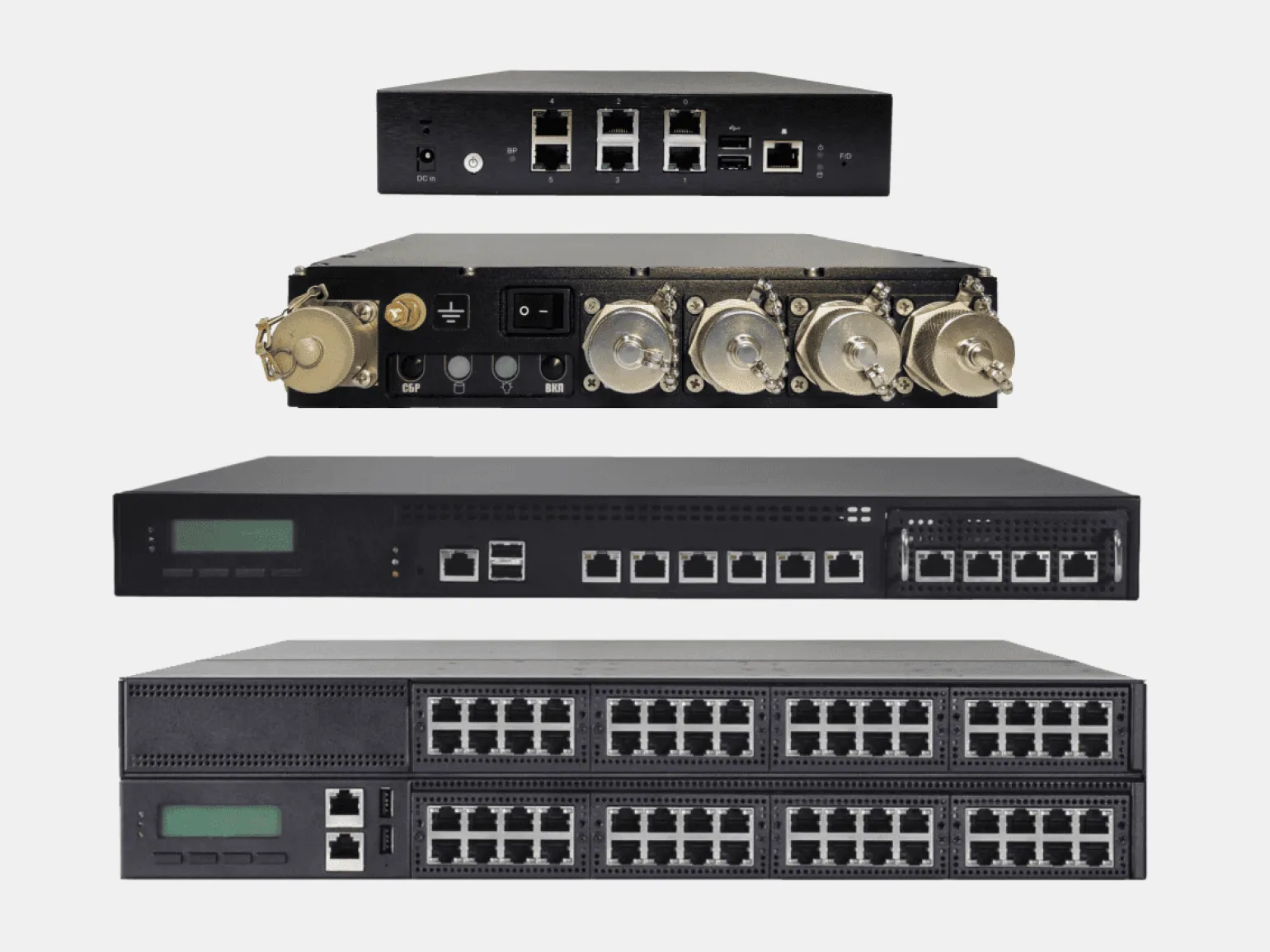
The Windows Firewall is an important component of the operating system's security system Windows. It protects your computer by monitoring incoming and outgoing network traffic. Users can customize the firewall settings based on their needs and security requirements, allowing them to effectively manage access to network resources. To change the firewall settings, go to the "Security Settings" section of the Windows Control Panel, where various options for configuring rules and filters are available. Setting up a firewall helps protect your computer from unauthorized access, malware, and other threats, making it an indispensable tool for online security.
A Windows firewall and a network firewall are two different technologies, but both are designed to protect your computer from external threats. A Windows firewall is software that restricts external access to your computer and controls data transfer between networks. It operates at the operating system level and can block specific ports for incoming and outgoing connections. This provides an additional layer of security, allowing users to customize access rules and protecting the system from potential attacks and malware. Properly configuring a firewall is an important step in ensuring computer security and protecting personal data.
A firewall, also known as a network firewall, is a device designed to protect a network from external threats and attacks. It operates at the physical level, installing itself between different networks and controlling data transfer between them. The main functions of a firewall include blocking specific ports and protocols, as well as performing checks for malware and other potential threats. An effective firewall is a key component of an information security system, providing protection against unauthorized access and minimizing the risk of data leaks.
What is a firewall for: Protection from external threats
A firewall effectively controls traffic between your computer and external networks and blocks unwanted connections. It protects against various external threats, such as viruses, malware, unauthorized access, DDoS attacks, phishing attacks, and leaks of confidential information. Using a firewall is an important step in ensuring network security and protecting user data.
- hacker attacks: a firewall blocks unauthorized access attempts to a computer or network;
- protection from viruses and other malware;
- protection of confidential information - passwords, banking and other personal data;
- protection from spam and unwanted mail.
How a firewall works and how it blocks unwanted connections
The principle of a firewall can be compared to a gateway: at the entrance, the system analyzes each incoming packet and decides whether to allow it or block it. The initial configuration instructions are set by the system administrator, who creates a list of allowed and blocked addresses or ports. Based on this data, the firewall determines which connections are considered unwanted and which are acceptable. Thus, a firewall protects a network by monitoring traffic and preventing unauthorized access.
To ensure computer security, a firewall can employ various protection methods. It analyzes incoming and outgoing traffic, blocking unwanted connections and preventing malware access. A firewall can use packet filtering, connection state checking, and even deep traffic inspection to identify threats. These methods help protect the system from attacks and intrusions, ensuring reliable protection of personal data and preventing information leaks. Effective use of a firewall is an important element of a cybersecurity strategy, helping to minimize risks and strengthen computer protection.
- Blocking IP addresses and domain names that are sources of unwanted traffic;
- Blocking ports used for unwanted connections;
- Restricting traffic on certain protocols that can be used for attacks;
- Detecting and blocking malware that may attempt to infiltrate the network.
In some cases, properly configuring a firewall can protect personal data from fraudulent activity and help maintain a high level of corporate information security. Effective firewall mechanisms help prevent unauthorized access to data, which is a key aspect of information security in modern organizations.
Employees actively exchange information within a company, and it is important to track the sources of this exchange. Fraudsters can easily disguise their traffic as legitimate, which poses a threat to data confidentiality. However, a modern firewall can detect such substitutions and prevent unauthorized access to the corporate network. Effective protection involves not only traffic monitoring but also the use of advanced information security technologies, which minimizes the risk of cyber threats.
One of the most common data theft scenarios is a DDoS attack. Taking down a website or server by sending a large number of requests becomes significantly more difficult if a firewall rule is pre-configured to recognize such traffic as a threat and block it. Protection against DDoS attacks involves not only filtering unwanted traffic but also keeping security systems up to date, which minimizes risks and maintains resource availability.
A firewall plays a key role in protecting a company's financial and reputational interests, especially in situations where it is necessary to block data transfer to unknown IP addresses. This becomes especially important if an employee accidentally downloads a malicious file and has already put their computer at risk. Firewall-level protection helps prevent further leaks of confidential information and minimizes potential losses. Effective use of a firewall is a crucial step in ensuring a company's cybersecurity.
A firewall can be compared to security at a nightclub, but network access rules are much simpler. A firewall's primary functions include analyzing and monitoring incoming and outgoing traffic. Firewall rules can result in three possible scenarios: accept—allow traffic; reject—block traffic and notify the user with an "Unavailable" error message; or drop—block data transmission without sending a response. Firewalls play a key role in ensuring network security, protecting it from unauthorized access and potential threats. Proper configuration of these systems allows you to effectively manage network traffic and minimize risks to information security.
Top 5 Popular Firewalls: Comparison of Their Features and Capabilities
Firewall settings vary depending on the network configuration and specific data security requirements. Proper firewall configuration is a key element in ensuring the protection of information systems. To achieve an optimal level of security, it is necessary to consider various factors, such as traffic type, protocols, and potential threats. Effective firewall configuration helps prevent unauthorized access and minimize the risk of data leakage.
pfSense is a powerful and versatile open-source firewall that provides reliable network protection. Thanks to its flexibility and customizability, pfSense is suitable for both small home networks and large corporate infrastructures. It offers a wide range of features, such as VPN, traffic filtering, bandwidth management, and network monitoring. Using pfSense improves network security and performance, and simplifies network resource management.
Cisco ASA is a security system that offers integrated solutions for firewalls, virtual private networks, and access control. With its multifunctional capabilities, Cisco ASA protects networks from external threats, provides secure remote access, and manages user rights. This system is a reliable tool for ensuring cybersecurity for organizations of all sizes.
Check Point is a comprehensive security system that combines a firewall, virtual private network, intrusion prevention system, and a variety of other information protection tools. This platform provides comprehensive protection for network infrastructure, allowing organizations to effectively prevent threats and minimize risks. Using a Check Point solution guarantees a high level of security, making it an ideal choice for businesses of any size.
Fortinet is a comprehensive security solution that includes firewalls, VPNs, intrusion prevention systems (IPS), antivirus software, antispam features, and many other tools. This system is designed to protect network infrastructure from various threats and attacks, providing a reliable level of security for corporate and small businesses. Fortinet allows you to centrally manage all aspects of security, significantly simplifying the process of monitoring and incident response.
Sophos is a multi-platform firewall that offers a customizable security policy and includes integrated threat protection tools. This solution provides reliable protection for network infrastructure, adapting to specific business requirements. Sophos helps prevent cyberattacks and minimize risks, allowing users to focus on their tasks without worrying about data security.
Firewalls come in different types, depending on the technologies used and the devices intended. The main categories of firewalls include network, software, and cloud solutions. Network firewalls provide network-level protection, controlling incoming and outgoing traffic. Software firewalls are installed on individual devices and protect them from unauthorized access and malware. Cloud firewalls provide protection through cloud services, allowing for scalability of security measures based on business needs. Each type of firewall has its own characteristics and advantages, allowing users to choose the most appropriate solution to ensure the security of their data and systems.
- Packet filtering firewall — filters incoming and outgoing traffic based on IP addresses, ports, and protocols.
- Circuit-level gateway firewall — operates at the session level and does not hide the addresses of source devices.
- Stateful firewall — is built on the basis of a packet filtering firewall, but allows you to monitor the state of the network connection between the sender and the recipient.
- Application level firewall — operates at the application level and controls applications exchanging data over the network.
- Next-generation firewall — additionally uses IPS/IDS, DLP, VPN, SSL, and other technologies.
- Hardware firewall — integrates with other devices (routers, switches, servers) and allows you to implement a full range of security measures.
- Software firewall — is installed on devices of a specific user and protects them from malicious attacks.
Configuring a Firewall in Windows: Step-by-Step Instructions
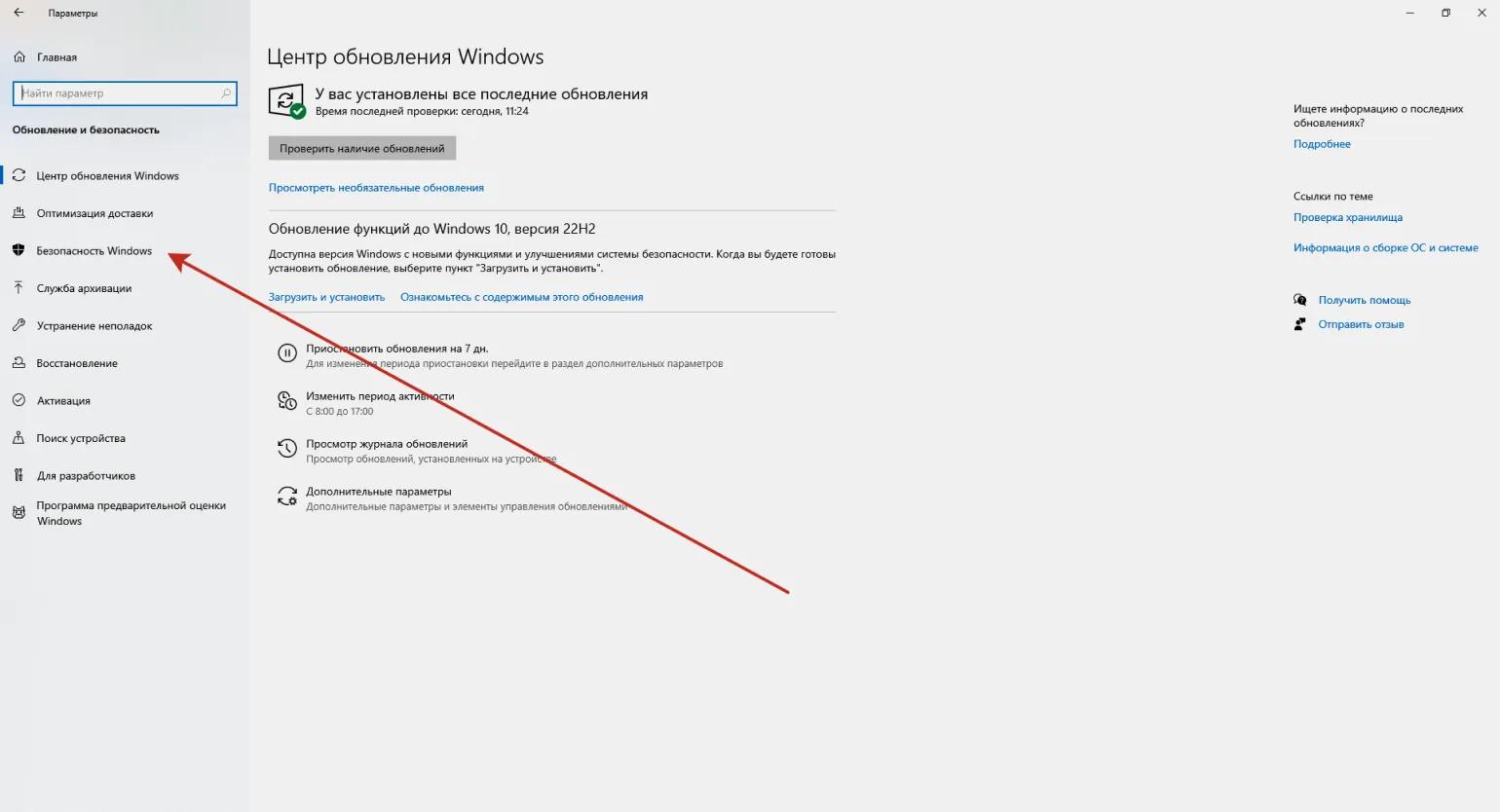
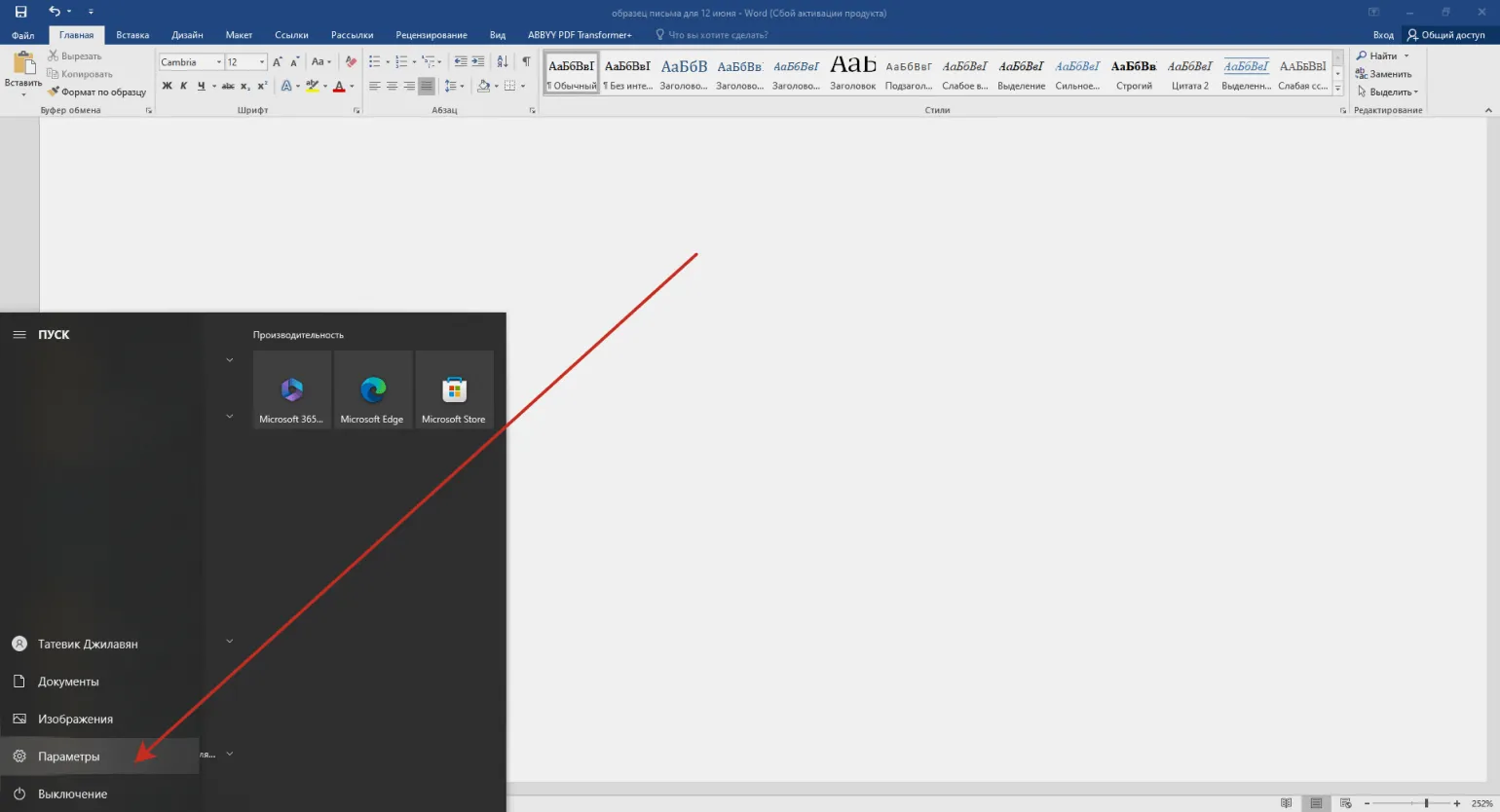
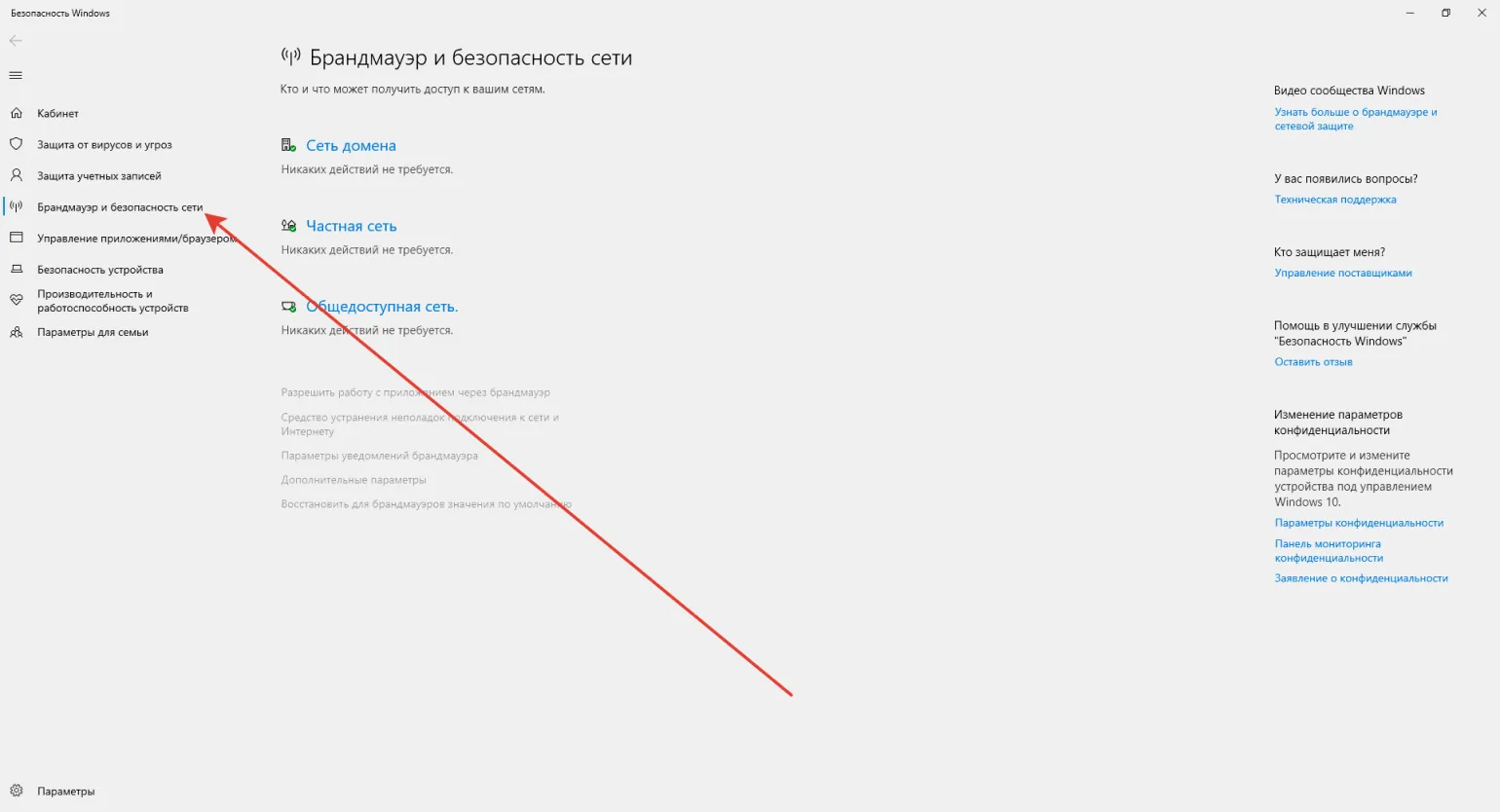
To enable a firewall in Windows 10, follow these steps. Open the Start menu and go to Settings. Then select Update & Security. In the left menu, click Windows Security, then select Network & Internet Protection. Next, find the Windows Firewall option and make sure it is enabled. If the firewall is disabled, enable it by following the instructions. Enabling a firewall will protect your system from unauthorized access and improve the security of your device.
Click the Start button and go to Settings.
Go to "Update and Security".
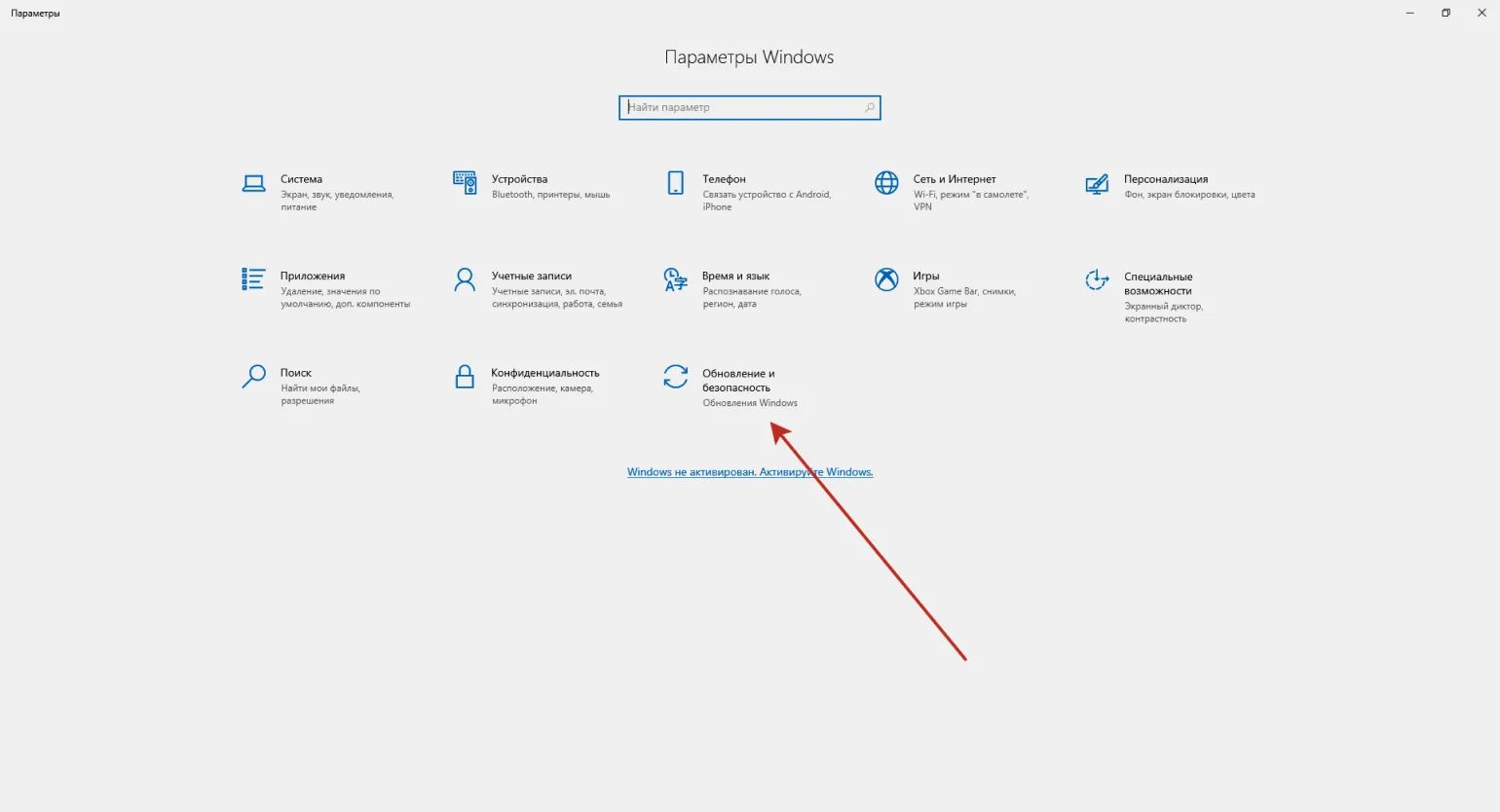
Go to the "Security" tab Windows."
To continue setup, go to the "Firewall and network security" section.
Check if the firewall is enabled. An enabled firewall protects your network and devices from unauthorized access and various threats. Regularly checking your firewall will help maintain a high level of security and prevent potential cyberattacks. Customize your firewall rules to suit your needs for optimal protection.
For To configure your application firewall, follow these steps. First, open the firewall control panel. Then, select incoming and outgoing connections to determine which applications can receive or send data over the network. Make sure the required applications are added to the allowed list. Configure filtering rules to restrict access to authorized users and devices only. Once configured, save the changes and test to ensure the firewall is working correctly and protecting your applications from unwanted connections. Regularly update your firewall settings to maintain a high level of security for your network.
- In the same "Firewall and network protection" section, select "Allow an app through firewall." Please note: if you have an antivirus program installed, this section will be disabled. In this case, you will need to configure the firewall in the antivirus program itself.
- Select "Allow another app." If you do not have administrator rights, the button will be disabled. On your personal computer, you can remove the block by clicking the "Change settings" button.
- Find the application for which you want to configure the firewall and click "Add."
- Set the desired parameters for the application and click OK.
Summary
Working without a firewall is possible, but it is associated with high risks. Without protection, anyone can access your system, which can lead to the theft of confidential information or infection of computers on the network with malware and viruses. Using a firewall provides reliable protection of the network and computers from unauthorized access, minimizing security threats. Therefore, it is strongly recommended to always use a firewall to protect your information and system.
Today, there are many solutions for maintaining internet security, including individual devices, mobile applications, cloud services, and built-in PC programs. Setting up a firewall takes minimal time, but it will help protect your data and funds from online fraud. Investing in a properly configured firewall ensures peace of mind and the protection of your online assets.
Reading is an important aspect of personal development and broadening one's horizons. It helps improve writing skills, enriches vocabulary, and fosters critical thinking. Books, articles, and other sources of information can significantly influence our perception of the world and understanding of various topics. Regular reading is not only entertaining but also educational, making it an indispensable tool in the self-education process. Invest time in reading to enrich your knowledge and broaden your horizons.
- How the Internet protects information and why quantum computers will soon destroy this protection
- Test: Guess where a real hacker attack is and where it isn't
- Hackers: who they are, what they are capable of, and how to protect yourself from them
Learn more about coding and programming in our Telegram channel. Subscribe to stay up-to-date with interesting content and helpful tips!
Cybersecurity Specialist Profession
You will develop analytical thinking, learn to search for vulnerabilities and ensure the security of IT systems. Master an in-demand profession even with zero IT experience. The course program is the most comprehensive on the market!
Find out more