Contents:

Training program with a job guarantee: "Testing Engineer and Artificial Intelligence"
Find out moreAlmost no app or website functions perfectly the first time. Developers understand this, so before the official launch, they subject the product to testing—a series of checks that help identify and fix errors before end users encounter them.
There are many types of testing, such as load, unit, regression, and integration testing, each with its own specific functions and objectives. One of the most popular and significant types is functional testing, which we will discuss in detail in this article.
In this article, you will learn the basics of functional testing, its different types, and the execution process. This material will be especially relevant for novice testers seeking a better understanding of this area.
Contents
- Functional testing is a verification process that aims to evaluate the extent to which software performs its functions according to the specified requirements. This testing focuses on the functionality of the system, that is, how it processes input data and produces the expected results. The main goal is to ensure that all intended application scenarios are implemented correctly.
In contrast, non-functional testing covers aspects that are not related to specific functions, but rather to the general characteristics of the system, such as performance, security, usability, and compatibility. Here, the emphasis is on how the system functions, not what it does. Thus, non-functional testing helps determine to what extent the application meets quality and reliability requirements.
In summary, functional testing focuses on the correct execution of functions, while non-functional testing analyzes the general qualities and characteristics of the software.
- Functional testing can be divided into several categories, each of which plays an important role in the software verification process. Here are the main types of this testing:
1. **Unit testing** - focuses on individual components or modules of the system, checking their operability and compliance with requirements.
2. **Integration Testing** - performed to evaluate the interaction between modules, allowing to identify problems that arise when they work together.
3. **System Testing** - covers the complete application, including all its features and capabilities, in order to ensure that they work in accordance with the established requirements.
4. **Acceptance Testing** - performed to check whether the software is ready for use by end users. It is aimed at confirming that the system meets business requirements.
5. **Regression Testing** - performed after changes are made to the code to ensure that new updates do not break existing functionality.
These types of functional testing help ensure high quality of the software and confirm that it meets user expectations.
- The functional testing process consists of several key stages. First, it is necessary to define the system requirements, which will help understand which functions need to be tested. After this, a test strategy is developed, which includes the selection of testing methods and the creation of test scenarios.
The next step is test execution, where testers check the extent to which the system meets the established requirements. During testing, all discovered defects and inconsistencies are recorded, which allows for further analysis and assessment of their severity.
Once testing is completed, the results are summarized and a report is prepared that will help the development team understand what the identified deficiencies were. Finally, after all the errors have been corrected, re-testing is carried out to ensure that all problems have been eliminated and the system functions correctly.
- Tools that will be useful in practice.
Definition of functional testing and its difference from non-functional testing methods
Functional testing allows you to evaluate how correctly the software performs the specified functions, corresponding to both customer requirements and technical specifications. Functional testing focuses on specific system operations, how it processes input data, and whether the results meet expectations. In other words, it answers the question: "Does the system perform the tasks expected of it?" Imagine a situation where you are building an online store, hoping that users will be able to easily complete the registration process, select the desired products, add them to their cart, and complete the purchase. All of these steps are important elements of your website's functionality. However, after the site goes live, you may discover that some of these functions are not working correctly—for example, registration fails or the cart does not save products. Such problems can arise for a variety of reasons, and functional testing allows for their early detection. When testing software, the tester typically does not pay attention to the program's internal structure or its source code. What matters is only how the system functions from the end user's perspective. For example, when testing the function of adding an item to a cart, the tester does not delve into the details of the database. They simply ensure that after clicking the "Add to Cart" button, the product is correctly displayed in the cart with the correct name, price, and quantity.
Thus, the tester sequentially goes through each stage of the user journey, checking the system's functionality using pre-developed test cases. These test scenarios contain step-by-step instructions, expected results, and criteria by which their success is determined.
An example of a basic test case designed to check the functionality of sending a message through a feedback form on a website.

In current software development practice, functional testing is carried out simultaneously with non-functional testing. While functional testing focuses on verifying that the system performs its tasks correctly, non-functional testing is aimed at assessing the effectiveness of these processes. Non-functional characteristics include parameters such as performance, interface usability, security level, and product aesthetics.
To better understand the differences, imagine a situation where you bought a brand new car. When you check whether the engine starts, whether the vehicle moves, whether the headlights work, and whether the windows open, this is functional testing. At the same time, non-functional testing has different objectives: how quickly the car can accelerate, how comfortable it is to drive, whether it meets safety standards, and whether it provides a comfortable ride.
We will not consider non-functional testing in detail below, as it is a comprehensive topic deserving a separate discussion. For more in-depth information, we recommend checking out our article on mobile testing. In this material, SberDevices QA lead Ruslan Muradov illustrates with examples how these two types of testing interact and mutually support each other.

Read also:
Testing mobile applications: why it is necessary and how it is
Mobile app testing plays a key role in the development process. It is necessary to ensure that the application functions properly, meets user expectations, and is free of critical errors. The main goal of this stage is to ensure high product quality, which, in turn, contributes to a positive perception of the application in the market.
The testing process includes several stages. First, a plan is developed that describes the test scenarios and criteria by which the application will be evaluated. Then, testers begin conducting various types of testing, including functional, user experience, and performance testing. It is important not only to identify errors but also to evaluate the usability of the interface, loading speed, and stability of the application.
After testing is complete, the results are analyzed and reports are compiled that record the identified defects and recommendations for their elimination. Thus, testing becomes an important mechanism for ensuring the final quality of the product and its successful integration into the lives of users.
Functional Testing Categories
We have already established that functional testing plays a key role in verifying the correct functioning of each individual function of the system. However, the choice of testing approach may vary depending on the goals, stage of development, and specifics of the product. Some methods focus on the accuracy of calculations, others on the interaction of various components, and still others on security aspects and the correct handling of user access rights.
These methodologies complement each other and have much in common. To facilitate understanding, functional testing is usually divided into three categories: depending on the level of detail (what exactly is being tested), access to internal logic (how the test is carried out), and function characteristics (what aspects are being assessed). Let's consider each of these categories in more detail.
This criterion demonstrates the stage at which the analysis and verification of system operation occurs, starting from individual elements and ending with the complete application. There are four key types of functional testing: unit testing, integration testing, system testing, and acceptance testing.
Unit testing is designed to test individual functions and components in isolation from the entire system. This approach allows you to focus on testing each element separately, thereby eliminating the influence of other parts of the program. For example, you can test the algorithm responsible for calculating a discount and confirm that for a purchase of 10,000 rubles, the price is indeed reduced by 15%, as stipulated by the application logic.
Integration testing is aimed at analyzing the interaction of various system components and their joint operation. It may include, for example, checking the connection between the client interface and the server or evaluating database functionality. During the checkout process in an online store, the system must transfer data from the form to the database, and then to the delivery service. Integration testing ensures that all these processes operate correctly and without interruption.
System testing is a comprehensive software check to confirm that the system functions as a whole. Various methods exist for conducting this type of testing. For example, smoke tests can quickly assess the basic functionality of an application, while end-to-end testing covers all possible user scenarios—from platform registration to the payment process and order status tracking.
Acceptance testing, known as UAT, is performed with customers or end users before the product's launch. The main goal of this stage is to ensure that the system fully meets established business requirements and is ready for practical use. For example, in the context of a banking application, a client has the opportunity to check whether the funds transfer process is functioning correctly, whether the data on completed transactions is displayed correctly, and whether notifications about suspicious activities are received on time.

Read also:
JUnit: module testing in Java and development through
JUnit is a framework for unit testing software written in Java. This tool allows developers to test individual sections of code, which helps identify errors early in the development process. Unit testing with JUnit helps ensure that each function works correctly and meets the specified requirements.
Test-driven development (TDD) is also closely associated with the use of JUnit. In this practice, tests are created first, and then the code that must pass them is written. This approach encourages more careful planning and structuring of code, as developers are forced to think through the logic of their functions in advance.
JUnit supports various types of testing, including unit tests and integration tests, making it a versatile tool for ensuring software quality. As a result, the use of JUnit not only simplifies the process of writing tests, but also increases the reliability of the developed application.
This criterion establishes the degree of tester's access to the internal structure and source code of the system. Depending on this level, three key methods of functional testing are distinguished: black box, which does not allow access to the code; gray box, which implies limited access; and white box, which provides full access to both the code and the application architecture.
Black box is a technique in which the tester interacts exclusively with the external interfaces of the system, analyzing its operation based only on input and output data. This approach typically includes three main categories of test scenarios:
- Positive tests are aimed at evaluating the functioning of the system when provided with correct input data. For example, if the user enters the correct login and password, this should result in successful authorization.
- Negative tests are aimed at analyzing the system's response to incorrect data. For example, if you enter an incorrect password, the system should display the message "Incorrect credentials."
- Boundary tests analyze the system's response to extreme values. This could include, for example, entering the maximum number of characters in a text field on a form or a minimum order amount.
The black box model is based on the fact that the tester analyzes the functioning of the system based only on the input data and output results, without looking into its internal mechanisms.

Gray box testing is a testing method in which a specialist has a certain understanding of the system structure and understands how the main processes function, but does not have full access to the source code. This approach is excellent for assessing the interactions between various components, as well as for checking the operation of APIs and databases.
For example, when testing the payment function in an online store, the tester understands that the system needs to initiate a request to the payment gateway, wait for confirmation, and adequately process the received response. Based on this, they analyze various situations: successful completion of the transaction, payment refusal, connection interruption during payment, and a number of other options.
White box testing is a testing method that provides a specialist with full access to the source code, internal structures, and algorithms of the application. This method allows you to find hidden errors that may be difficult to detect when checking only through the user interface. In addition, using a white-box approach helps identify memory leaks and other potential performance issues.
For example, a programmer can verify that the authentication mechanism correctly encrypts passwords, stores them in a secure format, and locks the account after a specified number of failed login attempts.

Read also:
Identification, authentication, and authorization are three key processes that play a vital role in ensuring the security of information systems, but each has its own unique function.
Identification is the first step in recognizing a user. During this process, the system asks the user to provide information that allows them to be identified, such as a username or account number.
The next step is authentication. At this stage, the provided data is verified. The system compares the entered information with the stored information and, if they match, confirms the user's authenticity. This can be done using a password, biometric data, or other methods.
Authorization completes the chain of these processes. It determines what rights and privileges the user receives after successful authentication. This includes access to specific resources, functions, and data within the system based on a pre-established security policy.
Thus, identification is responsible for recognition, authentication for verification, and authorization for granting access. All three stages are integral to creating a secure environment for user interaction with systems.
This criterion serves to define specific characteristics and properties of the system that are subject to evaluation during testing. Within the functional testing approach, four main aspects are typically distinguished: usability, accuracy, interaction level, and data protection.
Usability is an important criterion that helps ensure that the system meets the stated requirements and performs the functions required by users. For example, in a banking application, a tester checks whether it is possible to view balances, make transfers, pay for services, receive statements, and perform other key operations.
Accuracy is a parameter by which an expert analyzes the correctness of data processing and calculations, as well as the degree to which the obtained results meet user expectations. For example, in financial applications, it's crucial to ensure that interest rates for loans and deposits are calculated correctly, and in a tax calculator, that all deductions are applied correctly.
Interoperability describes a system's ability to exchange information with other elements and external services. For example, a mobile app for an online store must work correctly with payment systems, various delivery services, and the company's CRM system.
Security is an important aspect that helps determine the system's level of protection from unauthorized access, information leaks, and various vulnerabilities. When a tester interacts with a document management system, he has the opportunity to evaluate the correctness of access control to classified documents, the protection of information channels, or the reliability of digital signatures.

Read also:
Problems faced by QA engineers: what worries testers?


Step-by-Step Process for Implementing Functional Testing
The process of implementing functional testing can vary depending on the company, but, as a rule, it consists of several sequential steps: requirements analysis, documentation creation, test data preparation, actual testing, bug fixing, and retesting. Let's consider each of these stages in more detail.
First and foremost, the tester must familiarize themselves with the application's functionality, as well as the customer's requirements, technical specifications, and other source materials. It's crucial that they clearly understand the product's intended purpose and its target audience. Furthermore, they must ensure that the specified requirements meet the following criteria:
- Avoid inconsistencies—the documentation should not contain mutually exclusive terms. For example, it's unacceptable for one section of the specification to mention development exclusively for Windows, while the specifications indicate support for Linux-based systems.
- Requirements must be as detailed as possible so that the team can properly develop the functionality and test it. For example, the phrase "to register, the user must enter data" is not sufficient. A more appropriate statement would be: "to successfully register, the user must provide an email address, create a password of 8 to 20 characters, and enter a name and age, which must be at least 18 years old."
- Atomic requirements mean that each of them should cover only one specific function that can be tested as an independent unit. Instead of a general formulation, such as "the user must sort products," it is more appropriate to use more detailed requests: for example, "the user must be able to sort products by price (both from low to high and vice versa)", "the user must sort products by rating", and so on.
If inconsistencies or ambiguities are discovered in the requirements, the tester is obliged to notify the team or the customer about them and also to clarify all necessary aspects.
During the requirements analysis stage, the tester chooses a strategy, deciding which method to use: black box, gray box, or white box. In addition, he or she determines the most appropriate types of functional testing.
The specialist develops a test plan based on the studied requirements and creates test cases with acceptance criteria, checklists for operational checks, and scenarios for comprehensive testing of functionality. The amount of necessary documentation varies depending on the nature of the project:
- Large-scale systems require a comprehensive set of documents: this includes detailed plans, test cases with clearly formulated expected results, and requirements traceability matrices that ensure control of test coverage.
- For smaller projects, it is often sufficient to use checklists and basic scenarios. For example, for a corporate website, you can create a minimum list of tasks that includes checking the correct operation of the contact form, navigation elements, information sections, and a feedback form.
- Startups often resort to a minimal level of documentation or exploratory testing. The team's main goal is to bring the product to market as quickly as possible and quickly receive initial feedback from users, which will allow for the necessary improvements to be made in the future.
There are many templates for different types of test documentation. However, for training purposes, a universal table can be used:
Once the documentation is completed, the tester has a clear understanding of the data required to test the system. For example, to test the account creation process, he will need both valid and invalid email addresses, passwords of varying complexity, information about users of different age groups, as well as special scenarios including accounts of minors, users from other countries, and other unique cases.
Along with data preparation, it is important to create a working environment for the product. This includes installing the required software, connecting to databases, setting up the server environment, and defining the required access levels.
Testing begins only when all necessary preparations are complete. At this stage, the expert thoroughly examines the system, following pre-developed scenarios. The process can include both manual checks and automated tests that help compare the actual behavior of the system with what was expected and document any discrepancies with the established requirements.

Read also:
QA testing, or quality control, is QA testing is a process aimed at identifying defects and flaws in software before its release. This stage involves a series of tests aimed at assessing the functionality, performance, security, and usability of the product.
During QA testing, testers develop various scenarios that reflect real-world program usage. They conduct both automated and manual tests to ensure that all aspects of the application work as intended. An important part of the work is documenting the results and identified issues, which allows developers to subsequently fix bugs and improve the product.
QA testing is organized in several stages. First, testers familiarize themselves with the product requirements and create test plans. Then they conduct testing, analyze the results, and generate reports. The final stage involves re-testing after fixes to ensure all defects have been eliminated.
Thus, QA testing plays a key role in the development process, ensuring the high quality of the final product and user satisfaction.
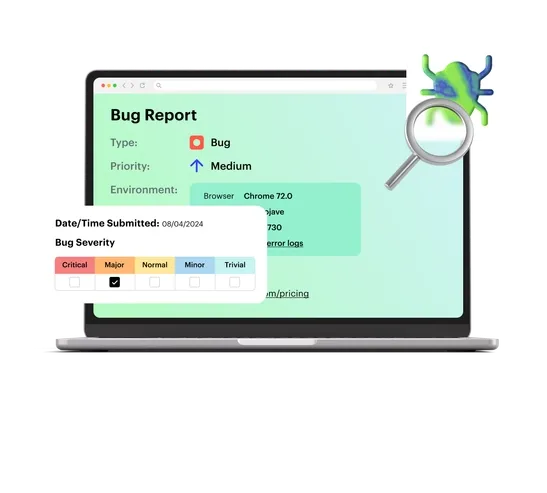
During testing, all identified defects are recorded in a bug report - a specialized document that describes in detail the problems found, the steps needed to reproduce them, the impact on system operation, and other significant points. For example, a tester may notice that when attempting to pay for an order using the promo code SALE50, the system displays a 404 error instead of providing a discount.
At the end of the functional testing stage, the developers receive a report containing information about the identified defects. After they fix these defects, the tester re-checks all affected areas. This process, which is a "test-fix" cycle, continues until the system begins to meet the established requirements.
After completing all testing stages, the product is transferred to final acceptance. At this stage, a demonstration of the system is usually carried out, during which the customer has the opportunity to evaluate how well the functionality meets his expectations. For example, when accepting an online store, a client can follow the entire buyer's journey: from registration and searching for a product to placing an order and receiving confirmation by email.


Useful tools for practical use
In the past, the testing process was performed manually: experts launched the application, entered the necessary data, activated buttons, took screenshots, and recorded the results in Excel tables. This method worked well enough as long as the systems remained simple and the requirements for them were low.
As projects grew in complexity, it became clear that the use of specialized tools became necessary. Many such solutions are available today, and we will discuss the most common ones below.
Automation tools provide the ability to run tests at a preset time, with each commit, or before the release of a new version. For example, a properly configured CI/CD pipeline can automatically initiate regression tests at night and provide reports by the morning of the workday. This approach significantly saves time that could otherwise be spent on manual work, increases product stability, and facilitates faster identification of critical errors.
- Selenium WebDriver allows you to emulate the process of filling out forms, evaluate the correctness of field validation, test the functionality of interfaces, and reproduce user actions in various scenarios.
- Cypress is a modern solution that is easy to configure and offers high performance. It is ideal for testing interactive components, including product filters.
- TestComplete is a paid tool with a graphical interface and support for multiple programming languages. It allows you to record user actions and develop and modify tests in languages such as JavaScript, Python, and C++.
- Katalon Studio is a comprehensive solution for testing websites, mobile apps, and APIs. It allows you to work with various platforms and test scenarios simultaneously. For example, you can develop a single test suite that will check both the correct display of the user interface and the functionality of API requests to the server.
- Robot Framework is an open-source tool that allows you to create tests in an accessible language. You can use simple commands like "Launch Browser", "Enter admin login" or "Check dashboard element" and the system will perform the specified operations.

Read also:
CI/CD is a set of practices that are becoming an integral part of the software development process. These acronyms stand for Continuous Integration and Continuous Delivery. They help development teams automate the build, test, and deployment stages of applications, significantly simplifying and speeding up their workflow.
The basic idea of CI is to regularly integrate code changes into a shared repository. This allows for the detection of errors early in the development process, which in turn reduces the risk of serious problems later. Each new change undergoes automated tests that help ensure its correctness and compatibility with existing code.
CD automates the process of delivering applications to production. This allows teams to deploy new versions of software faster and more reliably, while ensuring high quality and stability. Deployment automation minimizes the risk of human error and reduces the time required to release updates.
In a rapidly changing market and increasing user demands, implementing CI/CD is becoming critical for achieving a competitive advantage. This allows teams not only to respond more quickly to customer requests but also to reduce the costs of product support and development. Without CI/CD, modern software development would be significantly less efficient and more prone to risk.
Mobile app testing tools allow you to evaluate their functionality on various devices with different operating system versions, display sizes, and technical parameters.
- Appium is an open-source tool that provides cross-platform testing of mobile apps for the iOS and Android operating systems. It operates through the WebDriver API and provides the ability to write tests in various programming languages, such as Java, Python, and JavaScript.
- Espresso is a framework developed by Google for UI testing of apps on the Android platform. It is fully compatible with Android Studio, allowing you to quickly run tests and guarantees reliable results, even when dealing with complex scenarios.
- XCTest is a tool developed by Apple, designed for running unit and UI tests on the iOS platform. It allows you to test both components and the user interface of applications written in Swift and Objective-C directly within the Xcode development environment. The framework also supports asynchronous testing and user action simulation.

Read also:
Android Studio is the official integrated development environment (IDE) for creating applications on the Android platform. It was developed by Google and provides developers with powerful tools for designing, coding, and testing mobile applications.
To get started with Android Studio, you need to install the program on your computer. After installation is complete, the user will be prompted to create a new project or open an existing one. When creating a new project, the developer selects the application type, configures its settings, and chooses a template to help speed up development.
One of the key features of Android Studio is its code editor, which supports various programming languages, including Java and Kotlin. The editor provides auto-completion, syntax highlighting, and error checking, greatly simplifying the coding process.
Furthermore, Android Studio includes tools for visual interface design, such as the Layout Editor, which allows developers to create user interfaces using drag and drop. This helps better visualize how the application will look on various devices.
Application testing also plays an important role in the development process. Android Studio offers built-in emulators that let you run and test your app on virtual devices, as well as debugging tools to help you find and fix errors.
Once development is complete, you can build your app and prepare it for publication on Google Play or other app stores by following the simple instructions provided by the IDE.
Overall, Android Studio is a powerful solution for anyone looking to create Android apps, thanks to a wide range of features and tools that simplify the entire development process.
API testing tools allow you to analyze the interaction between your client application and the server. They can be used to verify the correctness of your HTTP requests, evaluate the structure of your responses, and study how the system reacts to errors and operates under increased load.
- Postman is a widely used application for testing REST- and GraphQL-based APIs. This tool allows you to create request sets, develop test cases, use environment variables, and integrate with continuous integration and delivery processes and other platforms.
- REST Assured is a library designed for testing RESTful APIs in Java. It provides an intuitive and clear syntax that simplifies the process of verifying HTTP requests and responses. In addition, this library is easily compatible with the JUnit and TestNG frameworks.
- SoapUI is a highly effective tool designed for testing both SOAP and REST APIs. It offers capabilities for creating scenarios, performing complex checks, and conducting load testing. For example, it can simulate thousands of simultaneous users connecting to a server, allowing you to evaluate how the system responds to maximum loads.
- Insomnia is a free, open-source platform designed for API testing. It provides the ability to create, send, and save HTTP requests, as well as organize them into special spaces and execute entire request chains with just one click.

Read also:
GraphQL is a query language that allows you to interact with APIs more efficiently. It was developed by Facebook and first introduced in 2015. The core idea is to allow clients to request exactly the data they need, rather than receiving a fixed set of information, as is the case with traditional REST APIs.
GraphQL is based on the concept of a schema. A schema describes the available data types, their relationships, and the operations that can be performed on that data. Clients construct queries by specifying the specific fields and objects they need, which avoids unnecessary information and minimizes the amount of data transferred over the network.
GraphQL became essential when applications required greater flexibility and speed in data retrieval. It allows developers to easily adapt APIs to changing needs, simplifies working with multiple resources in a single request, and reduces the number of network calls, which is especially important for mobile and web applications.
To learn more exciting things about programming, join our Telegram channel. Don't miss your chance to subscribe!
Read also:
- Software testing is a process aimed at identifying errors and defects in a program. The main goal of this process is to ensure the high quality of software products developed for users.
Testing helps ensure that the program functions according to the specified requirements and expectations. It includes various methodologies and approaches that allow you to check both individual application components and the entire system as a whole.
In addition, testing plays an important role in reducing the risks associated with using software, as it helps prevent possible failures and problems in the future. Thanks to testing, developers can improve their products by receiving feedback early in the development process and making necessary adjustments.
Thus, testing is an integral part of the software development life cycle and contributes to the creation of reliable and effective solutions.
- A tester is a specialist who checks software for errors and inconsistencies. Their main task is to ensure product quality so that the end user receives a reliable and functional application. Testers work closely with developers, analysts, and other team members to identify and fix issues at various stages of development. To become a tester from scratch, you need to master several key aspects. The first step is to learn the fundamentals of programming, at least at a basic level, to understand how code works. It is also important to become familiar with various testing methods, such as functional, regression, and load testing. The next step is practice. You can start by performing tests on open-source projects or participating in testing of publicly available programs. This will help you gain real-world experience and improve your skills. It is also advisable to study test automation tools, as they are becoming increasingly popular in this field. Additionally, it will be useful to take specialized courses or obtain certifications that will validate your knowledge and skills. Networking with testing professionals and participating in communities will help you receive advice and updates on the latest trends in the industry. Thus, with perseverance and a desire to learn, it is possible to become a tester even without prior experience.
- Common questions and tasks that may be encountered during interviews for software testing specialists.