
Contents:
- The Assignment Operator in Java
- Arithmetic Operators in Java
- Unary Operators in Java
- Comparison Operators in Java
- Logical Operators in Java: Boolean
- Ternary Operator in Java: Yes, but Be Careful
- The Instanceof Operator in Java
- Bitwise Operators in Java and Bit Shifting
- Compound Assignment Operators in Java
- Java operator precedence

Learn: The Java Developer Profession
Learn MoreMathematical symbols such as + (plus), – (minus), and = (equal) are familiar to each of us from school. In programming languages like Java, these symbols are called operators. Operators are used to tell the compiler what actions to perform on the operands—numbers, strings, objects, and other values—that appear on either side of the operator. Understanding how operators work is fundamental to programming, as they allow you to perform arithmetic, logical, and comparative operations, making your code more functional and efficient.
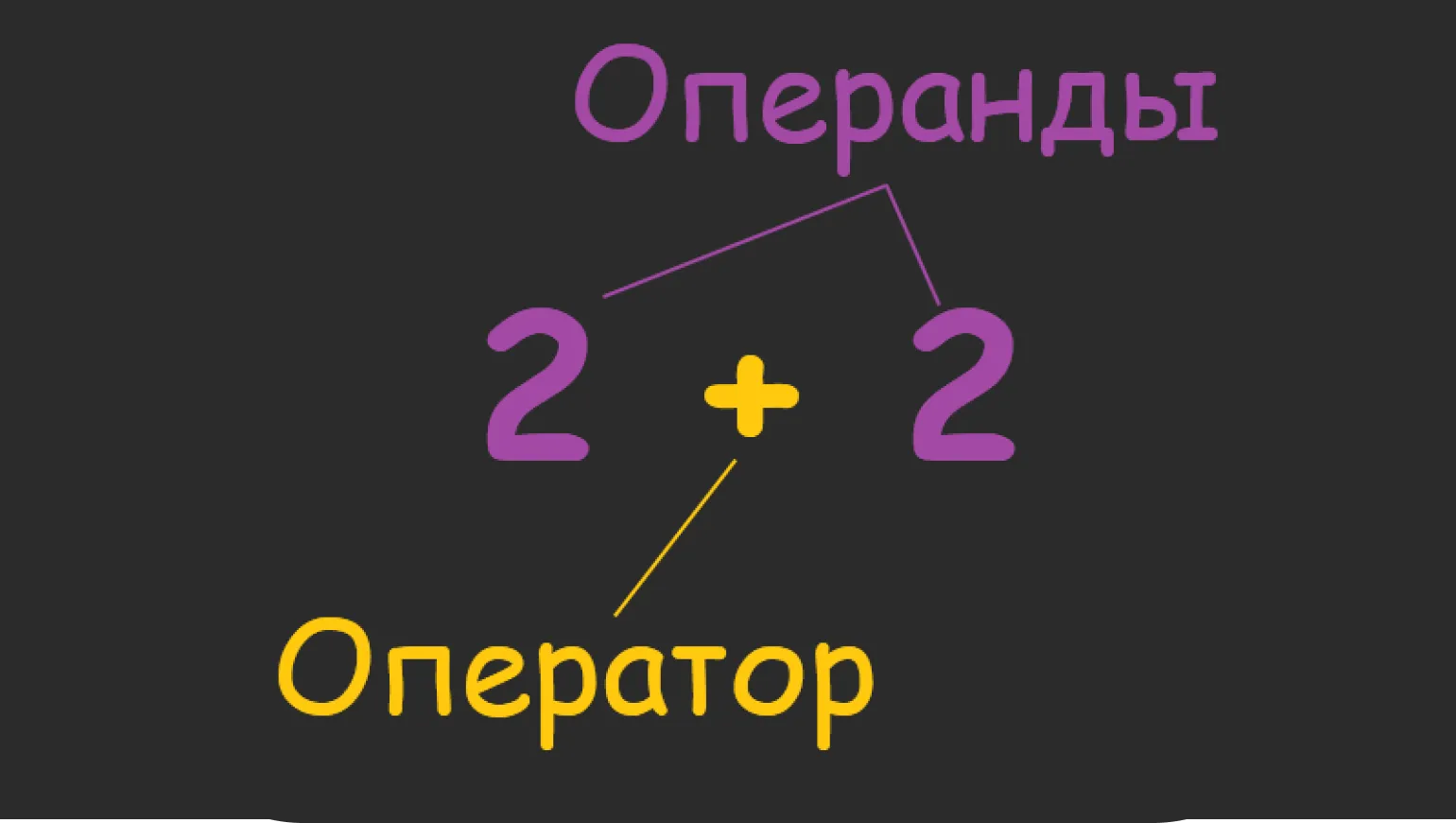
In the example above, the + operator tells the compiler to add two numbers. However, in practice, an expression may contain a different number of numbers—one, two, or three. Depending on the number of operands, operators are classified differently: unary operators work with one operand, binary operators with two, and ternary operators with three. This classification is important for understanding how operators work in programming languages and their application in various contexts.
In this article, we will take a detailed look at the main types of operators in the Java programming language. You will learn about the different categories of operators, their functionality, and usage examples. Operators are key elements of the language, allowing you to perform arithmetic, logical, and comparison operations. Understanding these operators will help you navigate Java programming better and solve problems effectively.
- Assignments
- Arithmetic
- Unary
- Comparisons
- Logical
- Ternary
- Instanceof Operator
- Bitwise
- Compound Assignment Operators
Let's discuss operator precedence and clarify the order in which they are executed. If you need a quick refresher on the main aspects of how the various operators work, you can directly refer to the cheat sheet located at the end of the article.
Assignment Operator in Java
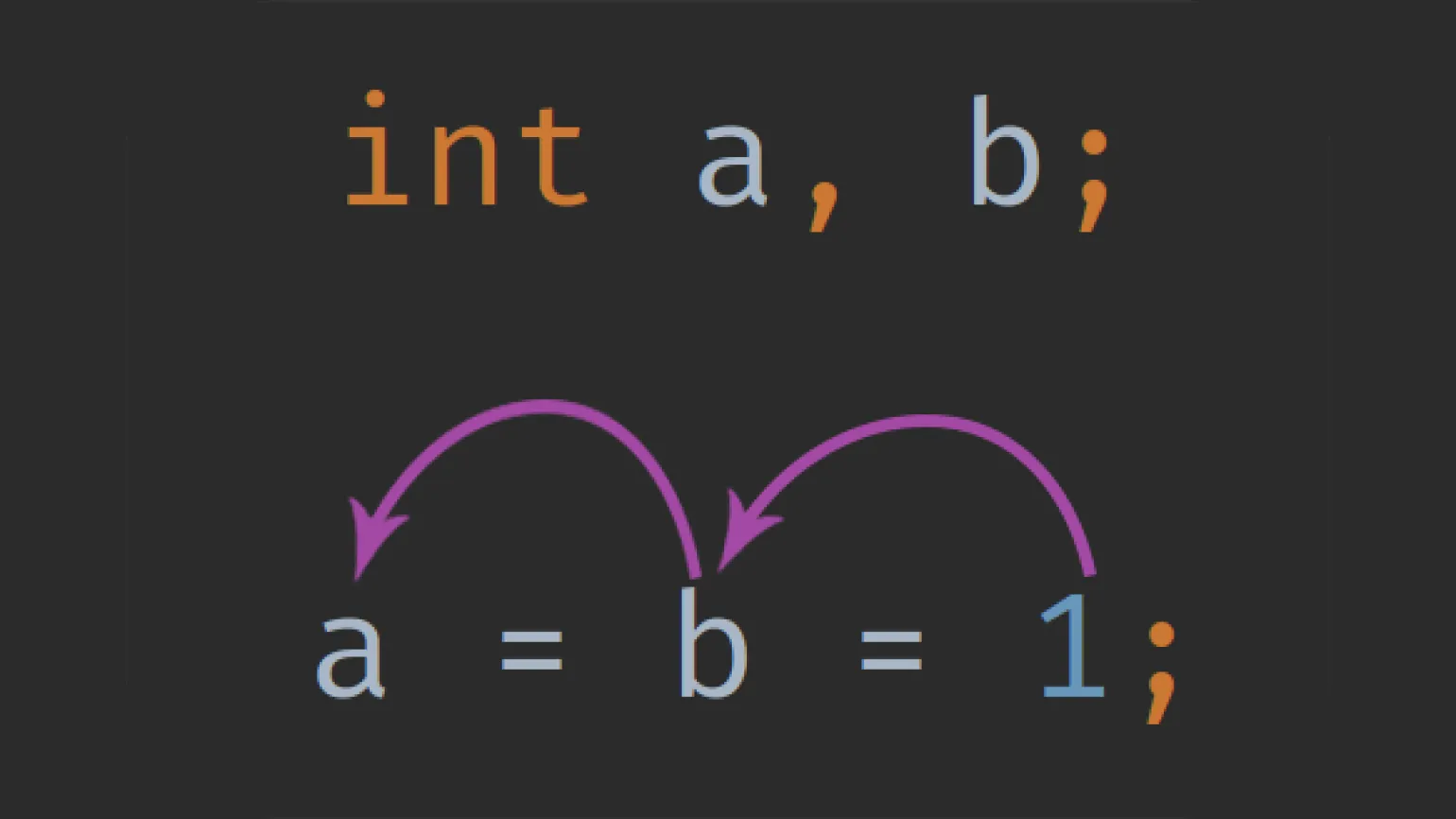
The assignment operator in Java is denoted by the = sign. Its main function is to transfer the value on the right side of the sign to the variable on the left side. This operator is a key element in working with variables, allowing developers to effectively manage data during programming. The assignment operator allows you to not only set the values of variables, but also update them, which makes it an indispensable tool in Java.
Reworked text taking into account SEO:
Here is a code example with syntax explanation in the comments. The code contains key elements and structure that will help you better understand its functionality. Here, we use HTML tags to create clear and understandable markup, which improves user perception of information and contributes to better ranking in search engines.
Note the correct use of semantic tags, such as `
Thus, proper code formatting and the use of comments significantly improves its quality and makes it more accessible to both developers and search engines.
What happens is that the variable b is assigned the value true, and then this value is passed to the variable a.
Arithmetic Operators in Java
Arithmetic operators perform basic mathematical operations: addition, subtraction, multiplication, division, and remainder. All of these operators are binary, meaning that they require two operands to perform their functions. Addition combines two numbers, subtraction finds the difference between them, multiplication increases one number by the amount of another, division divides one number by another, and remainder determines how many times one number fits completely into another, leaving a remainder. Understanding these operators is the foundation for performing more complex mathematical problems and programming.
Addition of two operands is a basic operation in mathematics and programming that combines values and returns their sum. In the context of programming, this operation is used to perform calculations, process data, and execute various algorithms. Addition can be applied to both numeric and string variables, depending on the programming language. Proper use of this operation allows you to effectively solve problems and optimize code.
The concatenation operator is used to combine two strings into one. In programming languages such as Java, you can execute the expression "I love" + "Moscow", which will result in the string "I love Moscow". This operation, known as concatenation, allows you to create more complex text messages and efficiently process string data.
In the Java programming language, the char, byte, and short data types are automatically cast to the int type when performing calculations. This allows them to be used in the same way as regular integers. The char data type in Java represents Unicode characters, which means that each character corresponds to a specific number. For example, the character ‘a’ has the value 97, and the character ‘b’ has the value 98. When added together, these values equal 195. Thus, understanding automatic type casting in Java allows you to work more efficiently with different data types and optimize your code.
Subtraction in programming: An operation that calculates the difference between two values by subtracting the right operand from the left. This basic mathematical function is used in various algorithms and calculations, providing the necessary accuracy and efficiency. Subtraction is an important part of many software applications and mathematical models, allowing you to process and analyze data.
The function returns the result of multiplying two or more operands.
The division function performs the operation of dividing the left operand by the right one. This process is a basic mathematical operation used to obtain the quotient of two numbers. It's important to note that division by zero is impossible and results in an error. Proper use of this function allows you to perform mathematical calculations with high precision, which is especially useful in programming and data analytics.
In Java, division by zero results in an error. If you attempt to divide by zero and the dividend is an integer, the program will throw an ArithmeticException. This happens because division by zero is mathematically impossible, and Java strictly enforces these rules.
If you attempt to divide a floating-point number by zero, Java will return special values: `Infinity` or `-Infinity`, depending on the sign of the dividend. This behavior is part of the IEEE 754 standard, which is used to work with floating-point numbers.
To avoid division by zero errors in Java, it is recommended to check the divisor value beforehand. If the divisor is zero, you should handle this condition, for example, with an 'if' condition, to avoid exceptions and ensure correct program operation.
Therefore, it is important to remember that division by zero in Java can lead to errors or the return of special values, and you should always take this into account when writing code.
Dividing a number by zero is not allowed. As a result, the program will terminate with an exception. However, if you convert the expression to a double (floating-point number), you will get an infinity result. This is important to take into account when developing software to avoid unexpected errors and ensure stable operation of applications. Properly managing division by zero can improve the quality of your code and increase its reliability.
The division operation returns the remainder obtained when dividing one number by another. This process is often used in mathematics and programming to determine the remainder that remains after division. In programming languages, an operator denoted by the percent sign (%) is commonly used to perform this operation. The remainder of a division can be useful in various tasks, such as checking the parity of numbers, resource allocation, and optimizing algorithms.
Unary Operators in Java
The Java programming language includes unary operators, which are arithmetic operators. The main feature of these operators is that they are applied to a single operand. Unary operators allow you to perform various mathematical operations, such as increment and decrement, as well as change the sign of a number. Understanding how unary operators work is an important aspect of Java programming, as they are often used to optimize code and simplify calculations.
Number operations: converting values to positive or negative.
Increment and decrement are operations used to modify the values of variables. Increment increases the value of a variable by one, allowing for quick incrementing of numeric data in programming. Decrement, on the other hand, decreases the value of a variable by one, which is useful for backtracking or decreasing counters. These operations are often used in loops and algorithms to manage values and their changes. Understanding increment and decrement is important for efficient programming and code optimization.
Decrement and decrement have two basic forms: prefix and postfix. While this may seem complicated, in practice it is much simpler. The prefix form modifies the value of a variable before it is used, while the postfix form performs the modification after the value is used. Understanding these differences is important for effective programming and code optimization.
- Prefix operators (++x) immediately change the value of a variable and substitute it into the expression.
- Postfix operators (x++) do the opposite—first use the variable's old value and only then substitute the new one.
Increments and decrements are important tools in programming, especially in loops, where they are used as counters. These operations allow you to sequentially output all the numbers in a given range. An increment increases the value of a variable by one, while a decrement decreases it. Using increments and decrements in loops helps effectively manage iterations, providing precise control over the execution time of operations and forming the necessary logic of program code. Using these methods significantly simplifies tasks related to processing sequences of numbers or elements in an array.
You can learn more about decrements and increments in our article, which explains in detail how to correctly solve complex expressions using these operators. We cover the basic principles of working with increments and decrements, and also provide practical examples for a better understanding. Read our article to improve your programming skills and use these operators more effectively.
Java has two additional unary operators: logical negation (!) and bitwise negation (~). These operators will be discussed in detail later when we study logical and bitwise operations.
Comparison Operators in Java
Comparison operators compare two operands, determining their relationship - which one is greater than, less than, or equal to the other. As a result of calculations, these operators return a boolean value, which can be true or false.
- true;
- false.
Java has six comparison operators that allow you to compare the values of variables and expressions. These operators play a key role in logical expressions and conditional statements such as if, while, and switch. Comparison operators include: equality (==), inequality (!=), greater than (>), less than (<), greater than or equal (>=), and less than or equal (<=). Proper use of these operators allows developers to effectively control program flow and make decisions based on conditions. Understanding and applying comparison operators is an important part of learning Java and software development.
Comparison operators play an important role in programming. Let's look at how they work using an example of comparing two integers and printing the results. We'll use standard operators such as equal, not equal, greater than, less than, greater than or equal, and less than or equal to illustrate their application. Comparing numbers allows you to make decisions in your code and control the logic of your program. It's important to understand how to use these operators correctly to achieve correct results in your calculations and logical expressions.
Comparison operators are widely used in conditional statements, where the execution of a specific block of code depends on specified conditions. In such situations, in addition to comparison operators, it's necessary to use branching statements, such as if-else and switch. For example, in Java, you can print the word true if 1 is not equal to 0. This allows you to effectively manage program execution flows depending on specified conditions and variable values.
Learn more about comparison operators and conditional statements in this article. Here you'll find a detailed explanation of the various operators, their applications in programming, and examples of their use in code. These concepts form the basis for developing logic in software applications. Read on to deepen your knowledge and improve your programming skills.
Logical Operators in Java: Boolean
Combining the Boolean values true and false is an important part of programming and logic. This allows you to create complex logical expressions that are used to make decisions in your code. Logical operators such as AND, OR, and NOT allow you to combine these values to determine the truth or falsehood of more complex conditions. For example, these operations can be used to check whether variables meet certain criteria. This is especially useful in software development, where it is important to correctly handle conditions and control the flow of code.
Logical operators differ from comparison operators in that they do not operate on individual numbers, but operate on the results of expressions. These operators are widely used in conditional constructs. For example, you can combine two expressions to execute a specific block of code if at least one of them returns true. Using logical operators allows you to create more complex and flexible conditions in programming.
There are six logical operators in Java, of which four are used most frequently. These operators allow you to perform logical operations, which are the basis for controlling the flow of program execution and making decisions. Using logical operators in Java is important for creating efficient and understandable code. Proper use of these operators helps developers create complex conditions and control the logic of the application.
Let's look at a few examples for comparison.
How does it work? Consider the construction (6 > 5) && (7 > 4). When executed, the compiler first checks the first condition, then the second. The && operator functions in such a way that if both expressions are true, it returns true. In this case, this is true, since 6 is greater than 5, and 7 is greater than 4.

Read also:
Logical operators in Java play a key role in controlling the flow of program execution. They allow Boolean expressions to be combined and evaluated, making it possible to make conditional decisions. There are three basic logical operators in Java: AND (&&), OR (||), and NOT (!). The AND operator returns true only if both operands are true. The OR operator returns true if at least one operand is true. The NOT operator negates the value of a Boolean expression, turning true into false and vice versa.
The use of logical operators in Java is especially important in conditions, loops, and the if statement. For example, you can combine multiple test conditions to perform certain actions only when all conditions are met. This allows you to create more complex and flexible algorithms.
Understanding logical operators in Java is the foundation for developing efficient and robust programs. They help developers write more readable and maintainable code, which in turn improves the quality of software.
Ternary Operator in Java: Yes, but Use Carefully
It reduces the if-else conditional construct to one line, which simplifies the code and makes it more readable. This improves the structure of the program code and reduces its volume, which is especially useful when developing applications and scripts. Using single-line conditional statements contributes to increased productivity and ease of code maintenance, which is important for developers.
The ternary operator, derived from the Latin word «ternarius», meaning «triple», is a language construct consisting of three operands: a logical condition and two expressions. When executing the ternary operator, if the logical condition is true, the first expression is executed; if false, the second. The standard notation for the ternary operator looks like this:
This operator is widely used in various programming languages, as it allows for compact and convenient writing of conditional constructs, which makes the code more readable and concise. Using the ternary operator helps reduce the number of lines of code and improve its structure, which is especially important in the context of rapid software development and support.
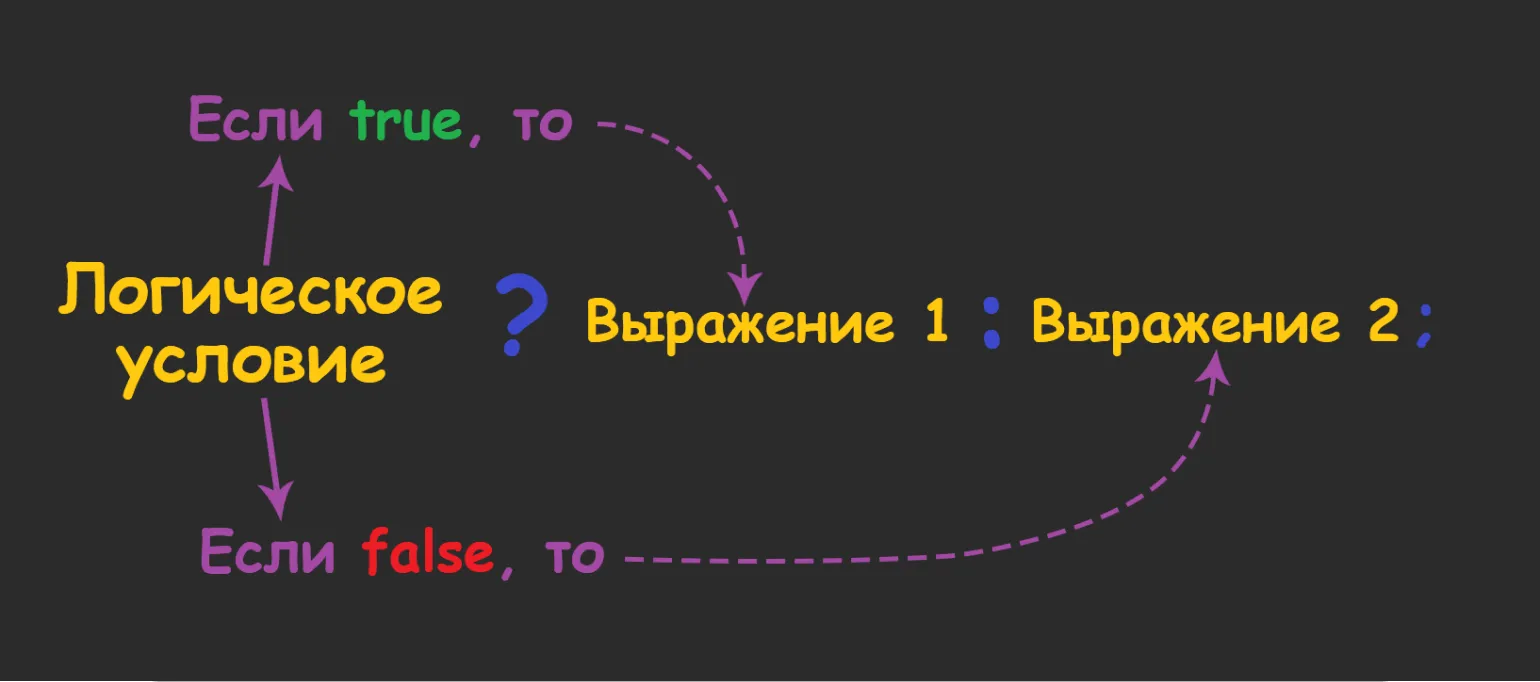
The point is that, That we can write an if-else construct in one line using the ternary operator. For example, if we need to test a Boolean variable condition and, depending on its value, assign the variable a the value 100 when condition is true, or 200 when condition is false, this can be done very simply. An example of using the ternary operator for this task looks like this:
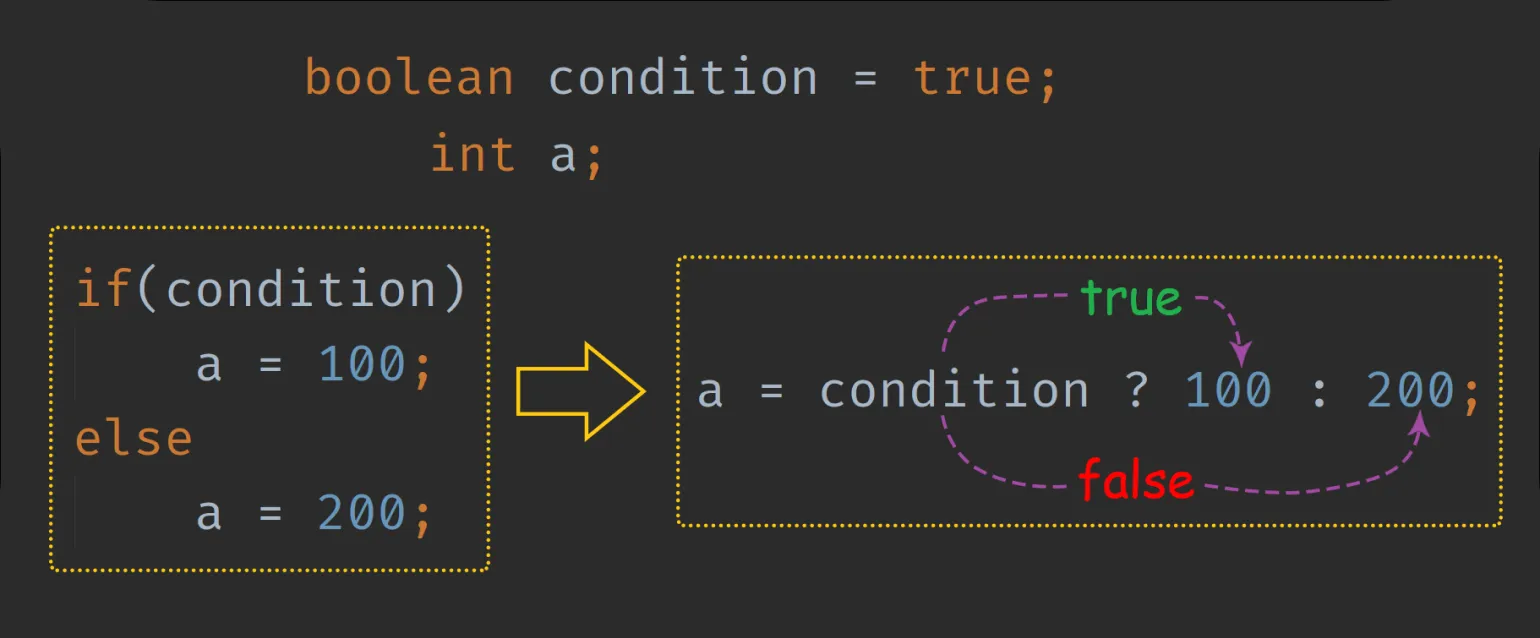
Modern developments sometimes create the illusion that using ternary operators can completely replace if-else constructs. However, in large projects with complex logic, this can negatively impact code readability. In our example, the logic is simple, but if additional operators are added to each expression, the code will become sloppy and confusing. This can make it difficult for other developers who will work with it to understand the code. Maintaining clarity and structure of code should always be a priority, especially in large-scale applications.
Ternary operators are appropriate in situations where the conditions are simple and easy to test. In other cases, it is recommended to use standard "if" and "else" constructs. This will ensure greater readability and understandability of the code, which is especially important for its future maintenance and optimization.
In our article "Boolean Type and Comparison Operators in Java," we discussed in detail how to effectively use ternary operators. These operators allow you to simplify writing conditions and make your code more concise. If you want to understand more about how to use ternary operators in Java, be sure to check out the linked article.
The instanceof Operator in Java
The function determines whether an object belongs to a particular class or interface and returns a Boolean value: true if the object conforms to the specified class or interface, and false otherwise. This allows you to effectively check the type of objects in programming, ensuring correct work with them and preventing errors.
Checking the type of an object using the instanceof operator is essential when you need to determine whether an object belongs to a particular class or its subclasses at runtime. This is especially useful when objects come from external sources, such as databases or other threads of execution, and it is important to ensure their compatibility with the methods of a particular class. The syntax for using the instanceof operator is as follows:

Bitwise operators in Java and offset Bits
Algorithms that operate on bits play a key role in cryptography and data encryption. They are essential for ensuring information security, as they allow for the efficient processing and protection of data at the binary level. Using bitwise operations allows for the creation of robust ciphers and algorithms, making them indispensable in modern information security systems. It is important to understand that knowledge and application of such algorithms is critical for developing secure applications and systems.
Java has seven bitwise operators, four of which are designed to perform bitwise operations. These operations are similar to logical operations, but instead of using true and false, they use the binary values 0 and 1. When performing bitwise calculations, each bit is processed sequentially. Unlike regular arithmetic, when adding two 1s, the result is not carried forward, and the answer is 1. This can be thought of as a column arithmetic process, where all intermediate results are ignored. Understanding bitwise operators is essential for effective Java programming, especially in tasks involving low-level data management and code optimization.
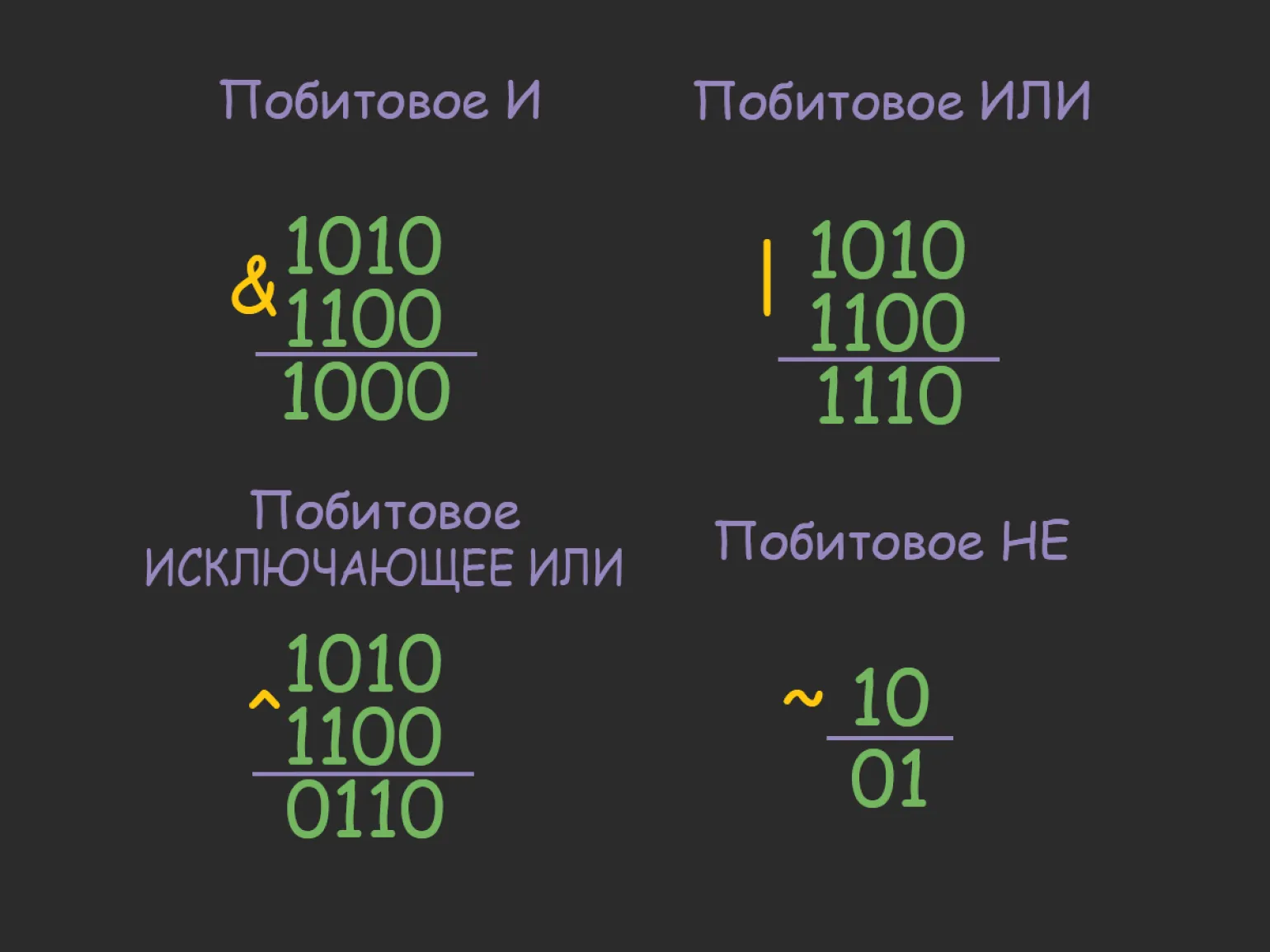
Bitwise operators are tools for working with binary data that allow you to perform operations on the level of individual bits. Basic bitwise operators include:
— AND (and): performs the logical operation «and» between corresponding bits of two numbers.
— OR (or): performs the logical operation «or» between corresponding bits of two numbers.
— XOR (exclusive or): returns 1 if corresponding bits are different, and 0 if they are the same.
— NOT (not): inverts the bits of a number, replacing 0 with 1 and 1 with 0.
— Left and right shifts: change the position of bits in a number, increasing or decreasing its value.
Bitwise operators optimize data manipulation, enabling efficient computation and resource conservation. They find application in a variety of fields, including programming, signal processing, and cryptography.
To understand how bitwise operations are performed in Java, let's first convert some decimal numbers to binary notation. This will help us better understand how bitwise operations work and how they are applied in Java programming. Bitwise operations play an important role in code optimization and allow for efficient data manipulation at the bit level. Understanding the binary system is key to working with bitwise operations such as AND, OR, XOR, and NOT.
Now let's perform logical operations on them.
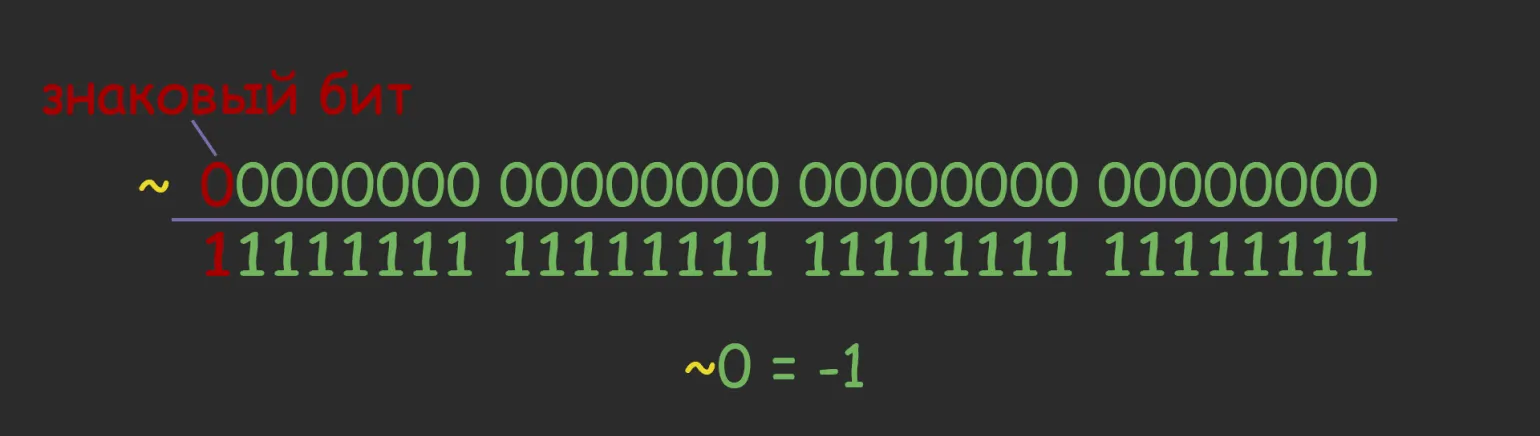
When the number 0 is negated bitwise, the result is -1. This phenomenon is due to the peculiarities of number representation in computer architecture. Firstly, most systems use a two's complement binary representation of numbers to indicate the sign. Secondly, bitwise negation inverts all the bits of a number. Since 0 is represented in binary as a sequence of zeros, its bitwise negation results in a sequence of ones, which corresponds to -1 in two's complement. These aspects demonstrate how bitwise operations can cause unexpected results in programming and computing.
- 0 in our example is of the int type and occupies 4 bytes of memory—that is, 32 bits.
- The most significant bit of the variable (the first one from the left) is the sign bit. If it is 0, the number will be positive, and if it is 1, it will be negative.
Understanding the concept of the most significant bit makes it easy to master the other three Bitwise operators, known as bit shift operators. These operators play a key role in manipulating binary data and are important tools in programming for optimizing performance and saving resources. Understanding bit shifting opens up opportunities for more efficient memory use and faster execution of operations, which is especially important when working with low-level programming languages. Shift operators change the position of bits in the binary representation of a number, moving them left or right. There are two main types of shift operators: logical and arithmetic. Logical shift moves bits without taking into account the sign, filling the vacated positions with zeros. Arithmetic shift, in turn, preserves the sign of the number, copying the most significant bit to new positions. These operations are important tools in programming, allowing you to efficiently perform mathematical calculations and manipulate data at the bit level. Proper use of shift operators can significantly improve the performance of algorithms and reduce resource usage. does not affect the most significant bit, leaving the number with the same sign (negative or positive). The cells of negative numbers at >> are filled with ones.
You can understand bit shifting if you visualize the process using a decimal number and its binary representation as an example. Although this may seem confusing, we will try to explain the basic principles. Bit shifting is an operation that moves the bits of a number left or right, changing its value. For example, if we take a decimal number and convert it to binary form, shifting to the left increments the number, and shifting to the right decrements it. Let's take a closer look at how this happens and what results we can get for different offsets.
Java has a toBinaryString() method that allows you to visualize decimal numbers in binary format. However, it is worth noting that binary numbers should not be confused with bits. For example, the number 2 occupies 32 bits in memory, but when using the toBinaryString() method, only two bits are displayed on the screen: 1 and 0. The remaining 30 zeros are not displayed because they are irrelevant, similar to how the decimal number 9 is not written as 009. Understanding this aspect is important for working with bits and manipulating numeric data in Java.
For a deep understanding of how bitwise operators work, it is recommended to use the modified BinaryString method. This method efficiently decomposes data into bits in the desired format, allowing for more accurate analysis and application of bitwise operations.
Shifting the bits of the number 1 to the left twice yields 4. If we continue shifting the bits 29 more times, we reach the minimum value for the int data type, which is -2,147,483,648. This demonstrates how bitwise operations can change numeric values in programming and the importance of understanding these types when working with programming languages.
Now let's look at how to change the direction of bit shifting. Note the difference between the >>> operations. Using the first operator, >>, all the bits will be filled with ones, which will result in a negative value. In the second case, using the >>> operator, we will get only zeros as an output. These differences are important for understanding how bits work and can significantly affect the outcome of program execution.
Bit shifting to the right is performed using the >> and >>> operators. When using a regular right shift (>>), a negative number retains its sign, since the most significant bit remains unchanged. In contrast, an unsigned right shift (>>>) changes the sign of a negative number to positive, since the most significant bit is changed. This difference between the two operations is important to keep in mind when working with integer values in programming.
Compound Assignment Operators in Java
Expressions are necessary to shorten the notation of mathematical operations and automatically convert operands to a common type. This simplifies the calculation process and improves code readability, which is especially important for developers and programmers. Using expressions helps avoid errors related to data type mismatches and optimizes algorithm execution.
The Java programming language provides shorthand forms of assignment operators known as compound operators. These operators allow you to perform certain operations between a variable x and a value y, after which the result of this operation is automatically assigned to x. Compound operators are a convenient way to shorten code and improve its readability. Examples of compound operators include +=, -=, *=, /=, and %=, which allow you to quickly and efficiently perform arithmetic assignment operations. Using compound operators in Java helps write code more concisely and reduces the likelihood of errors when manually assigning values.
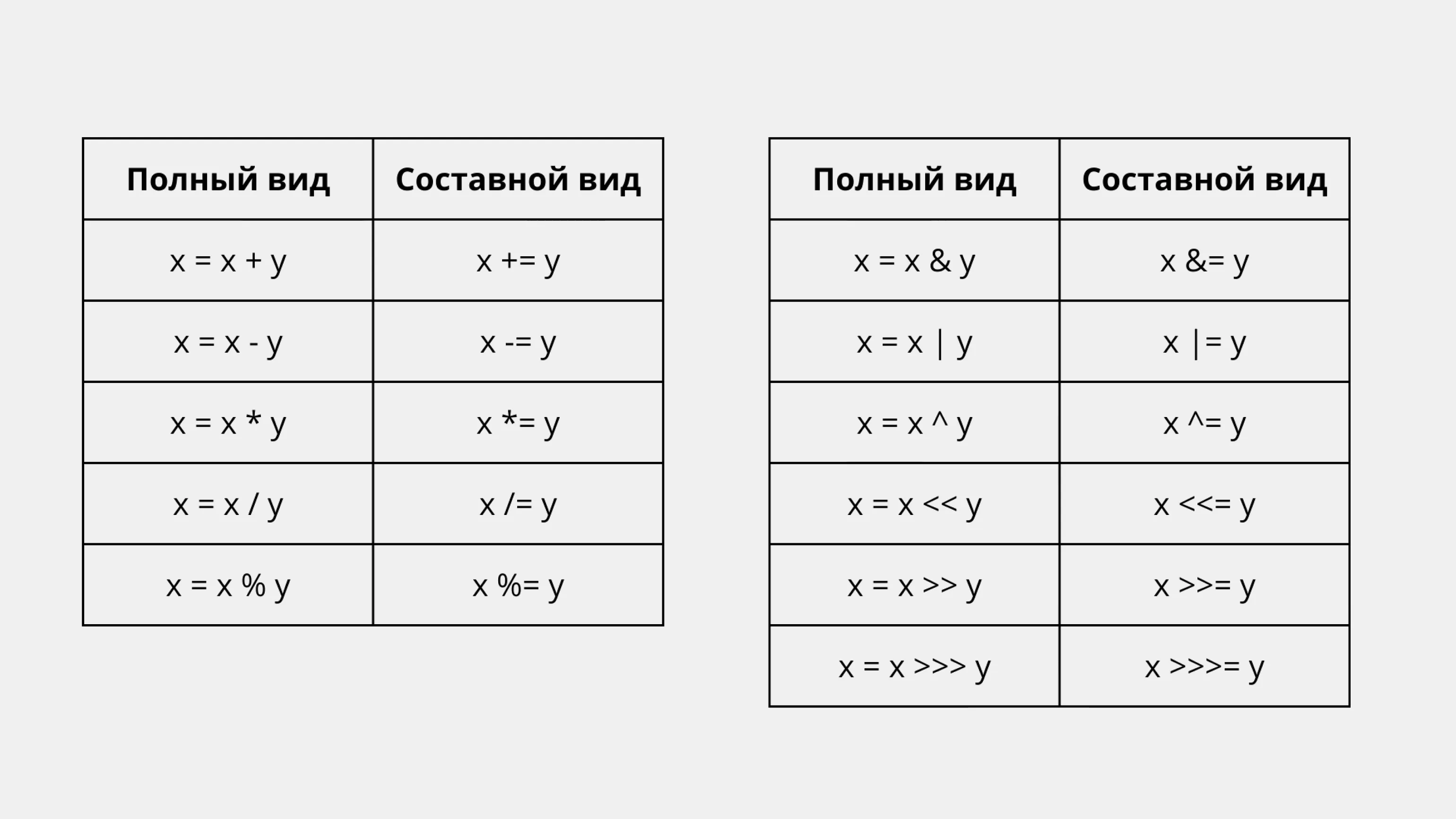
Compound Operators have their advantages, as they allow you to write operations more compactly and automatically convert variables to the same type if they differ. For example, in shorthand notation, you can easily add fractions and integers without worrying about the need for explicit type casts. In contrast, the full notation can result in an error if the data types do not match. Using compound operators simplifies code and makes it more readable, which is especially important in software development.
Java Operator Precedence
In the Java language, each operator has its own precedence level. The higher the operator's precedence, the earlier it is executed in an expression. Binary and ternary operators, with the exception of assignment operations, are executed from left to right. At the same time, unary operators and assignment operations are executed from right to left. Understanding operator precedence in Java is an important aspect when writing code, as it affects the order in which expressions are executed and, therefore, the results of calculations.
Java Developer Profession
You will learn Java programming from scratch and create web applications using the Spring framework. In six months, you'll gain fundamental skills and build a portfolio, and we'll help you find a job.
Find out more