Contents:

Who are you in the world of game development? Find out on a free course ➞ You will try out 3 professions in practice: game designer, 2D artist, and Unity developer. Create your first Mario-style game. Click for details.
Learn moreI first encountered Linux about seven years ago. I was impressed with this operating system, but its limited gaming capabilities made me return to Windows.
Using Wine and similar programs to run Windows applications can be a complex process. It requires setting up compatibility layers, installing drivers, and other technical steps. In contrast, it's much more convenient to simply click a shortcut and start playing. Ease of access and minimal technical difficulties make this approach more appealing to users.
Native Linux games were long rare, mostly being ports of popular titles like Quake and Mahjong. However, the situation has changed significantly. Every year, the number of games developed specifically for this operating system grows. Despite this, the myth that gaming on Linux is impossible persists. In fact, Linux offers a wide selection of games, including both indie projects and major titles from renowned studios, making this platform attractive to gamers.
Modern game developers strive to reach the widest possible audience, so they often release their projects on multiple operating systems, including Windows, OS X, and Linux. This is especially true for indie games and modern titles, where availability on multiple platforms is a crucial factor for success. Expanding their audience allows developers not only to increase sales but also to strengthen their market position.
Small studios developing games in Unity or Unreal Engine can easily release their projects on multiple operating systems. Larger studios often partner with specialized companies, such as Feral Interactive, who handle game porting. This allows Linux users to enjoy the gaming experience without any hassle. For example, among the games available for Linux, we can highlight:
- Life is Strange (since the first part);
- Tomb Raider (since 2013);
- Deus Ex: Mankind Divided;
- Hitman;
- Thief and many others.
Many games become available for Linux over time. For example, the game Metro 2033 was initially exclusive to Windows, but later a reworked version called Redux was released, which supports the Linux operating system. This indicates the growing interest of developers in this platform, which opens up new opportunities for Linux users in the world of video games.
As of April 2020, data on the number of ported games was presented. This data provides an overview of the current state of the gaming industry and trends in the reworking and adaptation of video games for various platforms. Game porting allows developers to expand their audience and increase the availability of content for players on different devices. Information on the number of ported games can be useful for both players and video game development professionals, as it reflects the demand and interest in certain games on various platforms.
While the number of games supported on Mac OS X on Steam is only 11,000, various tools are being developed for Linux that significantly expand the list of compatible games. This allows Linux users to enjoy significantly more gaming options than previously available.
Besides Wine, there are other ways to run games. One such solution is Lutris, a program that allows you to add more than 3,000 games to your existing collection. However, today the most advanced solution is Proton, which offers improved game compatibility and performance on platforms other than Windows.
Proton is a compatibility layer for games on the Steam platform, which provides the ability to run over 7,000 games. Unlike solutions like Wine and Lutris, Proton does not require additional configuration and installation steps. This makes it an ideal choice for users who want to enjoy games on Linux and other operating systems without unnecessary effort. Thanks to Steam integration, Proton simplifies the process of launching and configuring games, offering high performance and stability.
- Enable Proton in Steam settings.
- Download the game.
- And it works!
Some older games are an exception. These games remain popular and in demand despite the development of technology and the emergence of new gaming platforms. Their unique style, simplicity, and nostalgia attract both veterans and new players. Many of these classic games continue to inspire developers of modern projects, maintaining their relevance over the years.
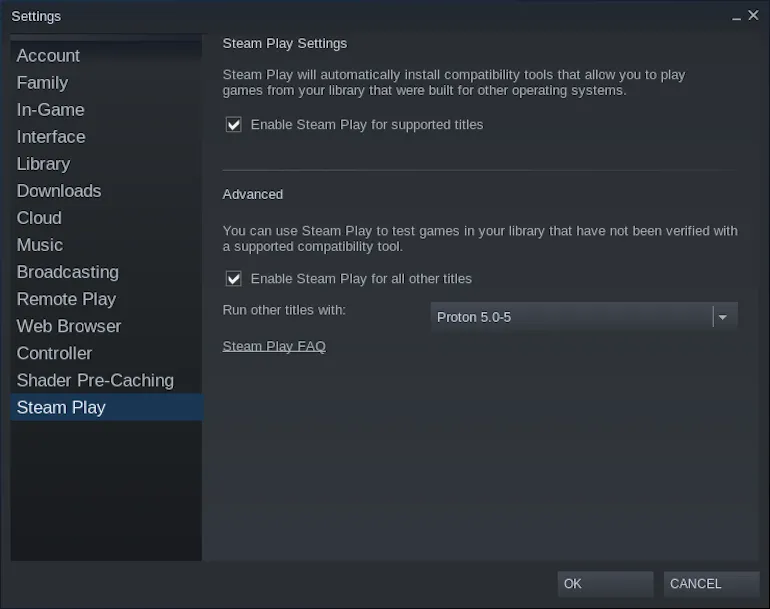
Enthusiasts have developed a website ProtonDB, which provides a list Proton-compatible games. Here you can find information on recommended settings and which Proton version is best for a particular game. ProtonDB is a valuable resource for users looking to optimize their Linux gaming experience.
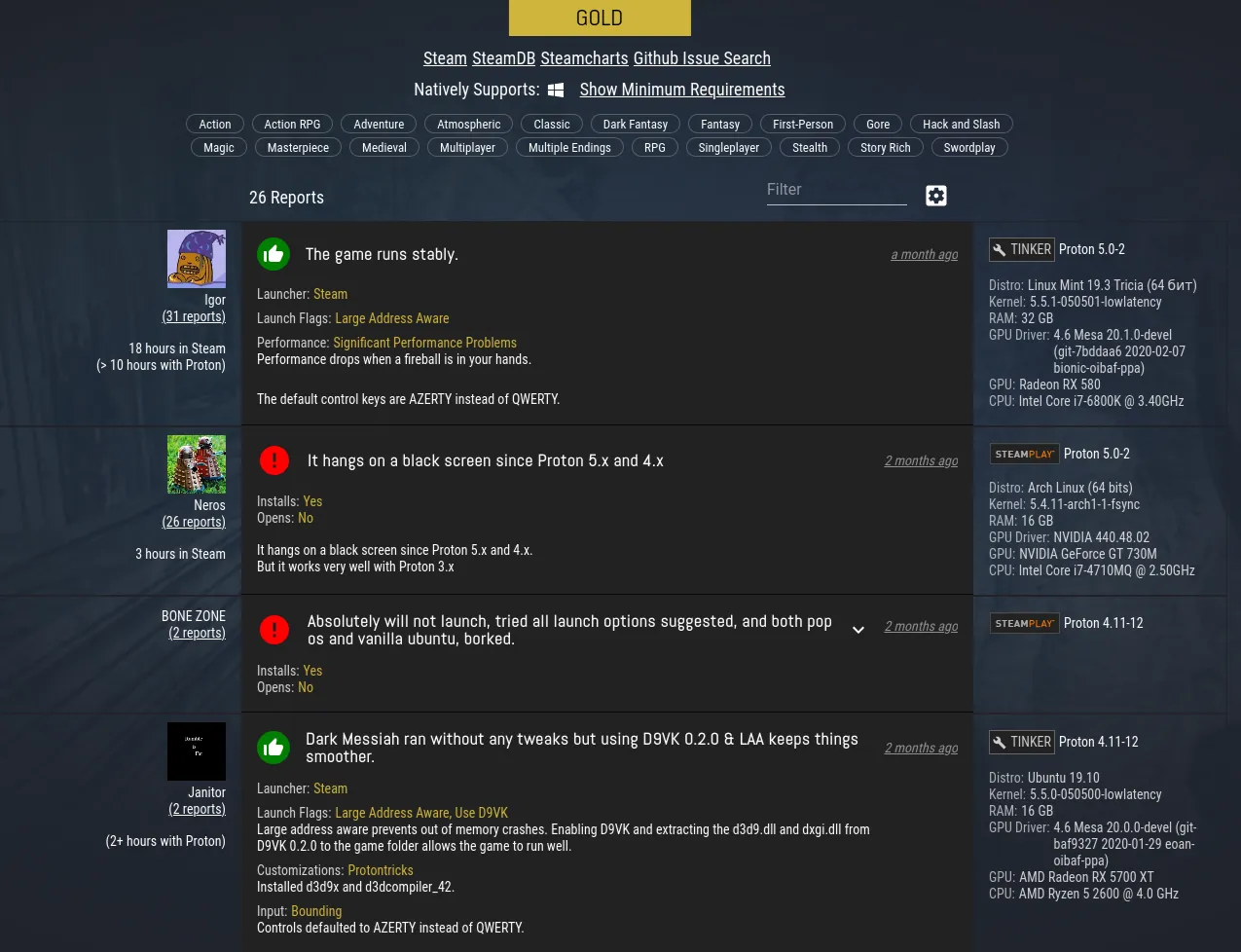
Released in 2018, Proton continues to be regularly updated and improved. Thanks to its updates, it makes an increasing number of games compatible with the Linux operating system. In the future, the number of games available on Linux can be expected to increase significantly, making this platform even more attractive to gamers.
Online gaming continues to be a problematic area. For example, Battlefield V experienced mass player bans because the game perceived DXVK as cheating software. This situation highlights the importance of game compatibility across different technologies and operating systems. Issues can also arise with virtual reality—not all headset manufacturers provide Linux support, and those that do often introduce it with a noticeable delay. Developers should pay attention to these issues to improve the user experience and avoid player dissatisfaction.
While most modern technology runs on Unix and Unix-like systems such as Linux, the Windows operating system remains the leader among personal computer operating systems. Although its market share has been gradually declining—from 95% in 2009 to 77% in 2020—Windows remains the primary platform for most PC games. This is due to Windows' widespread adoption and its compatibility with a wide range of software, making it a preferred choice for users and developers.
The popularity of the Windows operating system has led to most tools and libraries for developing and running games being created specifically for this platform. One of the key components is the DirectX graphics library, developed exclusively for Windows. OpenGL has long been used as a serious alternative, but despite being cross-platform, it demonstrates lower performance compared to DirectX. This situation highlights the importance of Windows in game development and its impact on the creation of high-quality gaming products.
Currently, Vulkan, an improved version of OpenGL, has come much closer to DirectX. The introduction of Vulkan support in games simplifies the process of porting them to the Linux platform, making Vulkan an attractive choice for developers. Additionally, wrappers like DXVK allow DirectX-based games to run using Vulkan capabilities, improving compatibility and performance. Vulkan support opens new horizons for cross-platform game development, making them accessible to a wider audience.
For more information on graphics libraries, please refer to the article "What to Develop Games With." This article provides helpful recommendations and tips for choosing the right game development tools, as well as insights into the best graphics libraries to help you create visually appealing game content.
Difficulties may arise due to the specific nature of the game. For example, "Space Rangers 2" is a combination of two games. While this solution reduces the load on the computer, it creates difficulties when porting and running on other operating systems. These features may become an obstacle for players wanting to enjoy the game on more modern platforms.
Previously, developers had to interact directly with graphics libraries to perform rendering tasks. Nowadays, this function is performed by the engine, freeing developers from the need to delve into details. Now, simply selecting the desired library in the settings is enough, which significantly simplifies the development process and speeds up project implementation.
You can develop a game for Windows using DirectX and then compile it for Linux using Vulkan. Usually it only takes a few clicks of a button, but in some cases you will need to make some minor changes to the code.
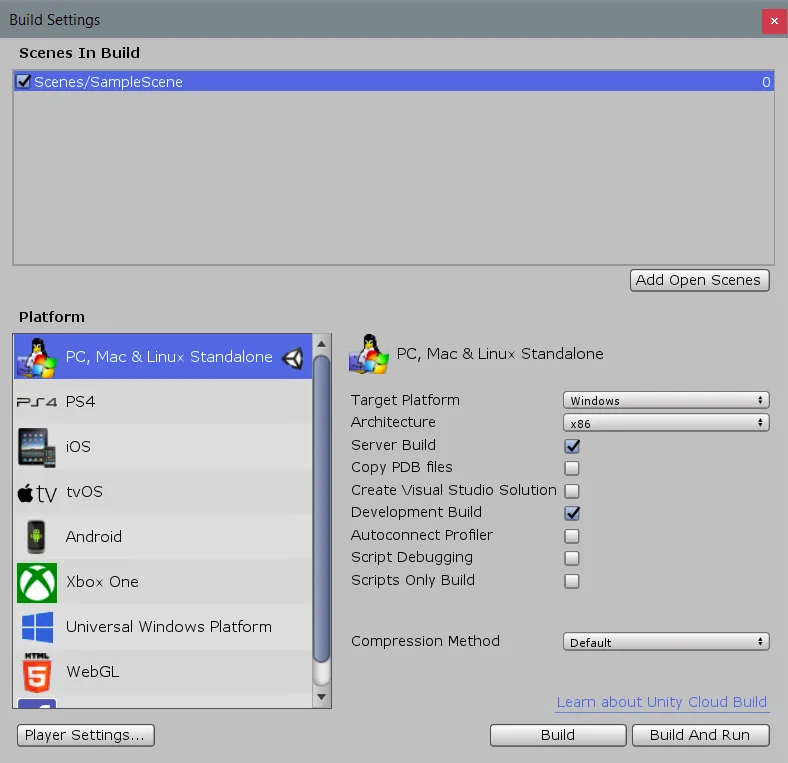
Porting games to Linux or OS X allows you to expand your audience and attract new users Without significant additional development costs. However, it's worth keeping in mind that developing games exclusively for Linux may be unprofitable, as the number of gamers on this platform is significantly lower. As a result, you may struggle to recoup your investment. Therefore, cross-platform development is a smart choice, as it will provide access to a wider player base.
Vulkan is widely supported in most popular game engines, opening up opportunities for Linux users. To enjoy gaming, it's important to master the skills of developing high-quality games. Some of the best tools for this are Unity and Unreal Engine 4, which provide powerful capabilities for creating engaging projects.
Who are you in the world of game development? A mini-course for those who want to make games.
In this free mini-course, you'll try your hand at being a game designer, 2D artist, or Unity game developer, and choose the profession that's right for you.
Find out more