Learn: Online tutor
Learn more
An expert in the field of digital tools in education and pedagogical technologies for hybrid learning, a corporate trainer at Center-Game and an active member of the Edutainment Community. I am the author of the Digital Tools for Creative Education Telegram channel, where I share innovations in educational technologies. I also head the Phystech - School technological entrepreneurship project laboratory, which received recognition by winning the presidential grants competition. My work focuses on developing effective teaching methods, integrating modern technologies, and improving the educational process.
Photo from Anna Babina's personal archive.
Short videos are becoming the dominant media format in the modern world. For children and teenagers, recording and posting an Instagram story or a TikTok video has become a simple and familiar activity. Even busy adults are more likely to choose a series of ten-minute videos on topics they find interesting, rather than wasting time on 90-minute lectures. Thus, short videos meet the needs of modern audiences, offering an accessible and convenient way to receive information and entertainment.
Clip thinking has become a hot topic of discussion, and instead of lamenting its negative aspects, we can use this trend for educational purposes. Flipgrid, a free service from Microsoft, offers excellent opportunities to adapt to modern forms of content consumption. With Flipgrid, educators can create interactive video platforms that promote student engagement and develop critical thinking. Use Flipgrid for effective learning to adapt to the demands of the times and make the educational process more engaging and accessible.
What is Flipgrid
Flipgrid is a platform that combines elements of a social network and an educational tool, allowing administrators, such as teachers, to create controlled groups. In these groups, educators can assign tasks and suggest topics for discussion, and students, in turn, can record their responses and leave comments on their peers' posts. This creates an interactive educational environment that promotes active student participation and the exchange of opinions. Flipgrid effectively supports interaction between students and teachers, making it a valuable tool in the modern educational process.
Flipgrid provides a unique opportunity for users to create and publish short videos directly on the site or in the mobile app. This feature allows you to quickly record videos and share them instantly. Flipgrid also offers flexible access settings that allow you to tailor interactions to different groups and assignments. For example, you can restrict comments or allow them only in text format, excluding video responses. This makes Flipgrid ideal for educational institutions seeking interactive learning and interaction.
To register on the Flipgrid platform, all you need is an email address. If you already have a Google or Microsoft account, you can get started with Flipgrid in just a few clicks. The platform is also convenient for students: they can view lessons and participate in discussions using a provided link or QR code from any device, whether a computer or smartphone. Flipgrid ensures accessibility and ease of use, making learning more interactive and accessible.
Flipgrid is a powerful tool that can significantly facilitate the work of teachers and trainers. This platform allows you to create interactive video discussions, which promotes deeper engagement with the learning process. Teachers can use Flipgrid to organize discussions, exchange opinions, and assess student learning. To get started, simply register, create a group, and add discussion topics. The user-friendly interface and available features make this process simple and intuitive. Flipgrid helps develop communication skills and critical thinking, making it an ideal complement to educational methods.
How Flipgrid is Useful in Education
Quick recording and the ability to instantly share created videos offer many useful opportunities for teachers and educators. Let's look at several effective ways to use Flipgrid in the educational process. This tool not only allows you to share knowledge but also actively engage students in discussions, which promotes deeper learning. Flipgrid is ideal for creating interactive assignments, organizing group projects, and exchanging feedback between students. Using Flipgrid, teachers can motivate students, develop their critical thinking, and improve their communication skills.
The Flipgrid platform allows you to record videos up to ten minutes long, making it ideal for creating short lessons. This time is enough to explain the pronunciation of foreign words, cover key concepts, and other educational topics. Flipgrid also supports uploading pre-recorded videos from your device and lets you add videos from YouTube and Vimeo, giving you more options for creating diverse content.

Please note the following materials:
Microlearning: the advantages and disadvantages of short Microlearning is becoming increasingly popular in education due to its effectiveness and convenience. This approach uses short, focused learning materials, allowing learners to absorb information quickly and easily. One of the main advantages of microlearning is its adaptability to individual student needs. Short formats allow for a focus on specific topics, which promotes better knowledge acquisition and increases learner motivation. However, microlearning also has its drawbacks. One of these is the limited scope of material. Short formats may not always provide a deep understanding of complex topics. Furthermore, the reliance on technology and platforms to access microlearning may be a barrier for some users.
In summary, microlearning is an effective tool in modern education, but it is important to consider its limitations. Combining short-format videos with traditional teaching methods can be an optimal solution for achieving maximum results.
Flipgrid offers the ability to share pre-recorded videos, making it unsuitable for live online conferences. However, it is an excellent tool for preparing presentations and developing public speaking skills. When recording videos, users can add illustrations, stickers, and other visual elements, as well as use the screen as a background. Limiting videos to, say, three minutes can help students learn to express themselves clearly and concisely, an important aspect of effective communication. Flipgrid fosters creativity and confidence, making it a valuable resource in the educational process.
The service is an effective teaching tool for a variety of subjects. Students can record and upload poetry recitations, character discussions for literature lessons, social studies video essays, dialogues for English language learning, and short oral project presentations for business courses. Teachers can review recordings at any time, providing flexibility in teaching. They can also invite students to evaluate each other's work, highlighting strengths and areas for improvement. This not only promotes critical thinking but also increases student engagement in the learning process.
Flipgrid offers the opportunity to provide detailed feedback, but is not designed for quantitative grading. This makes the platform ideal for supporting constructive dialogue and in-depth analysis, fostering critical thinking and self-reflection skills. Using Flipgrid helps create a safe space for exchanging opinions and ideas, which in turn promotes a deeper understanding of the learning material.

Rework the text without changing its essence. Optimize it for SEO and add information if necessary. Eliminate emojis and unnecessary characters, as well as sections with numbers and symbols. Simply provide plain text.
Read also:
Educators are increasingly calling for the elimination of traditional grading in the educational process. The main reason for this is the desire to create a more favorable learning environment, where the focus is on the development of skills and abilities, rather than numbers on a report card. Grades can cause students stress and a feeling of insecurity, which negatively affects their motivation and interest in learning.
Abandoning grading allows teachers to focus on the individual needs of each student, ensuring a deeper understanding of the material and the development of critical thinking. This also promotes a more open and trusting relationship between students and teachers, which is an important aspect of successful learning.
The idea of abandoning grading is finding more and more supporters who believe that assessment should be constructive and aimed at development, rather than comparing students with each other. Instead of grades, alternative assessment methods such as portfolios, self-assessment, or feedback can be used to help students better understand their achievements and areas for growth.
Thus, abandoning traditional assessments can be a step toward a more effective and humane educational process focused on the personal development and future success of students.
Flipgrid is a convenient platform for moderated communication that allows for comments and reactions. This service can be used to encourage mutual support among students, develop skills in constructive criticism, and the ability to accept feedback. If tensions arise in the group, comments can be disabled, ensuring comfortable interaction. Flipgrid helps create a safe learning environment, promoting the development of communication and critical thinking skills in students.
Flipgrid provides a unique opportunity for English-language teachers to join an active community. Here, teachers share their lessons, teaching methods, and inspiring ideas. Content authors typically provide their contact information, making it easy to contact them to share experiences or express gratitude for useful materials. This creates a favorable atmosphere for professional growth and collaboration among educators.
How to get started with Flipgrid
The platform's interface is presented in English, but its design is intuitive. Even users without advanced digital skills will find it easy to master. Using the platform is no more difficult than registering and working with a social network.
To get started with Flipgrid, go to the service's main page and click the blue "Sign Up" button. You will be prompted to sign in with a Microsoft or Google account. If you don't have an account on one of these platforms, select the appropriate option, and Flipgrid will offer to create a new account. Simply fill in the required fields to register.
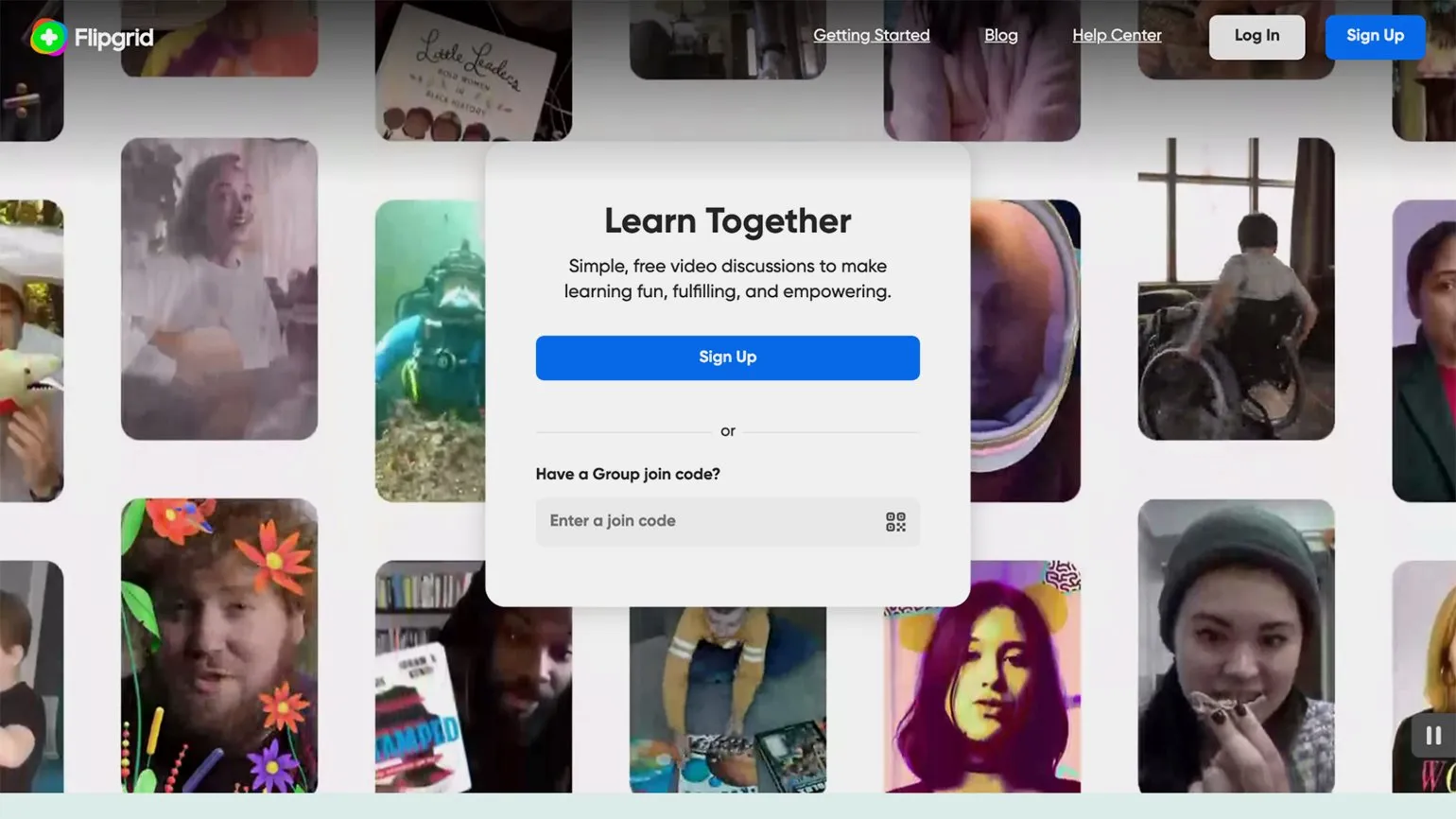
The Flipgrid service provides free access to all users without any restrictions. Flipgrid has no paid plans, making it accessible to a wide audience. No need to verify your status as an employee of an educational institution, making the platform easy to use for everyone. Flipgrid is a convenient tool for collaboration and idea sharing in the educational environment. A Flipgrid group is an effective way to organize your space, allowing you to invite members and add topics, such as lessons or assignments. You can create separate groups for different participants, such as students in different years, or for different subjects and topics, such as History and Social Studies. This allows for more focused interaction and information sharing, significantly enhancing the educational process. Because groups help structure learning, their use can significantly improve communication and collaboration among participants.
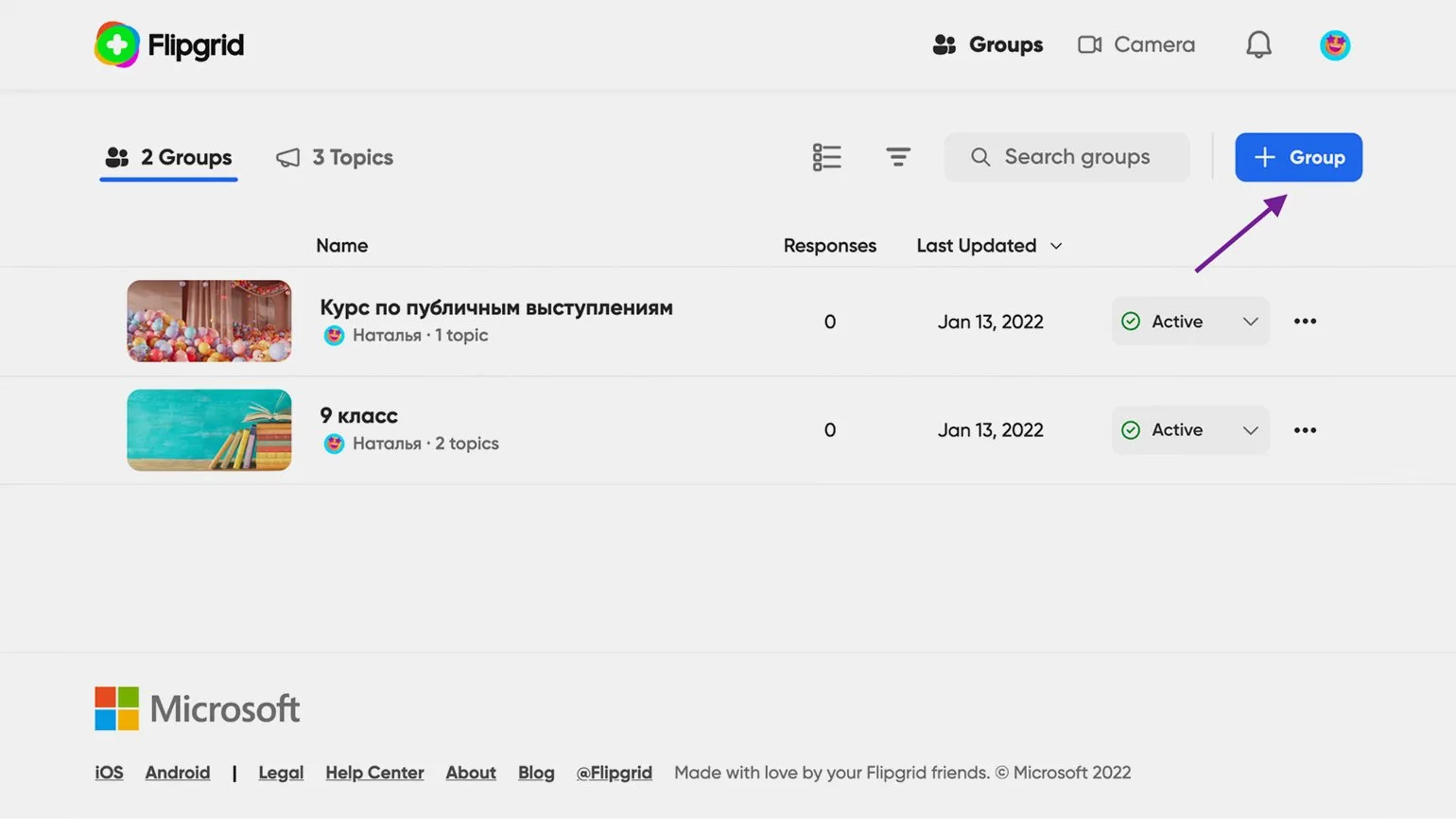
To create a group, go to the tab "Groups" and click the "+ Group" button. In the window that appears, enter a name for your group. By clicking "Change Theme," you can select an image for the group from the suggested options or upload your own. This process will help you customize the visual design and make your group more attractive to members.
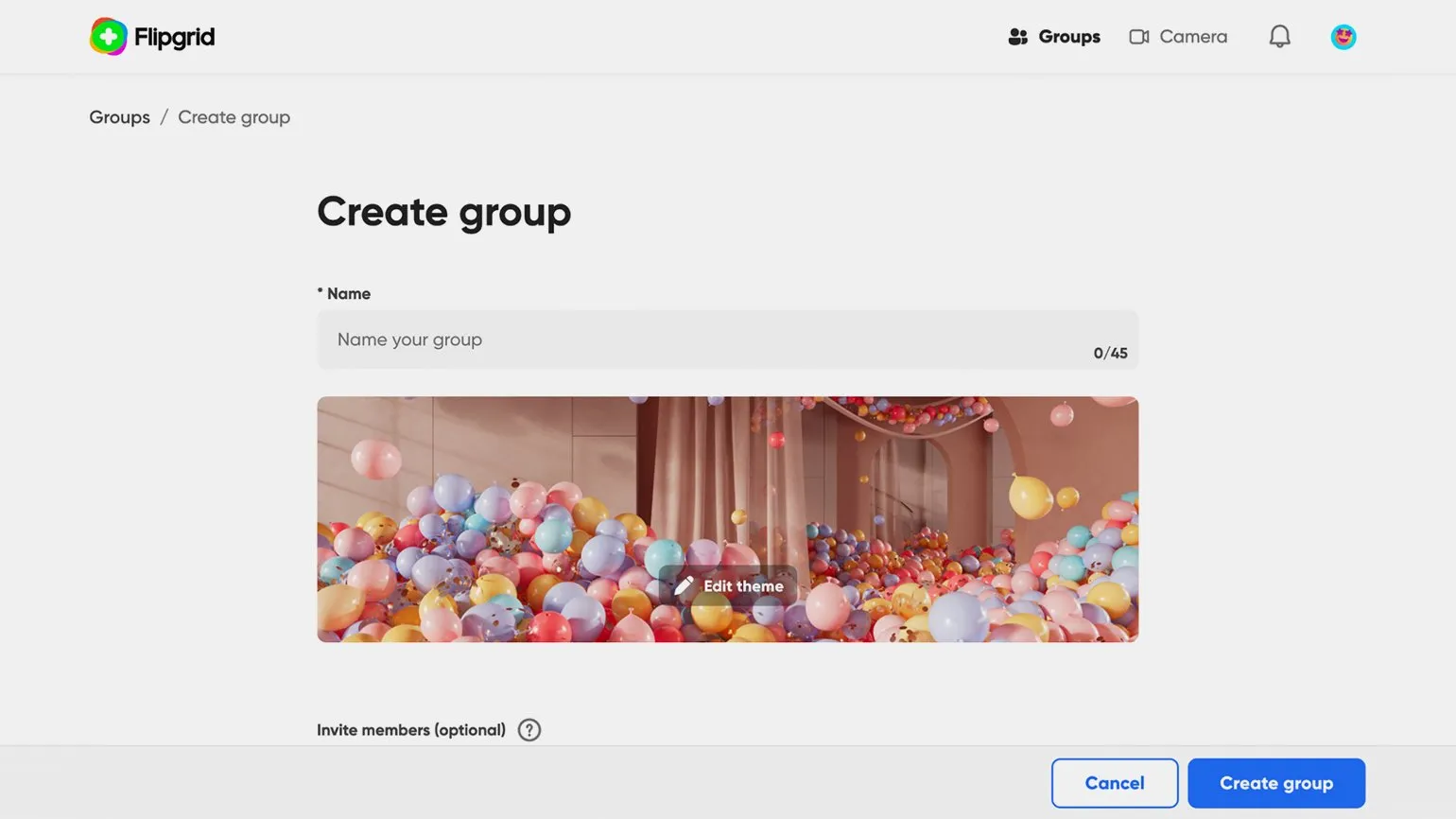
You can create a group by clicking the Create button group" at the bottom of the page. After that, the group will become available in your personal account. You can also set up access rights for members right away, but this process can be completed at any time.
If you are on the new group creation page, choose the most convenient way to add members.
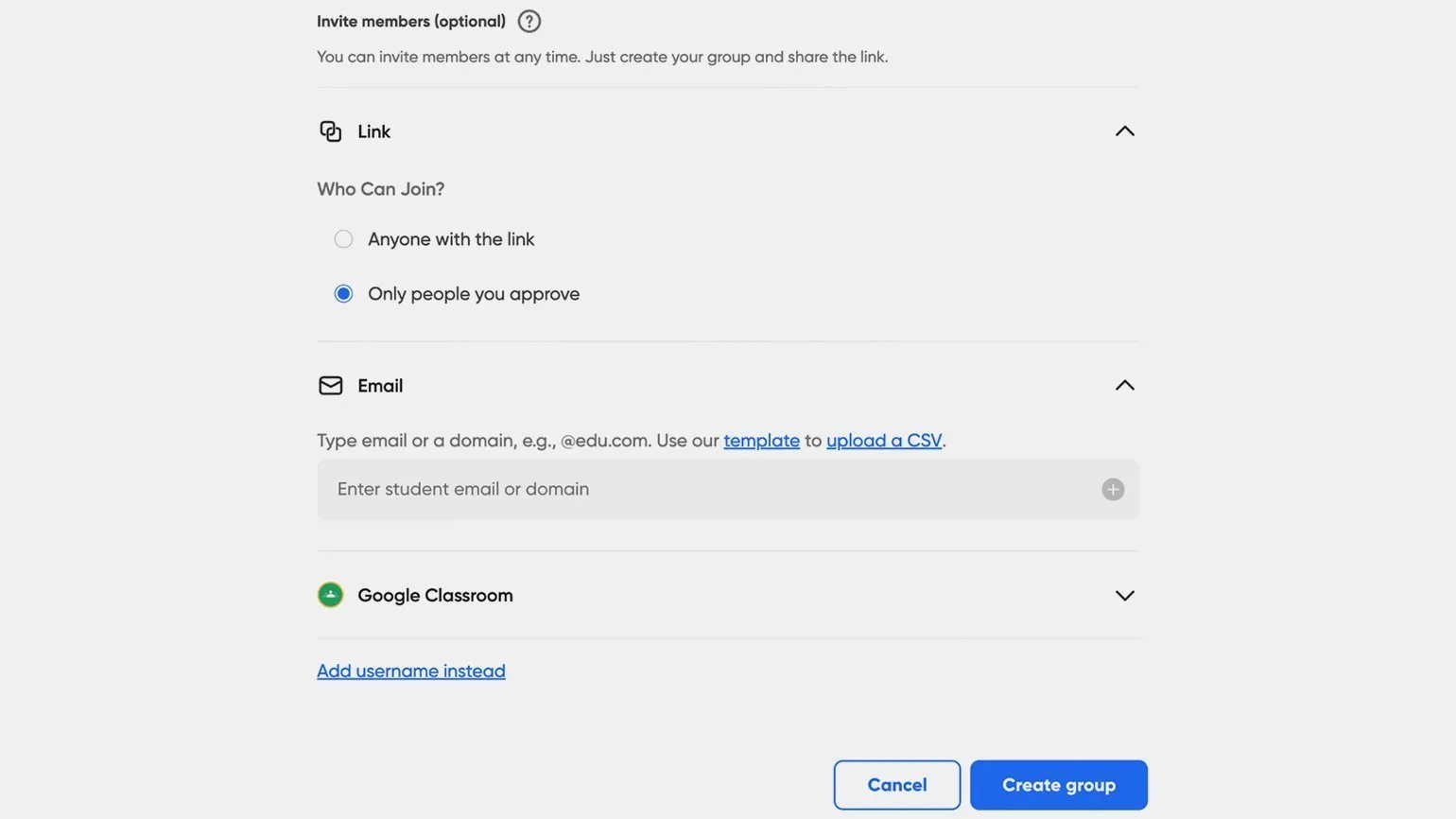
- Via link. This is the easiest way - through the Share button on the group page, you can copy the link or upload a QR code - they will allow participants to join. You can choose whether users will be added to the group immediately after registering with Flipgrid (Anyone with the link) or only after your permission (Only people you approve). The second option is selected by default. The link corresponds to the Join Code, which is located next to the Share button. Participants can enter it in the corresponding field on the service's main page.
- Via email. Here you will need to enter the email addresses of all the participants you want to add to the group, or a domain name (for example, @kompaniya.ru) — for example, if you are inviting everyone in your organization. Then only users with the corresponding email addresses will be able to join the group.
- Via Google Classroom. If you use this platform, select it to upload a list of students.
- Via specified usernames (Add username instead). This method is useful for inviting people who do not have Microsoft or Google accounts. Each member will need to enter a first name, last name, and a unique username. Once entered, they will be able to join the group.
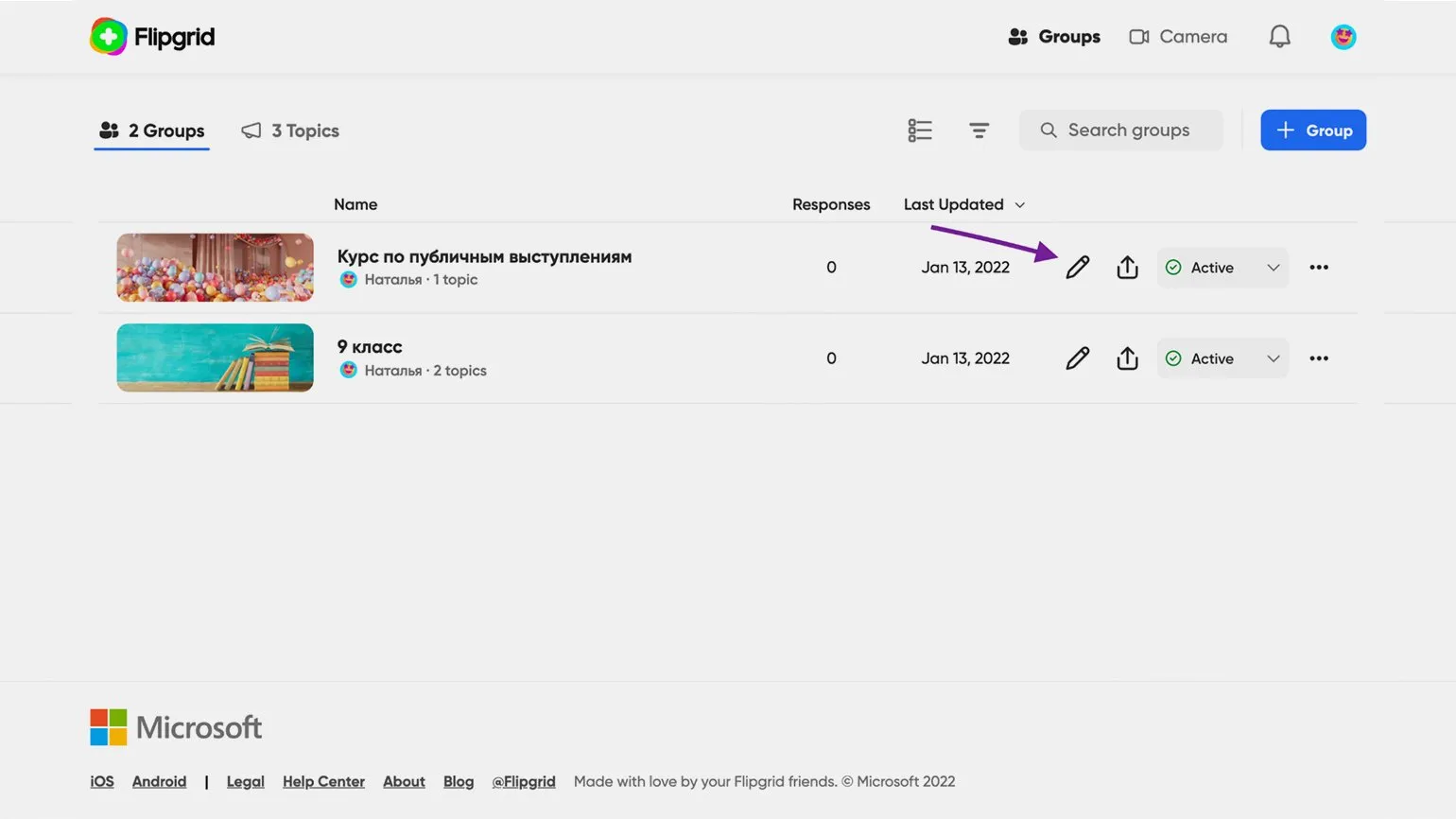
To change access settings or add users by email, use the group menu at any time. Open the Groups tab, find the desired group in the list, and click the edit icon (shaped like a pencil). This will allow you to quickly and conveniently manage access rights.
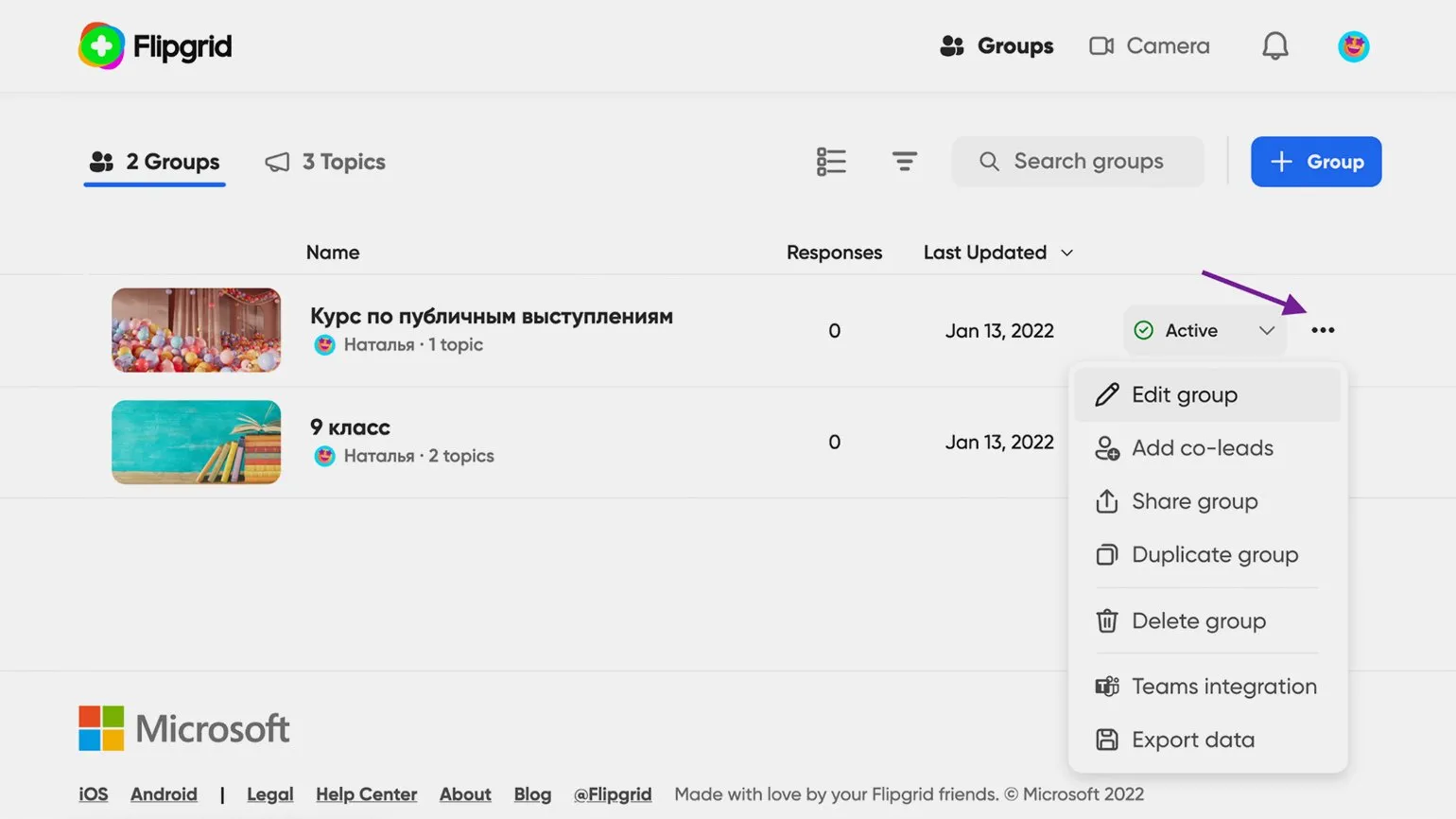
Clicking on the three dots in the upper right corner opens a menu with additional options.
- Add co-leads allows you to add other administrators. Users with these rights can invite and remove members, create new topics, and moderate replies and comments.
- Duplicate group creates a copy of the group, but only the settings and topics are saved. The member list, replies, and comments are not copied.
- Delete group deletes the group.
- Teams integration integrates the group with the Microsoft Teams service. You can learn more about this in the Flipgrid support article.
- Export data exports group statistics to a table in CSV format.
Each topic is a post containing content in text, image, or video format. After creating a group, an initial topic titled "Hello, I am…" automatically appears, encouraging members to get to know each other. This creates a welcoming atmosphere for communication and interaction, allowing group members to easily initiate a dialogue and exchange information. This approach helps build community and strengthens connections between participants.
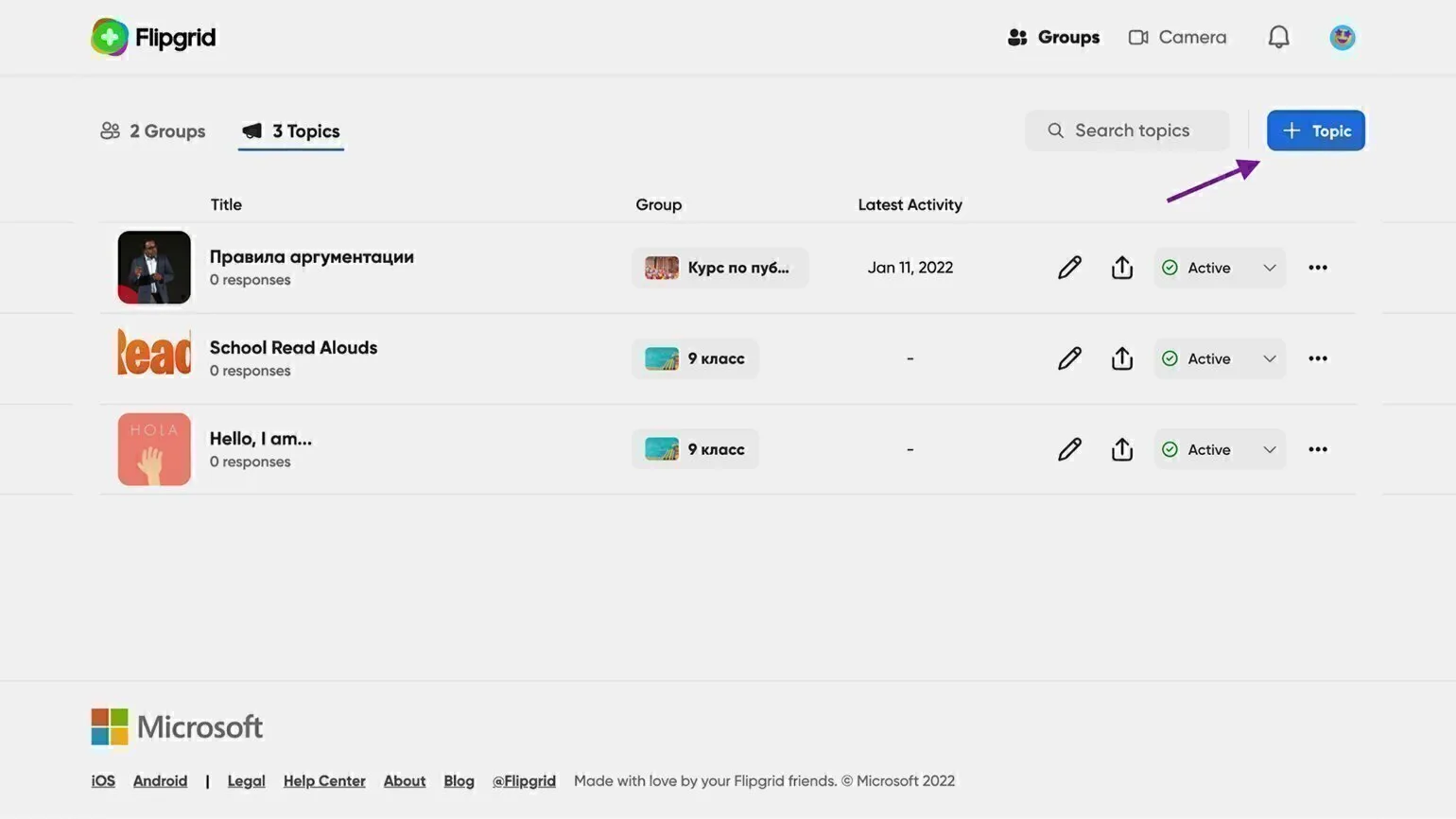
To create your own topic, go to the tab "Topics" or open the group page by clicking on its name. Then click the blue button on the right labeled "+ Topic."
The platform's interface is intuitive: a title, a text field with simple editing tools, and the ability to add media content. You can attach various elements to your post, such as images, videos, audio files, or documents. These features allow you to create diverse and engaging content that will capture your audience's attention and improve engagement with your material.
- Image;
- Video recorded with Flipgrid;
- Emoji, GIF, or sticker;
- Video uploaded from your device;
- Video via a YouTube or Vimeo link;
- Integrated content from Buncee or Adobe Creative Cloud Express.
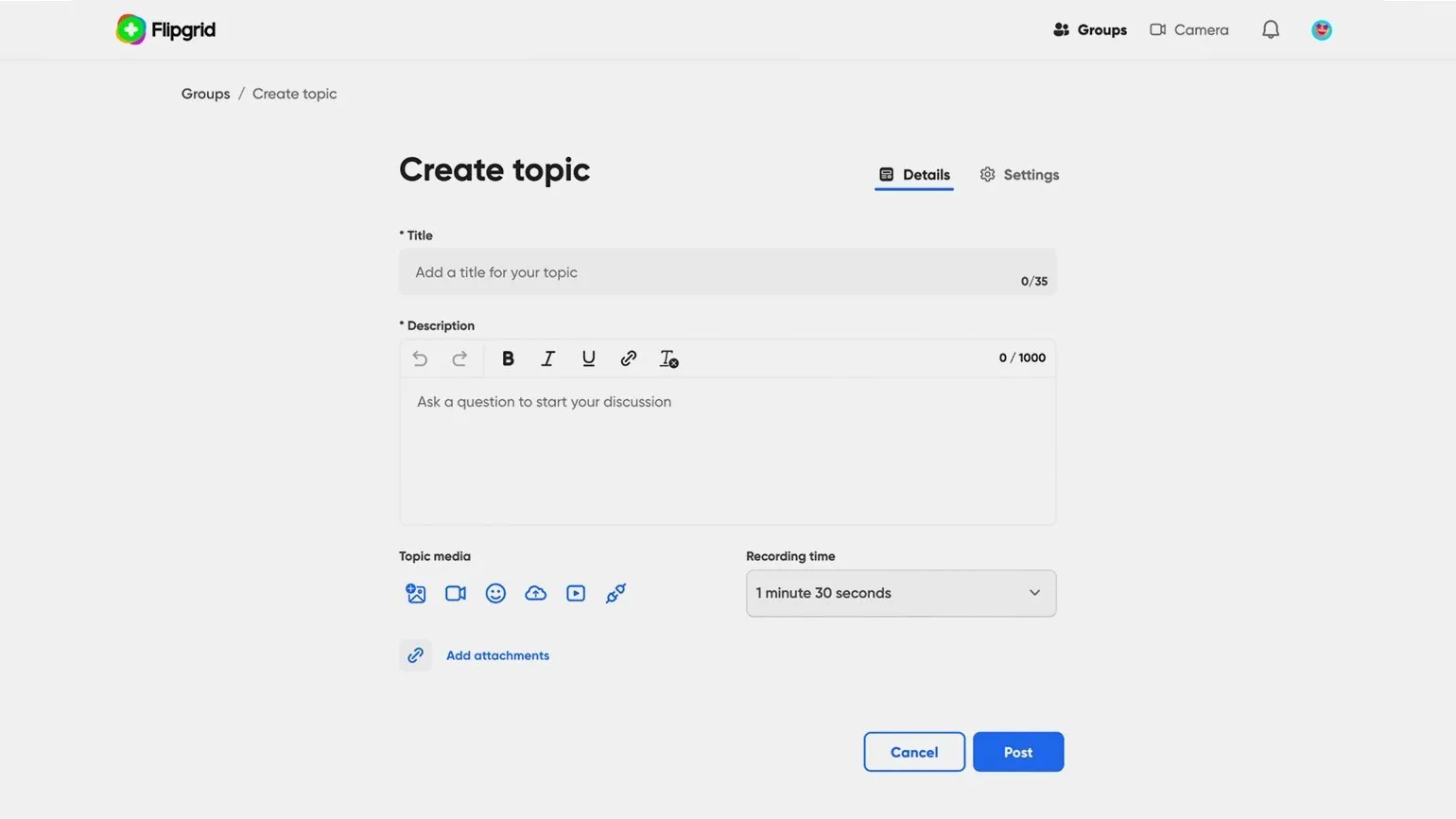
You can add only one element to a topic, for example, one image or one video. You must also attach an active link to an online resource or cloud file. This will improve the perception of the material and make it more informative.
In this section, you set the maximum duration of the video recording (Recording time) that participants can create in response to this post. Available time frames range from 15 seconds to 10 minutes.
Now you need to go to the topic settings tab. Here you can change the post status by choosing between the options "Hidden" and "View only". If you select "Hidden", the recording will not be visible to participants, and if you select "View only", they will be able to see the topic, but will not be able to leave comments. Also on the right is a function that allows you to configure access to the topic using the calendar. On the specified first date, the post will become active, which will allow participants to see it and publish responses. On the second date, the status will change to "View Only", limiting the ability to comment.
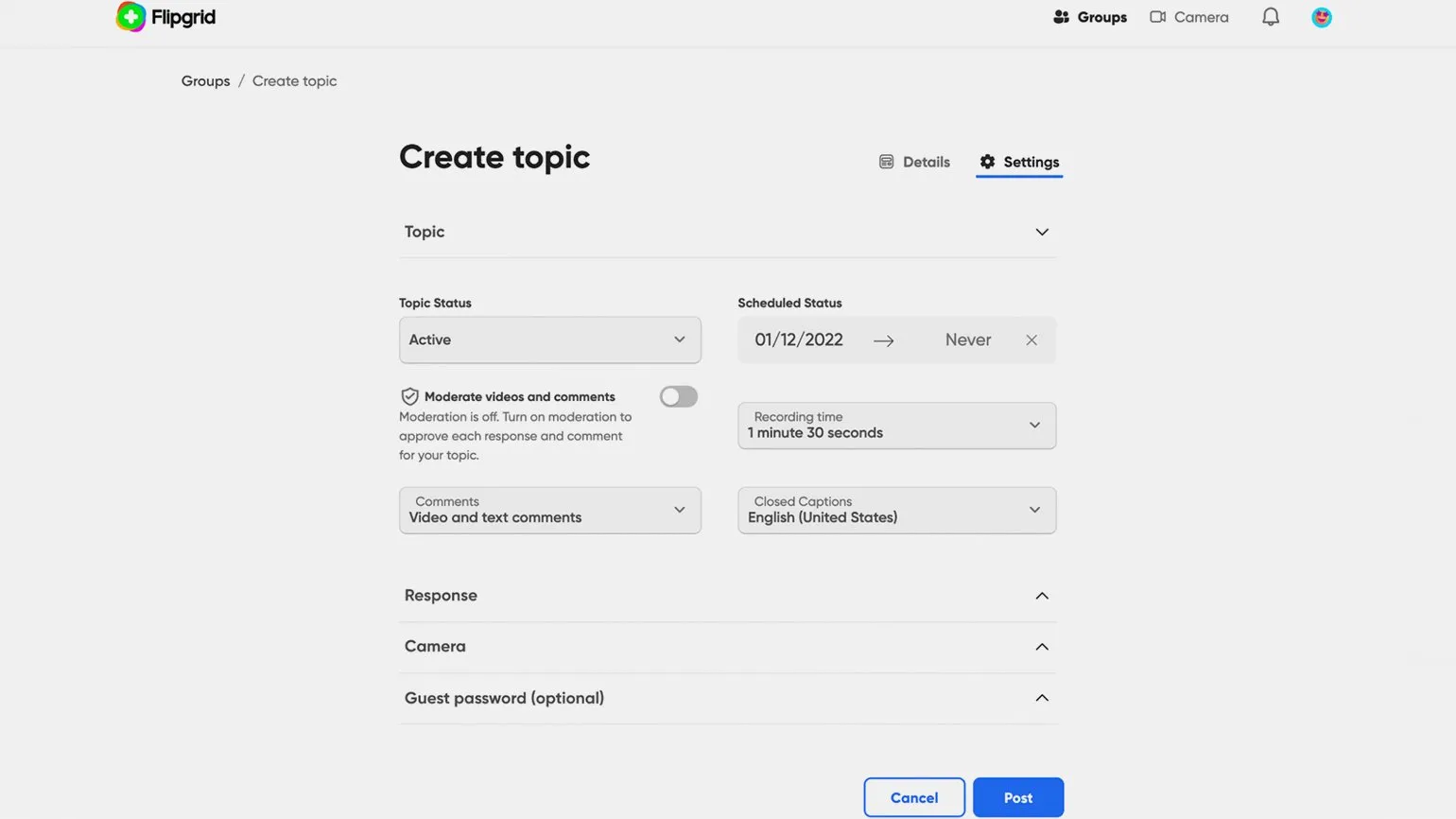
The "Moderate videos and comments" toggle allows you to control the publication of replies and comments under your posts. Comments will only appear after your approval. By default, moderation is disabled. You can choose the format of allowed comments, allowing participants to leave text and video comments, video only, or text only. You can also disable comments entirely. This will help you maintain high-quality interaction with your audience.
The "Closed Captions" feature allows you to activate automatic captions for all new videos in this category. Russian language support is also available, making the content more accessible to a wider audience.
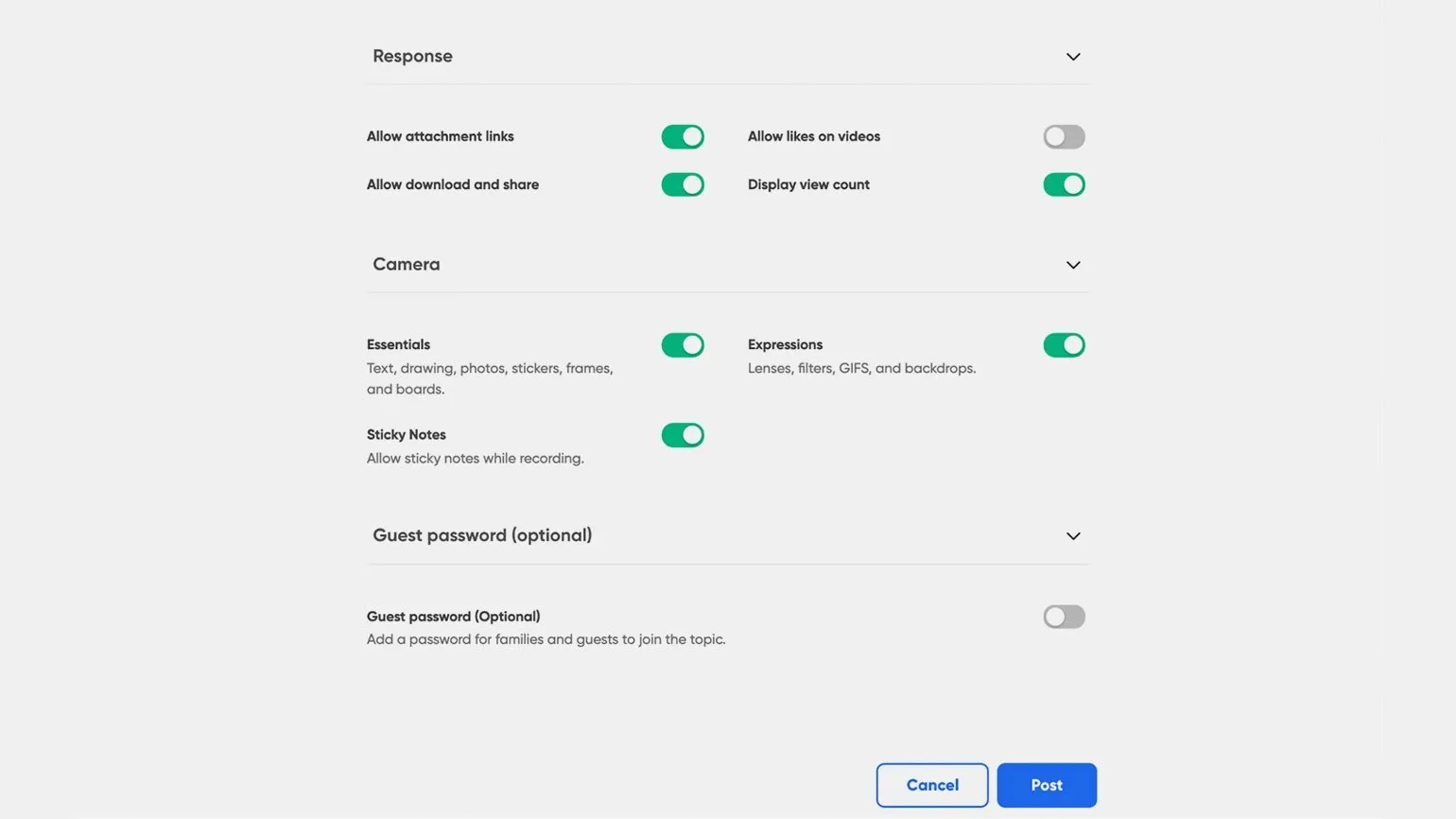
In the Response subsection, you can customize participants' responses and add comments to them. This improves user interaction and enhances the quality of discussions. Customizing responses allows you to control how participants communicate with each other and allows moderators to monitor discussions. Convenient comment customization tools will help create a more structured and informative conversation, which in turn will positively impact participant engagement and activity.
- Allow attachment links — allows or prohibits participants from attaching links to published videos.
- Allow likes on videos — enables or prohibits liking under videos. No one will see which user specifically liked it, in any case.
- Allow download and share — allows or prohibits users from downloading their own published videos.
- Display view count — shows participants the view counter under the video or hides this information.
The Camera section offers recording settings that allow users to choose the elements used in their videos. These settings provide the ability to customize content, which helps create more attractive and unique videos. Users can customize settings such as filters, effects, and other elements to improve the quality and visual appeal of their recordings.
- Essentials — text, drawings, photos, frames.
- Expressions — filters, backgrounds, gifs, various camera effects.
- Sticky Notes — virtual stickers for notes that will appear on the screen during recording, but will disappear from the finished video.
The last item is the guest password feature. If you want to give people outside the participants group access to your post, activate this switch. Then create a password and share it with guests. They will not need to register with Google or Microsoft to access your content. This simplifies the process of inviting new users and makes your post more accessible to a wider audience.
All created topics are displayed in the Topics tab. The pencil icon, similar to the one used in the groups tab, opens the topic settings window. By clicking the three dots on the right, you can copy a topic, move it to another group, delete it, record a reply, export statistics to a spreadsheet, or publish the topic to the Discovery community. We'll talk about the community later, but for now, let's take a closer look at Flipgrid's key feature.
Video recording is available at every step of the process. You can create a video by clicking the "Camera" button in the upper right corner, and then add the resulting video to any topic as a reply. The three-dot menu in the tab where all topics are located also provides the option to record a video. Additionally, by opening any reply, you can publish a video as a comment, if this is allowed in the post settings. This approach significantly enriches user interaction and allows for more visual sharing of opinions.
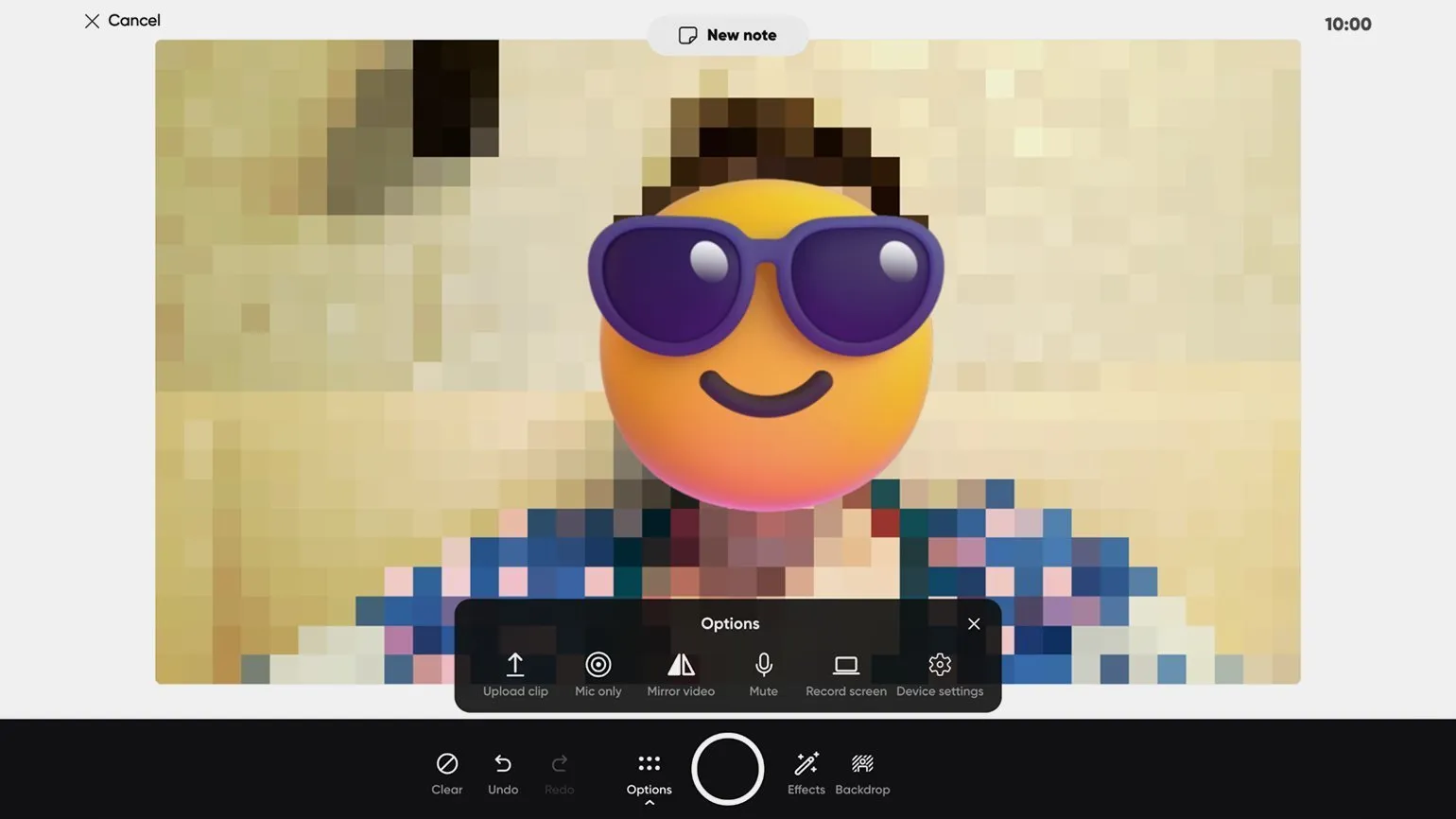
The camera is easy to use and highly functional. Basic video settings can be found under the Options button, where you can choose to upload a finished video, mirror the image, record audio or video only, and even record your screen. The Backdrop button opens a selection of background images, allowing you to customize the visual style of your recording. The Effects section offers a variety of filters, stickers, GIFs, and frames, allowing for creative experimentation. You can also activate a virtual whiteboard here, which allows you to write and draw while recording, which greatly expands your content creation capabilities.
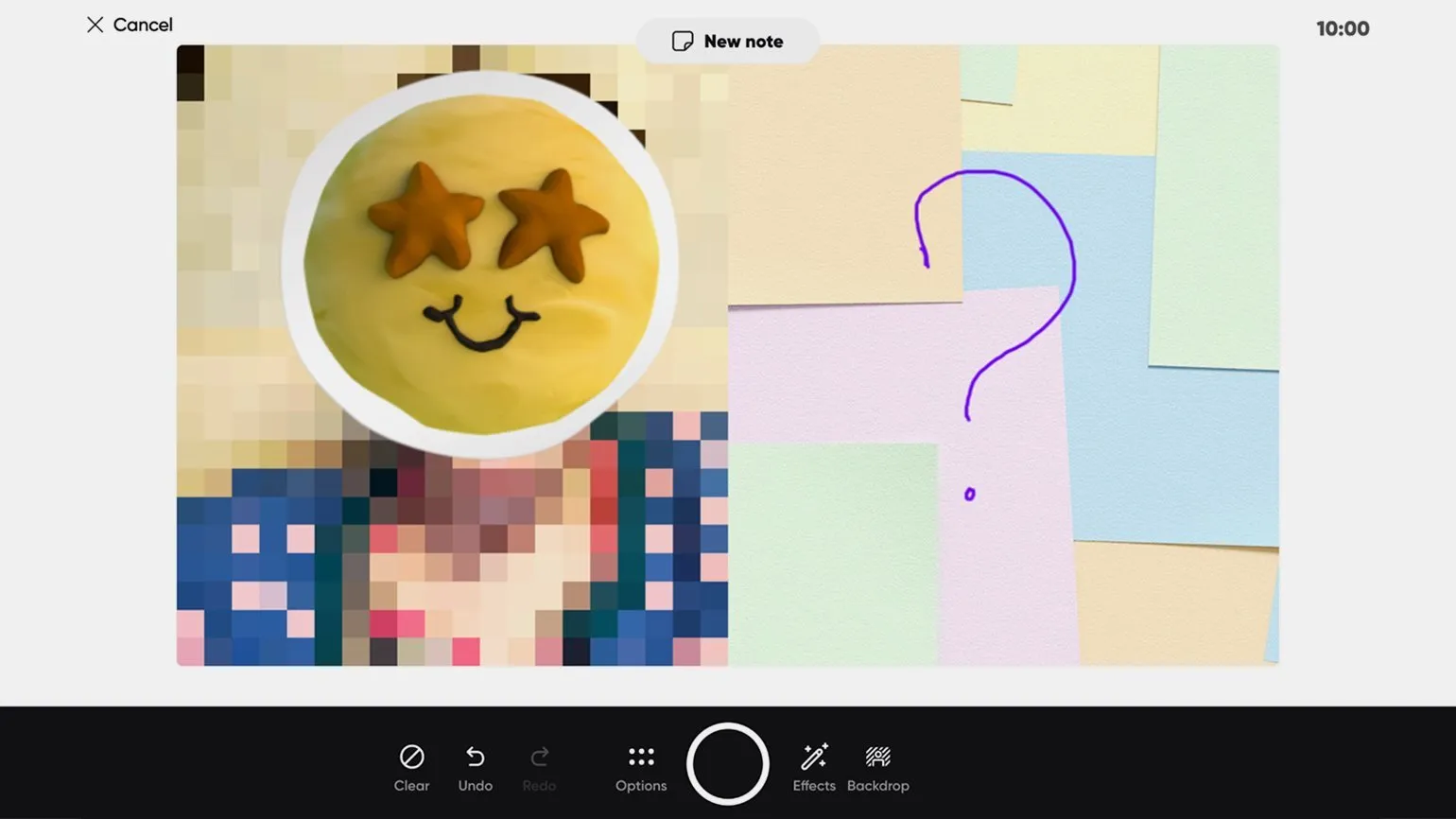
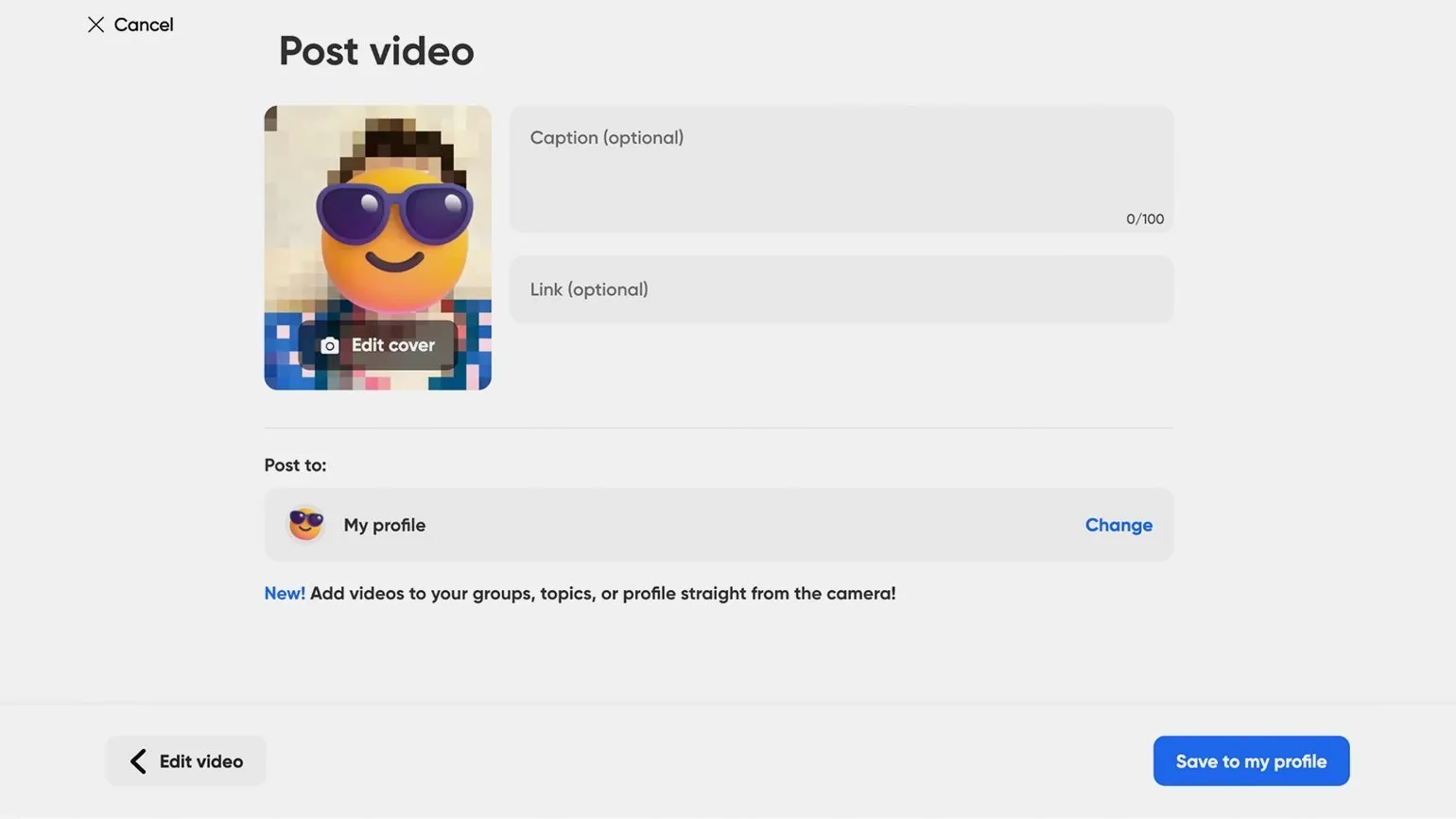
At the top of the screen The "New Note" button is a handy mini-notepad for taking notes. Here, you can quickly jot down an outline of your presentation. Importantly, these notes won't be included in the main recording, allowing you to focus on preparation without the risk of accidentally revealing personal information. After creating a video on the Flipgrid platform, users can add music and make any necessary edits, including shortening and adding new elements. When the final video fully meets the requirements, it can be supplemented with a description and a link, for example, to a presentation, after which the finished material should be published.
To access the knowledge base and inspiration, click on your profile picture in the upper right corner and select Discovery. This database, regularly updated by creative teachers, is primarily in English. Here you'll find a wide selection of topics for discussion with students, as well as ready-made lessons. All materials are organized by subject and target audience, including groups from preschoolers to adults. Use the search bar to quickly find content on the topic you're interested in.
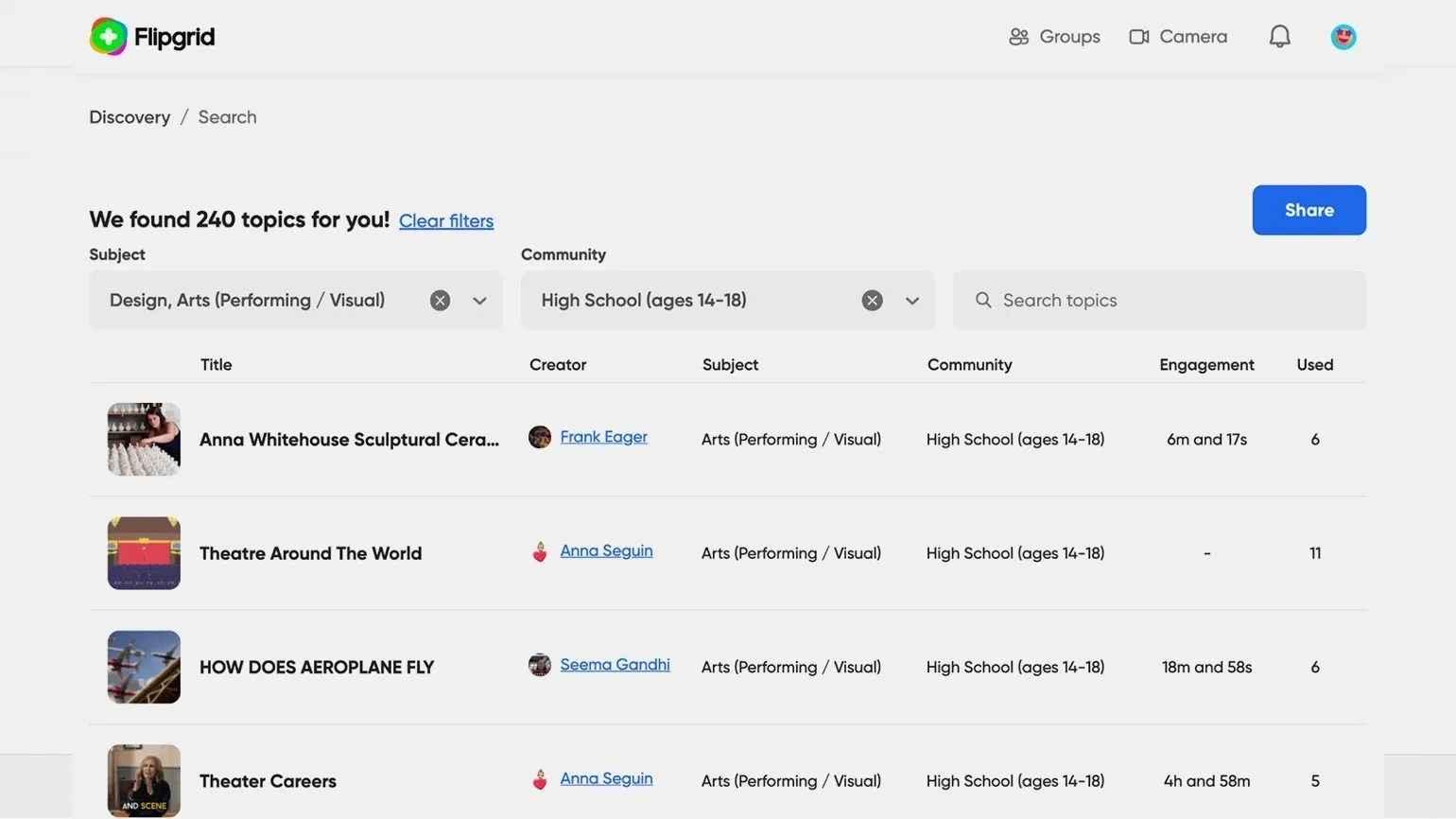
If you've found suitable material and want to add it to your group, just Click on its name, then on the “+ Add Topic” button and select the desired group from the list. This simple process will allow you to easily organize content and improve interaction in your group.
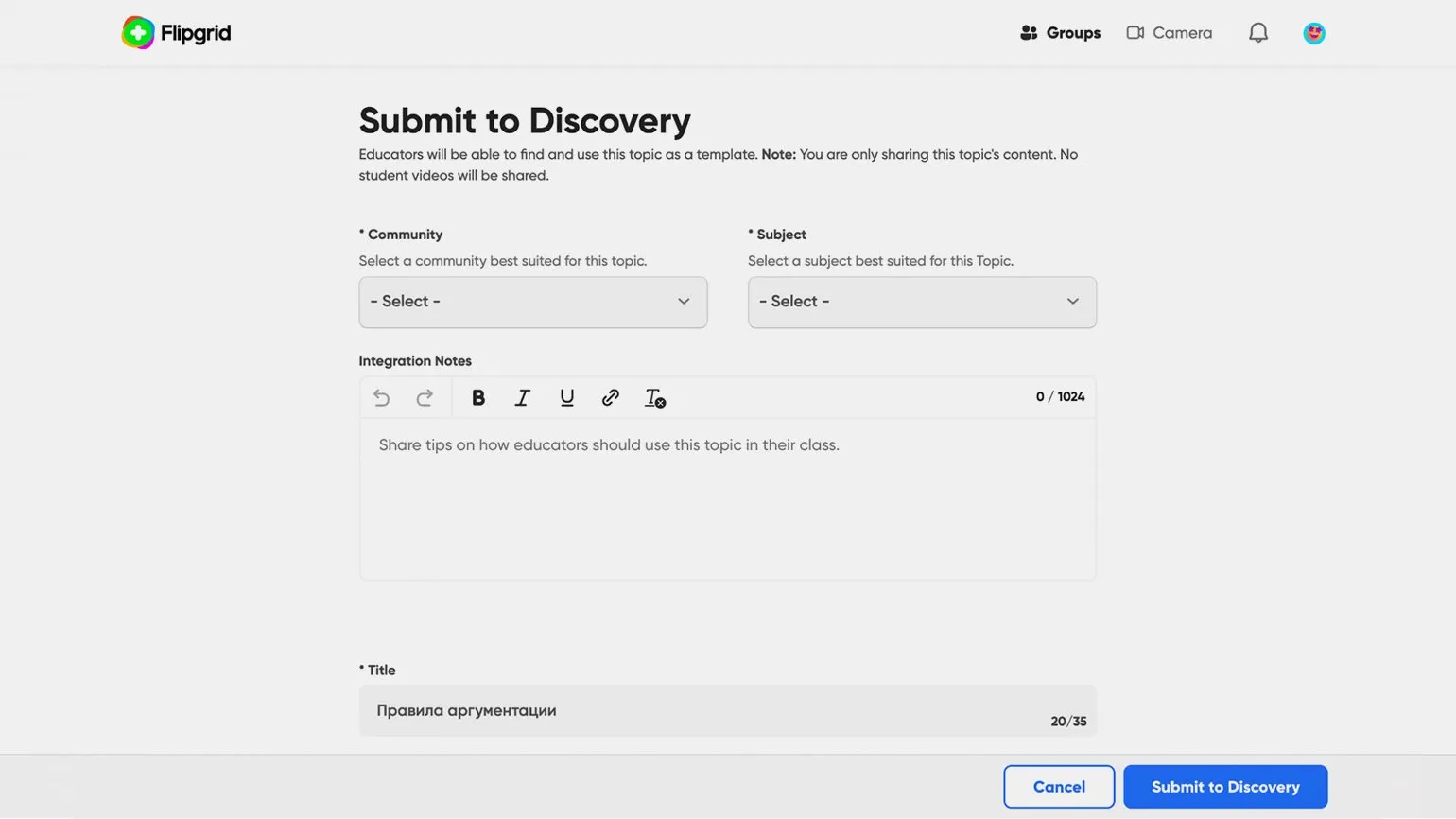
The community provides the opportunity to share its content. To do this, open the topic list, click the three dots to access the action menu for the selected topic, and select "Submit to Discovery." In this section, you should specify the appropriate category and target audience, as well as add recommendations for using your material. After moderators review your content, it will be added to the general database.
Reading is an important aspect of our lives, contributing to the development of thinking and broadening our horizons. Regularly reading books, articles, and scientific materials helps improve vocabulary, increase knowledge, and develop critical thinking. It's important to choose a variety of genres and topics for reading to enrich your understanding of the world. Don't forget the importance of reading for personal and professional growth. It's not only useful but also engaging. Read and discover new horizons.
- How the Notion app is useful for teachers, educators, and methodologists
- How SpatialChat brings online communication with students closer to real life
- 9 services that will help create an engaging online course
- 6 useful resources in English for educational designers
- 12 tools for educational online events
Online Tutor
It doesn't matter what you teach—English, CrossFit, yoga, vocals, or culinary arts. Everything you previously taught in schools, studios, and offices can now be taught online. Promote your knowledge and skills and earn money from anywhere in the world.
Find out more