
Contents:
- Bitrix24 Service Overview: What It Is and How It Works
- Bitrix24 Platform Features: Everything You Need for Business
- Efficient Sales Management Using the Deals Tool
- Efficient Product and Inventory Management in Bitrix24
- How to Effectively Use Bitrix24 to Analyze Your Customers
- Efficient Document and Invoice Creation in Bitrix24
- How to Effectively Evaluate Sales and Employee Performance
- Benefits of Using Bitrix24 for Business
- Disadvantages of the Bitrix24 Platform: User Opinions
- Key Aspects of the Bitrix24 Service

Test: Find out your digital profession in 15 minutes!
Find out moreOverview of the Bitrix24 service: what it is and how it works
"Bitrix24" is Bitrix24 is an effective platform designed to optimize business processes and increase team productivity. Available in both a web version and a mobile app, it supports Windows and macOS operating systems. Since its launch in 2012, the service has become popular among entrepreneurs due to its wide range of features. Bitrix24 includes project management, CRM, collaboration, and communication tools, making it an ideal solution for companies of any size seeking to improve their efficiency and organization. Bitrix24 users can effectively manage tasks and projects, organize video conferences, and monitor sales. The platform also offers tools for creating online stores and websites using a user-friendly builder. In addition, Bitrix24 supports inventory control and provides the ability to analyze website performance indicators, which allows you to optimize business processes and increase productivity.
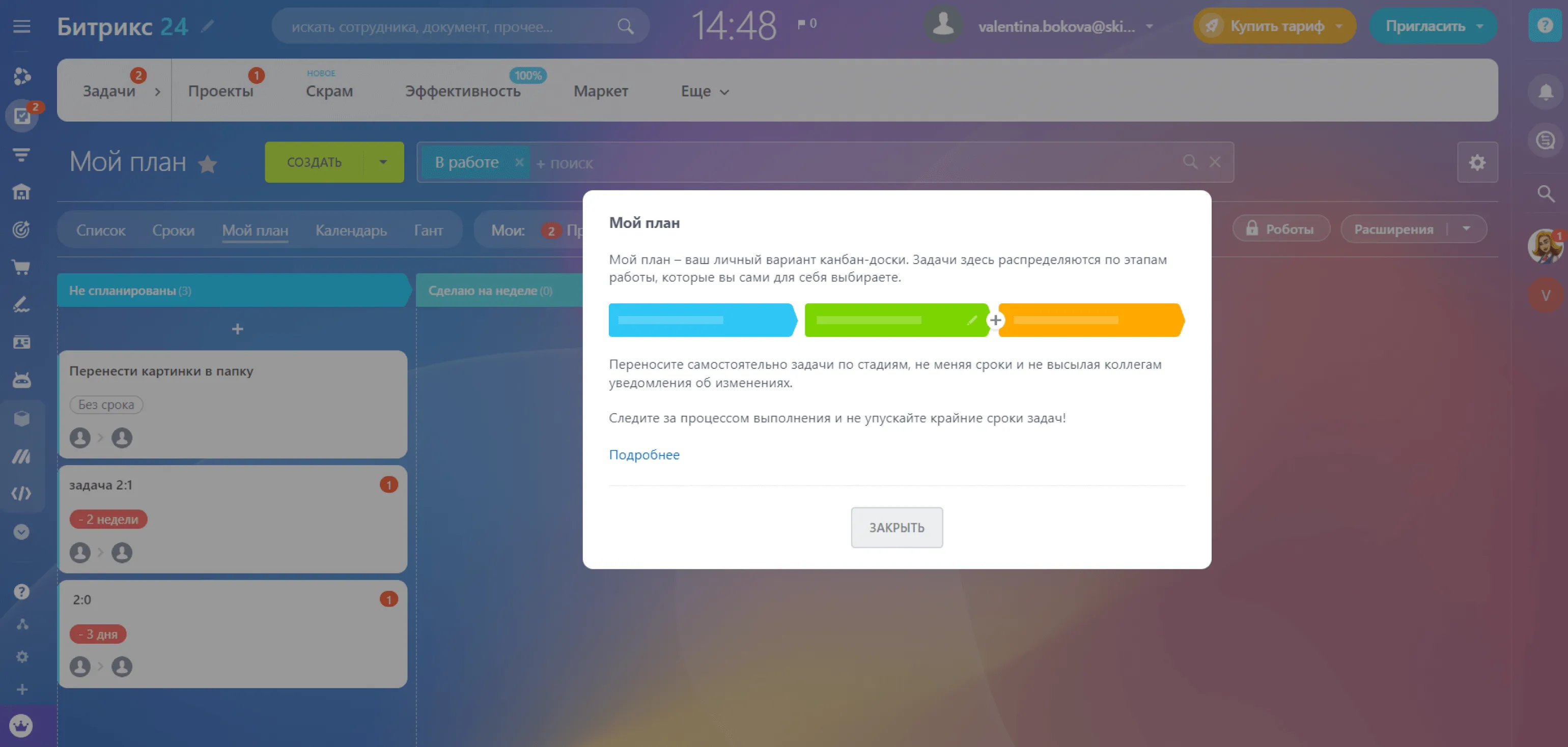
The service is ideal for both small teams of 2-3 people and large organizations, including online stores, digital agencies, online retailers, and mobile operators. It provides an effective solution for project management and communication at various scales, allowing you to optimize workflows and increase productivity.
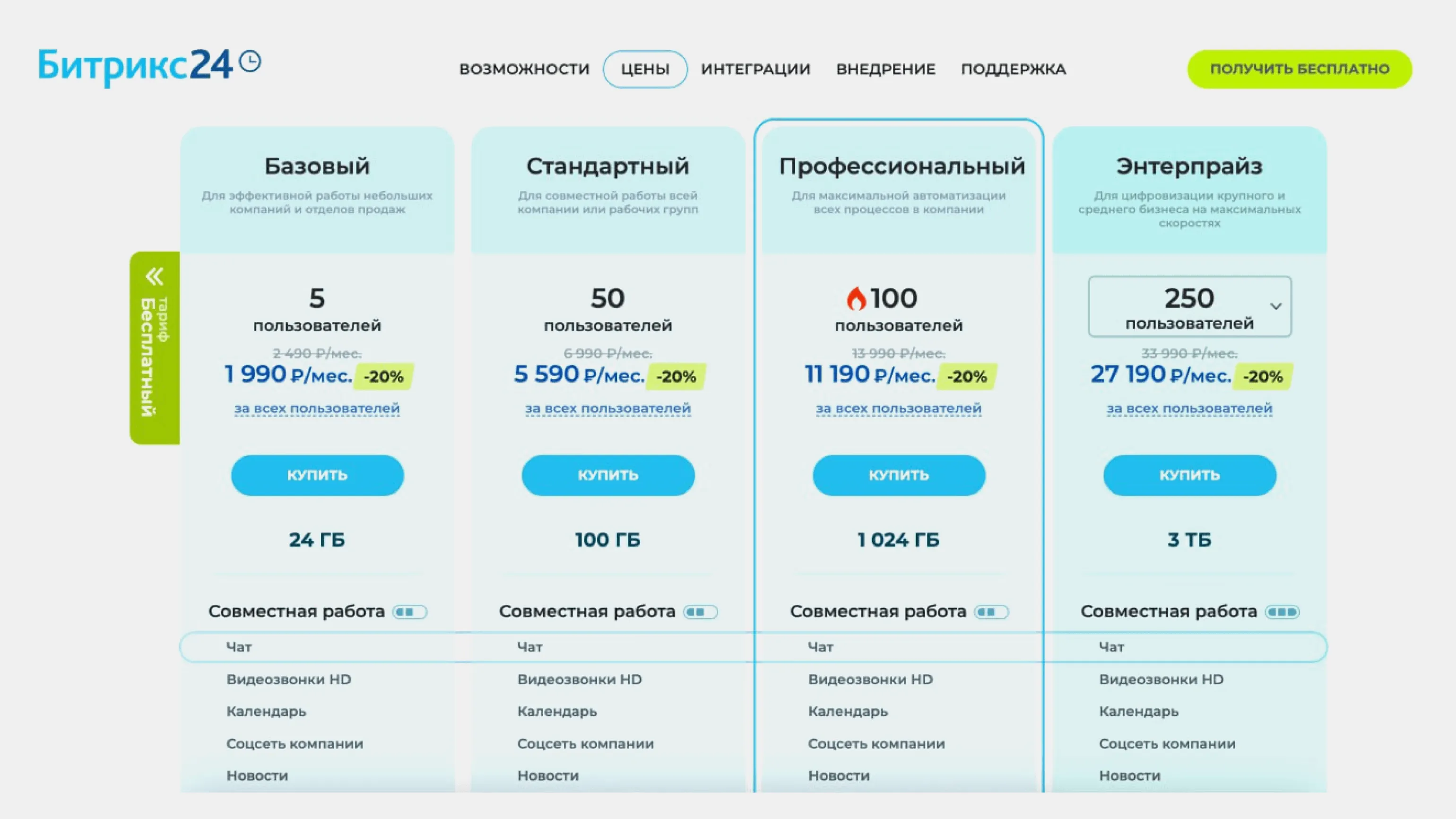
Bitrix24 offers a variety of pricing plans to suit different business needs. The Basic plan is available for 2,490 rubles per month, the Standard plan costs 6,990 rubles, and the Professional plan costs 13,990 rubles. Large organizations can choose from the special Enterprise plan, which costs 33,990 rubles per month. Choosing the right plan will help optimize your workflows and increase your team's efficiency.
Each Bitrix24 plan has its own limitations on the number of users and available features. More expensive plans offer advanced capabilities, allowing customers to choose the most suitable option based on their needs. Furthermore, Bitrix24 regularly runs promotions, offering new plans with significant discounts. For example, in October 2023, a 20% discount was available for new users, making the transition to the platform even more attractive. The choice of plan depends on the scale of your business and the features you desire, so it's important to carefully evaluate all offers.
For users who want to evaluate all the features before purchasing, a 15-day trial of the "Professional" plan is available. This is an excellent opportunity to familiarize yourself with the benefits of the service and make an informed decision about purchasing it.
Registering on our service is very simple. You need to enter your email address, after which the system will automatically generate a unique access link. After completing the registration process, you will gain access to your personal account, where you can take advantage of all the platform's features. Start using our service today for maximum efficiency and convenience.
Bitrix24 platform features: everything you need for business
The Bitrix24 platform is a powerful tool for integrating business processes in a single workspace. It ensures effective management of the company, personnel, and sales, offering all the necessary tools in a single personal account. Using Bitrix24 allows you to optimize work processes, increase employee productivity, and improve interaction between departments. The platform combines CRM, project management, and communication functions, making it the ideal solution for businesses of any size.
Effective communication between employees is key to a company's success. The Bitrix24 platform offers a wide range of tools to improve team collaboration. The system's integrated corporate messengers, phone services, and email tools allow employees to conveniently communicate, exchange messages, and organize workflows. Chats ensure quick interaction, and a cloud drive allows for storing and sharing documents, simplifying collaboration and increasing productivity. Using these tools helps create a more cohesive and effective team.
Each user can customize their workspace to suit their needs. The interface can be presented in a Kanban board format, facilitating the visualization of tasks and processes. A calendar for planning work time is also available, allowing you to allocate slots for specific tasks. Other useful features are also available to improve work efficiency and help organize processes more conveniently.
All collaboration tools are gathered in the "Collaboration" section. This section significantly simplifies interaction between team members, allowing for the effective exchange of ideas and resources. With a user-friendly interface and a variety of features, your team can better coordinate efforts and achieve their goals.
Task setting and monitoring are highly organized. Tasks can be assigned to both individual employees and entire groups. This is especially convenient when working on multiple projects, as it allows you to create groups for each project and effectively track their progress. This approach promotes increased productivity and improved team collaboration, which in turn contributes to the successful implementation of projects and the achievement of goals.
Each project employee has a certain level of access to tasks. For example, a manager might have the "Responsible" status, which gives them full access to all aspects of the project, including the ability to make changes and create new tasks. An assignee assigned to a specific task receives the "Assignee" status and access only those materials necessary for their work. Proper assignment of roles and access levels facilitates effective project management and optimizes workflows.
The system offers the ability to create open and closed projects. Open projects are available to all employees, facilitating the exchange of ideas and collaboration. Closed projects, on the other hand, require a special invitation to participate, ensuring access control and information confidentiality.
Changes to projects are recorded in real time, significantly improving management oversight and enabling the rapid assessment of team performance. This approach promotes greater process transparency, allows for a quick response to emerging issues, and enables effective project management. Real-time change recording also enables more accurate analytics and planning, ultimately leading to improved work quality and increased team productivity.
All information on current projects and tasks is organized in a convenient "Tasks and Projects" section. Here, you can easily find up-to-date data, view the status, and track the progress of all your tasks. This section is designed to simplify project management and improve work efficiency. Bitrix24 provides high-quality logistics and warehouse management. The platform allows for simultaneous management of all warehouses, allowing you to create necessary documents, track the receipt and shipment of goods, and identify defects and losses. This ensures effective inventory control and helps optimize logistics processes, which, in turn, positively impacts the overall level of customer service. Using Bitrix24 in warehouse management helps reduce order processing time and improve business efficiency. The Warehouse Accounting section consists of the Receipt, Sales, Movement, and Write-off subsections, providing convenient access to product information. The Sales subsection displays sales records, including product descriptions, prices, and customer information. This helps warehouse workers improve their efficiency when processing deliveries and managing inventory. Using this section helps optimize warehouse accounting processes and improve overall control over product movement.
The Bitrix24 platform offers extensive marketing capabilities. It allows you to effectively create newsletters and launch advertising campaigns. Bitrix24 also allows you to collect and manage customer contacts, which facilitates the successful promotion of products and services. Using these tools, companies can improve their marketing strategies and increase customer engagement.
The service offers the ability to send newsletters via email, social media, and SMS, and also provides a phone call function. Ready-made newsletter templates save significant time, and the ability to segment audiences increases customer engagement. Using our service, you can effectively manage communication with your audience and improve the results of your marketing campaigns.
Detailed reports are available that allow you to effectively track the results of newsletters and advertising campaigns. These reports will help you analyze key metrics and optimize strategies for better results.
The "Marketing" section provides the ability to customize employee access. This allows managers to fully manage advertising activities, while performers can limit themselves to creating and sending newsletters. This approach ensures the effective distribution of roles and responsibilities in the marketing process, which contributes to more coordinated teamwork and increases the effectiveness of advertising campaigns.

Creating and managing a website or online store in Bitrix24 is a simple and intuitive process. Thanks to convenient templates and a powerful builder, users can quickly develop a site fully responsive for iOS and Android mobile devices. This ensures convenient access to your content and services from any device, significantly increasing your chances of attracting new customers and improving the user experience. Using Bitrix24, you get not only development tools but also the ability to effectively manage your online business.
The site will be equipped with built-in tools, including online chat, an application form, and a callback widget. Integrating additional features, such as social media buttons and Google Analytics, will require some configuration.
The platform offers over a thousand ready-made templates for creating a variety of websites. Our range includes solutions for news resources, construction companies, and veterinary services. All templates are designed with modern trends in mind and allow you to quickly and easily launch your project online.
Tools for managing your website are available in the "Websites and Stores" section of the sidebar of your personal account. Here you will find all the necessary functions for effective website administration, including content setup and management, as well as tools for performance analysis and optimization.
Bitrix24 provides functionality for maintaining customer and partner profiles, significantly simplifying relationship management. The system accumulates data on all orders, as well as basic information about each client, including company name, address, and contact information. This allows for quick access to important information and improves customer service. Using Bitrix24 to store and analyze customer data helps improve the efficiency of business processes and strengthen business relationships.
A key function of the system is customer journey tracking. Data on customer interactions is automatically collected from the end-to-end analytics system, providing a complete picture of interactions. This allows businesses to better understand customer needs and optimize marketing strategies to improve sales efficiency.
All information is concentrated in the "Companies" section, providing convenient access for employees.
Business process automation is a key feature of the Bitrix24 system. This platform allows you to effectively configure automated processes for routine tasks. For example, when a task status is changed to "Completed," an invoice is automatically created and sent to the client. This significantly simplifies the work of employees and allows them to focus on more important aspects of the business, increasing overall productivity. Automation in Bitrix24 helps optimize workflows and improve customer interactions.
The system provides ready-made templates with pre-configured action chains. For example, when a payment is made, the transaction status is automatically updated to "Paid." This simplifies process management and increases work efficiency.
Choosing a suitable template allows you to set a trigger for process automation, which significantly improves employee efficiency. For example, when an incoming call is received, the client's card opens automatically, eliminating the need to manually search for information. This not only saves time but also improves customer service, allowing employees to focus on more important tasks. Process automation using triggers is becoming an essential tool for streamlining workflows and increasing productivity. The Bitrix24 system offers a variety of tools for effective sales management. In this article, we will take a detailed look at key features such as Deals, Products and Warehouses, Clients, Sales, and Analytics. These tools will help optimize sales processes, improve product inventory, manage customer bases, and conduct in-depth analysis of results. By leveraging the capabilities of Bitrix24, companies can significantly improve their efficiency and increase sales. Effective Sales Management Using the Deals Tool The Deals tool is a key element for effective sales management. This section provides information about the request receipt date, client details, deal amount, and invoice. This simplifies not only the monitoring of ongoing projects but also the preparation of necessary documents and invoicing. Using this tool promotes greater transparency and organization of sales processes, which in turn leads to increased efficiency for your team.
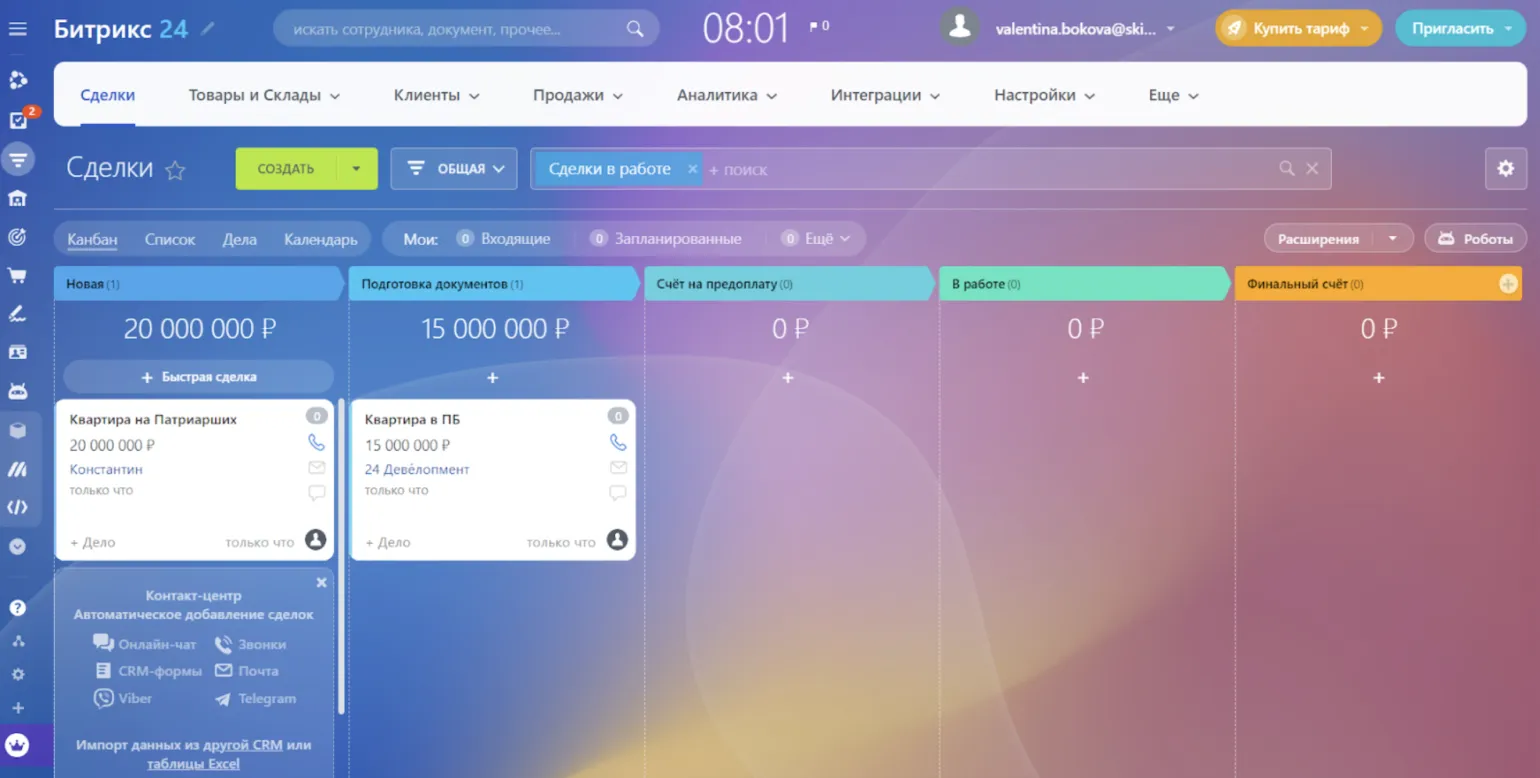
Deals can be viewed in two formats: a Kanban board and a list. The Kanban board provides a quick assessment of the current sales status, allowing you to instantly see progress at each stage. The list format, however, allows you to analyze details of a specific employee's deals or review company orders as a whole. The choice between these two formats depends on the user's needs and the objectives of the analysis.
Sales process automation is an essential tool for improving business efficiency. With automation, you can set up automatic reminders to customers about upcoming payments, as well as notifications to employees about unclosed deals. This significantly saves time and effort, allowing your team to focus on more important tasks. Implementing such solutions helps improve communication with customers and optimize workflows. Using sales automation tools can boost sales and improve customer satisfaction, which ultimately positively impacts your business's profitability.
To automatically transfer deals to your CRM from various external sources, you need to set up integrations with email services, messaging apps like Telegram and Viber, and online chats. Importing data from Excel or Google Sheets is also an important feature, simplifying and speeding up the process of uploading information to the system. Setting up these integrations will enable more efficient deal management and allow your team to focus on business growth.
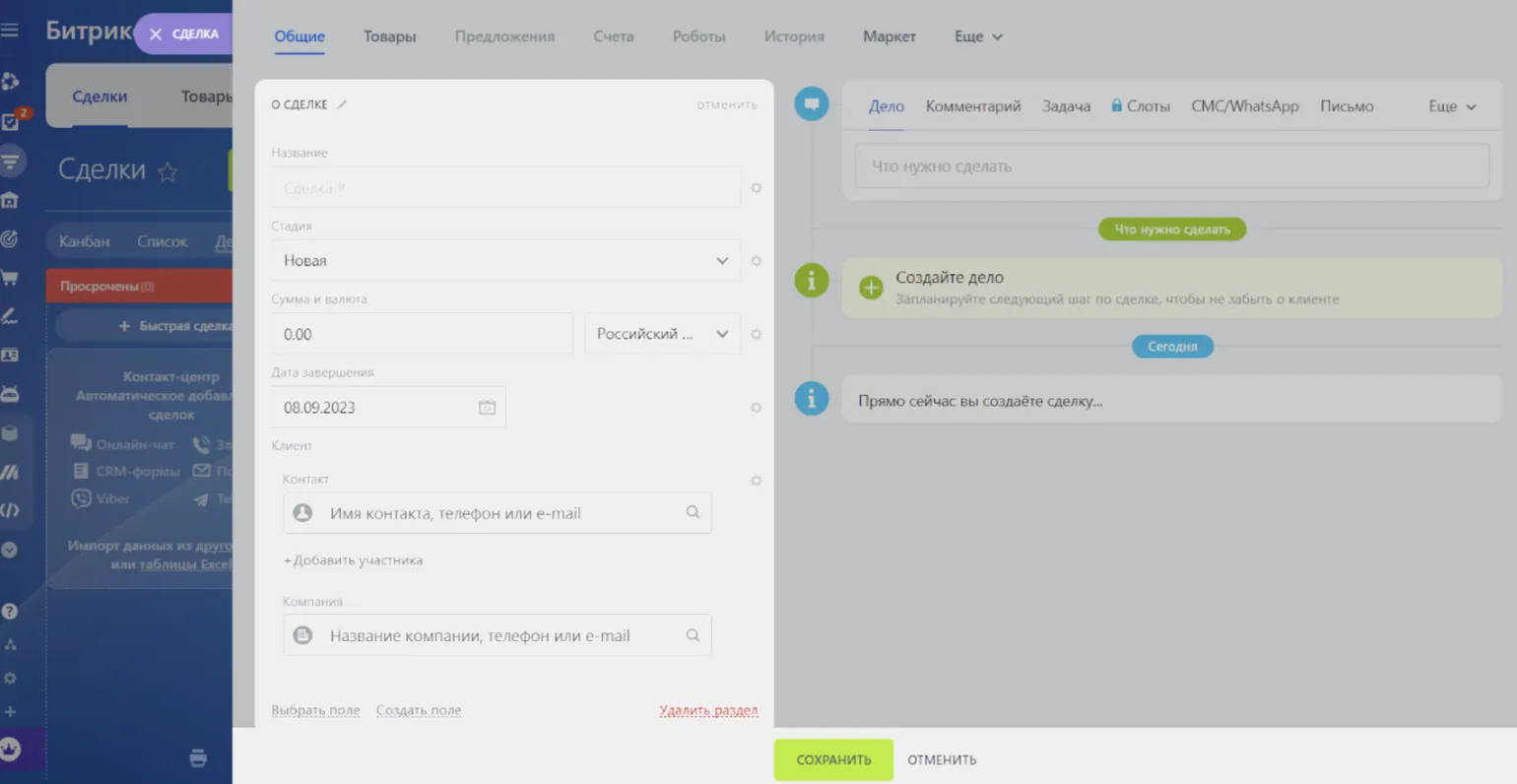
To create a new request, click the "Create" button and fill out the form. Specify the transaction name, status, amount, completion date, and buyer contact information. This approach will help keep information up-to-date and quickly respond to changes. Correctly filling out all form fields will ensure effective application management and improve the quality of customer service.
Efficient Product and Inventory Management in Bitrix24
The Bitrix24 system features a specialized "Products and Warehouses" module, which provides comprehensive information on product inventory. Users can effectively track the quantity of products, their characteristics, receipt dates, as well as information about suppliers and customers. The module includes two key sections: "Product Catalog," which displays all available products with their descriptions and characteristics, and "Warehouse Accounting," which allows you to manage inventory, monitor product movement, and optimize storage processes. Using this module improves product management and increases the overall efficiency of business processes.
The "Product Catalog" section is a critical tool for managers, providing the ability to analyze product inventory in the warehouse and identify products with excess stock. This analysis allows you to assess product popularity and determine which products are in greatest demand, which plays a key role in optimizing inventory management. Effective use of a product catalog helps reduce costs, improve customer service, and enhance overall business performance. An updated and structured catalog also facilitates better market understanding and allows for rapid response to changing consumer preferences.
The "Warehouse Accounting" tab allows you to perform key warehouse operations, including receipt, acceptance, transfer of goods between warehouses, inventory, write-off, and sales. Users can create warehouse documents and add seals directly within the program interface, significantly simplifying the accounting process and making it more efficient. Optimized accounting improves data accuracy and improves inventory management.
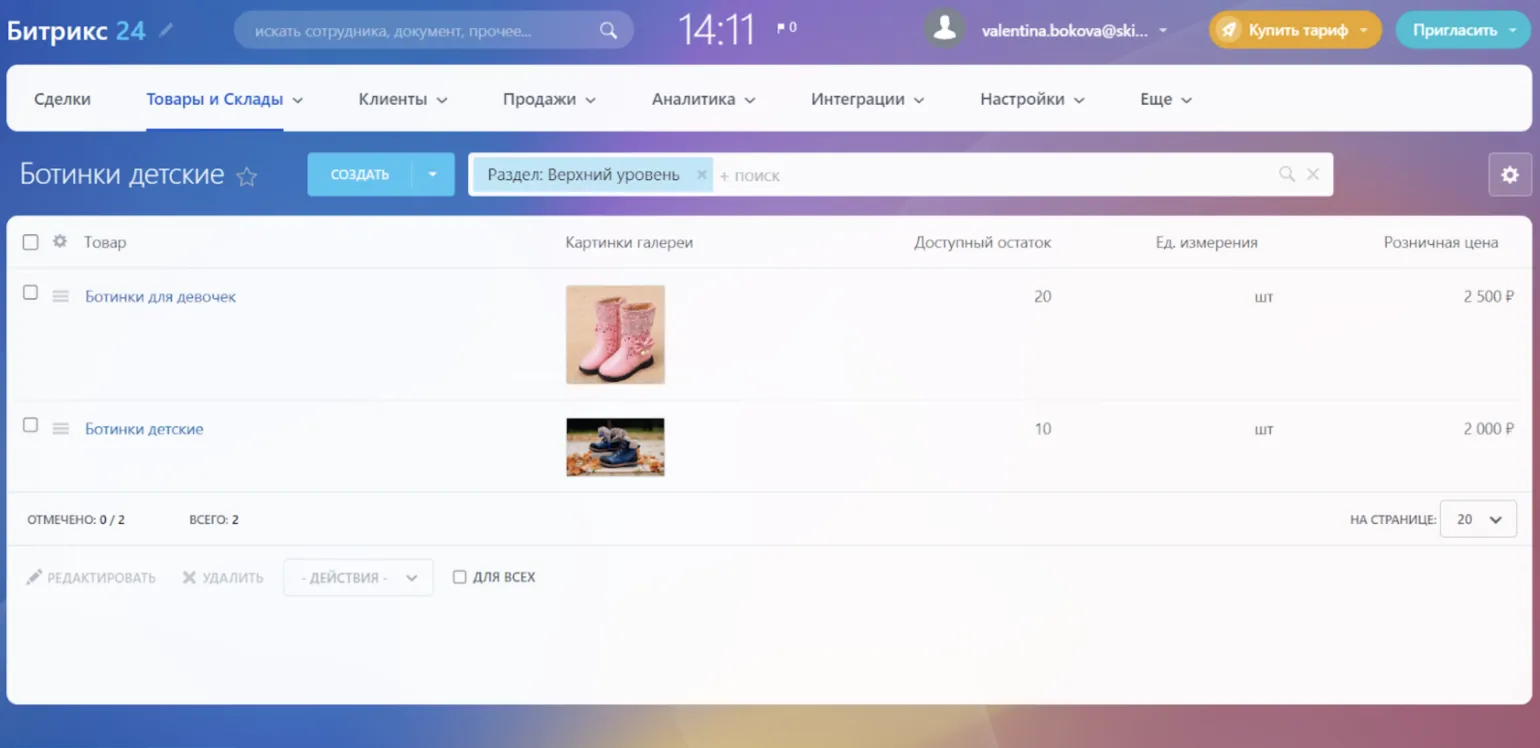
To add a new product to the system, click the "Create" button and fill out the form, specifying all the necessary information, such as specifications, price, and stock quantity. The process is simplified by the ability to upload a product photo and specify a barcode, which makes inventory management more convenient and efficient.
How to Effectively Use Bitrix24 to Analyze Your Clients
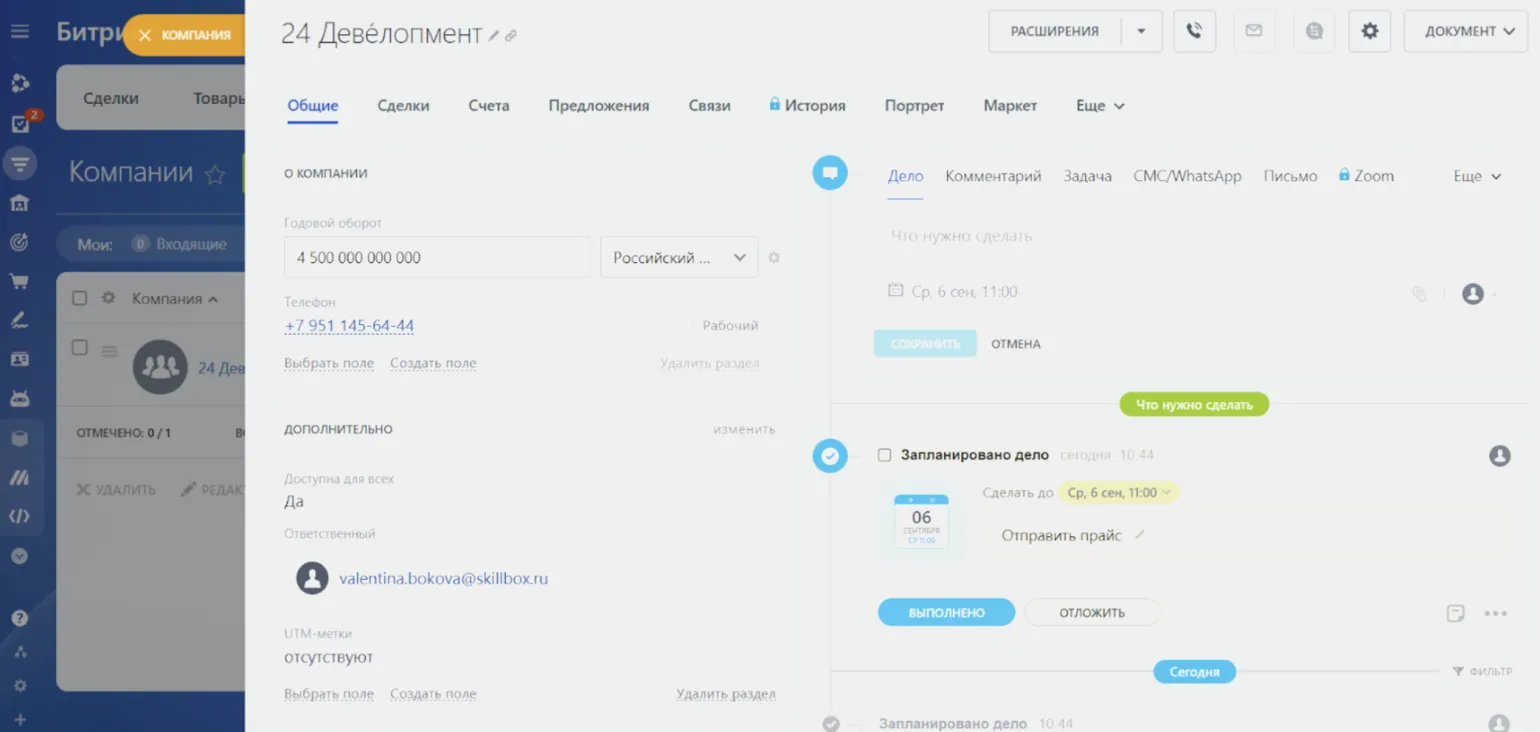
The "Clients" section in Bitrix24 offers a comprehensive overview of your clients and partners. Information about individuals is available in the "Contacts" tab, while data about legal entities can be found in the "Companies" section. This structure allows you to conveniently organize and centralize all the necessary information, improving the efficiency of working with clients and enhancing the quality of service. Using the Bitrix24 system helps optimize interactions with clients and partners, which contributes to business growth.
Client cards contain basic data, including name, contact numbers, messengers, and comments. Companies also have access to additional information, such as annual turnover and transaction statistics. This data allows for a more in-depth analysis of financial relationships with business partners and informed decision-making.
Regularly updating customer profiles significantly improves understanding of their needs and helps create a detailed profile of the target audience. Based on the collected information, personalized loyalty programs can be developed, allowing for tailoring communications strategies and offers to each customer segment. This not only increases customer satisfaction but also improves the effectiveness of marketing campaigns, which in turn contributes to sales growth and brand strengthening in the market.
Efficient Document and Invoice Creation in Bitrix24
The Bitrix24 customer relationship management (CRM) system provides effective tools for automating the creation of documents such as invoices and commercial proposals. Users can take advantage of ready-made templates located in the CRM "Sales" section. This solution significantly simplifies workflows and saves time on document preparation. Through integration with other system functions, Bitrix24 helps optimize customer interactions and improves overall business productivity.
Automatic filling of details significantly minimizes the likelihood of errors and speeds up the document creation process. Invoices are generated based on pre-prepared templates, allowing for quick generation of the necessary documentation. After creating an invoice, it can be easily printed or sent to the client in PDF or DOCX format. This functionality is especially useful for businesses where prompt document processing and maintaining a high level of customer service are essential. Integrating automation into workflows helps optimize time and resources, which positively impacts business efficiency.
Creating commercial proposals has become more efficient thanks to CRM integration. All necessary company and product information is automatically uploaded, saving time and reducing the likelihood of errors. Bitrix24 also offers the ability to set up automatic reminders for clients. If a client doesn't respond within a certain time, the system sends them a notification, and a task is created for the manager in their personal account for follow-up contact. This significantly increases the likelihood of successful completion of transactions and improves customer interactions.
How to effectively evaluate sales and employee performance
The Bitrix24 CRM system offers extensive capabilities for sales funnel analysis, manager performance monitoring, advertising campaign performance evaluation, and revenue forecasting. The key element of this system is the Analytics section, which allows users to gain a deeper understanding of current trends and optimize business processes. With the powerful Bitrix24 toolset, you can not only track performance indicators but also make informed decisions to increase the profitability of your business.
The Analytics section provides users with intuitive charts and graphs that allow you to filter data by various criteria. This tool allows you to analyze orders in detail, dividing them into categories such as deliveries and pickups. This simplifies the analysis process and helps identify key trends in the data, leading to more effective decision-making.
Our resource offers a full set of tools for in-depth business analysis, including sales tracking, manager performance evaluation, customer interaction, sales reports, inventory control, and call statistics. We offer end-to-end analytics that aggregates data on your online store's performance. Simply click on any value to access related elements. For example, by clicking "active leads," you'll see a complete list of contacts, significantly simplifying client management and improving your business's efficiency.
The "Sales" section provides detailed sales pipeline analysis, volume planning, and data comparisons for different periods. For example, you can compare January's sales volume for the current year with the same figures for January last year. This analysis helps identify trends, evaluate sales effectiveness, and adjust strategies for better results.
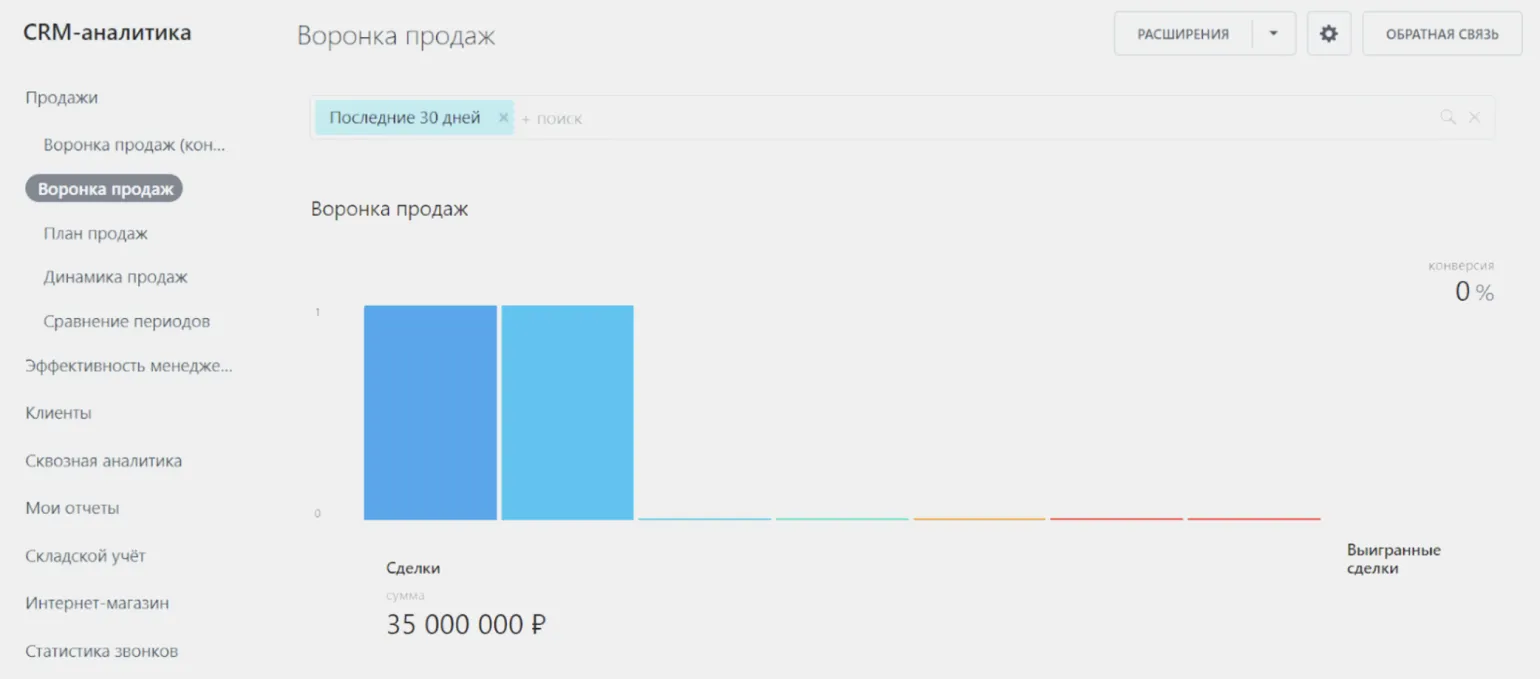
This tab provides information on deal conversion and manager performance indicators. Here you can find the number of planned deals, the current number of deals being processed, and the total number of closed deals. This data will help you evaluate your team's performance and identify potential areas for process improvement.
Analysis of data for the past 30 days, the current month, and the previous month allows you to quickly track sales dynamics. This approach allows you to identify trends and adjust business strategies in real time. Comparing indicators for the specified periods helps make informed decisions to optimize sales and improve business efficiency.
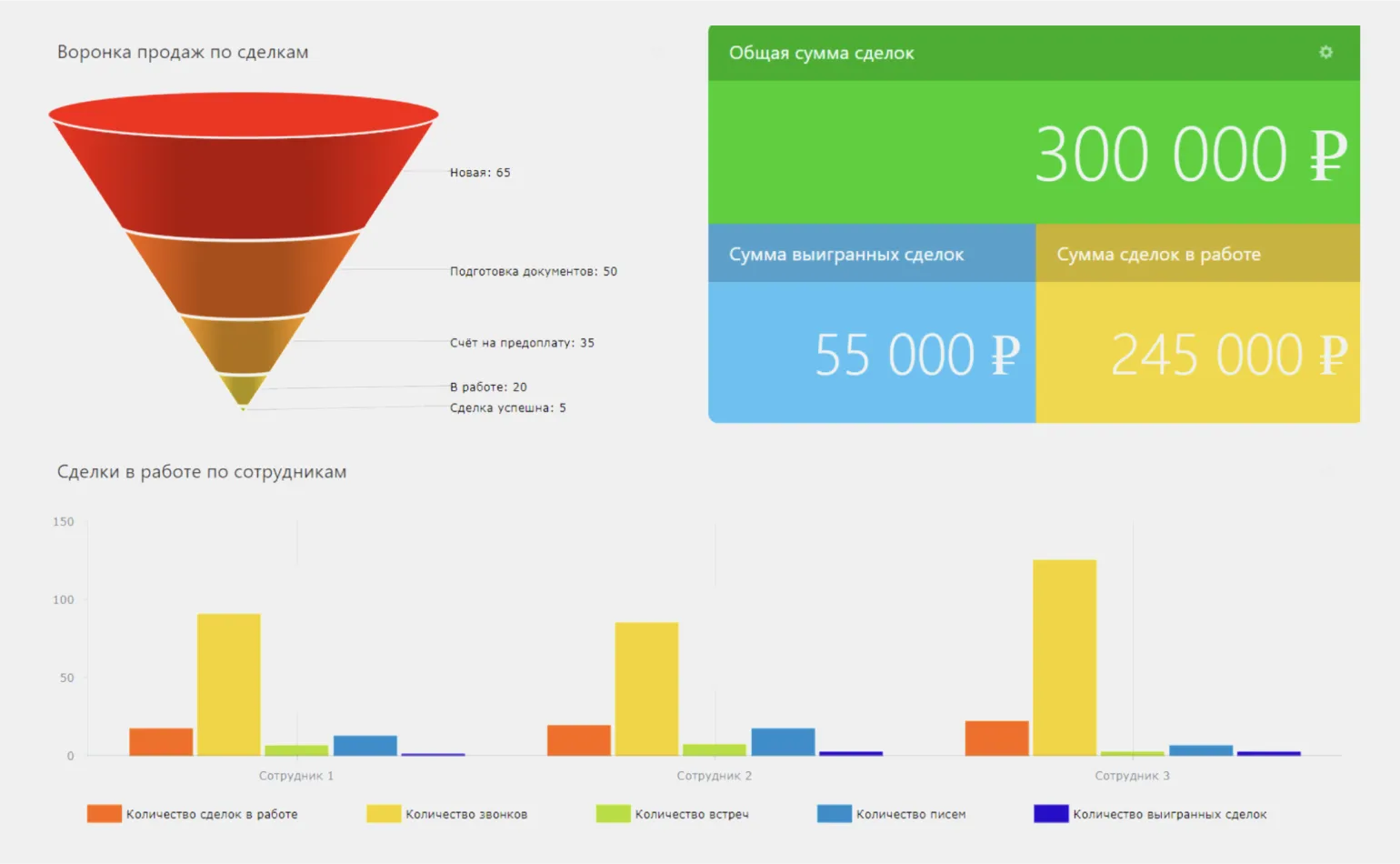
Manager performance analysis helps evaluate the performance of each employee. It includes key metrics such as the number of processed requests, processing speed, and the percentage of clients who converted into buyers. This allows you to identify the strengths and weaknesses of managers and optimize processes to improve the company's overall results.
The "Customers" tab contains data on clients and their financial rating, including purchase frequency and transaction volumes. This information allows you to assess the value of each client for the company, which facilitates more effective relationship management and improves service levels. Analyzing customer data helps identify trends and preferences, which in turn can lead to the optimization of marketing strategies and an increase in company revenue.
End-to-end analytics is a powerful tool for evaluating the effectiveness of advertising campaigns. It allows you to not only analyze advertising costs but also evaluate the sales volume achieved through these efforts. End-to-end analytics allows you to clearly see the impact of advertising traffic on sales, including the number of users attracted through advertising channels and the percentage of those users who made purchases. This allows businesses to more accurately plan marketing strategies and optimize budgets, increasing overall advertising ROI.
The "Reports" section allows you to visualize manager and sales data through presentations. However, it should be noted that these reports are not downloadable. Report generation is available for both the current month and quarter, allowing you to effectively analyze your work results and plan further steps.
Bitrix24 offers the ability to create reports using templates, but the selection of available templates is limited, and they don't always contain the required information. Furthermore, the customization options for these reports are also limited, complicating the integration of more complex systems. This can be a barrier for companies seeking more detailed and tailored reports to analyze their operations. To achieve maximum business efficiency, it's important to have flexible reporting tools that meet specific user requirements.
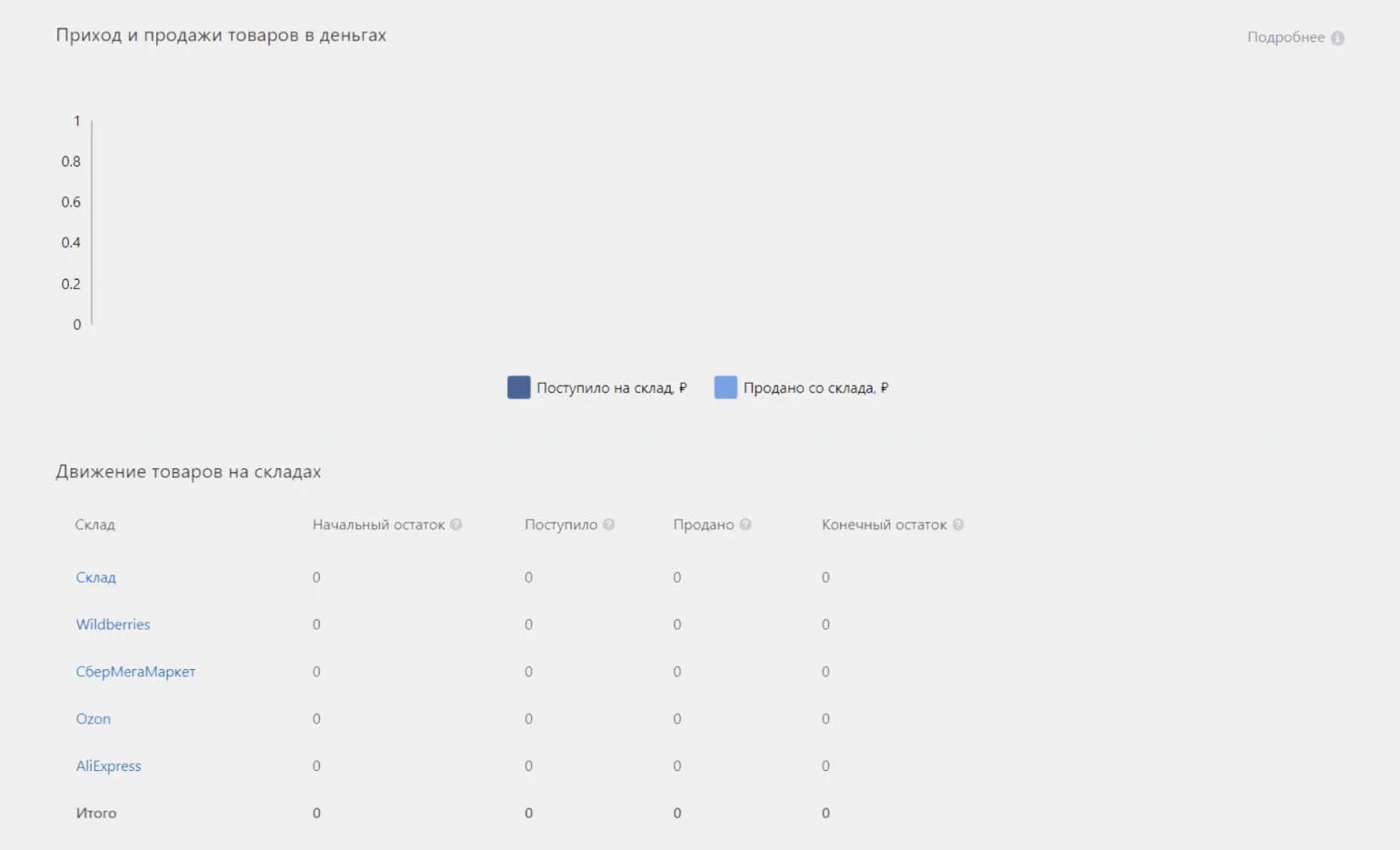
The "Warehouse Management" section provides detailed information on the movement of goods in warehouses. Here you can upload data on partner warehouses, including platforms such as Wildberries and Ozon, among others. This tool helps optimize inventory accounting and management processes, which contributes to increased business efficiency.
Marketplaces, considered separate warehouses, allow users to track product balances and manage their movements directly from the Bitrix24 system. This significantly simplifies inventory management processes and increases efficiency. With this integration, users can quickly respond to changes in product availability and optimize logistics.
During customer interactions, you can effectively search for products by their description and quickly complete transactions. For example, if a customer is interested in a "yellow vase with a floral pattern," the system will instantly provide information on the availability of this product and its quantity. This allows you to process orders without delays, improving customer interactions and raising the level of service.
Benefits of Using Bitrix24 for Business
Based on a survey of Bitrix24 users, we identified the main advantages of this service. Among them, it is worth noting flexibility, versatility, and a variety of certified integrators. These characteristics make Bitrix24 an ideal solution for business, allowing you to adapt the platform to the specific needs of a company and effectively integrate it with other tools.
Flexibility is a key characteristic of the Bitrix24 platform. It offers a variety of ready-made solutions, including document templates and sales chain management tools. The platform also allows for the easy integration of additional modules, ensuring its adaptation to the unique requirements of your business. This makes Bitrix24 the ideal choice for companies looking to optimize their processes and improve efficiency.
Bitrix24 offers a wide range of modules for creating websites, blogs, and forums with the necessary functionality. Users can develop their own modules and components, significantly increasing the platform's adaptability to specific needs. This approach ensures flexibility and scalability, making Bitrix24 the ideal solution for businesses of any size.
Natalia Esipenko, Director of Pravilnaya Novostroyka LLC, emphasizes: "Our platform offers ready-made solutions and modules that are easily integrated into a project. This makes it possible to adapt the system to unique business requirements."
Bitrix24 is a universal platform that covers a wide range of business management aspects. It not only optimizes sales processes but also effectively manages document flow and data analysis. Thanks to its multifunctionality, Bitrix24 is the ideal tool for automating various business processes, allowing companies to increase productivity and improve customer service.
Maxim Fedorov, brand producer and co-founder of the ENDY agency, shared his experience using the Bitrix24 platform: "We use Bitrix24 for everything: from sales and project management to client communication. We have also integrated accounting and financial planning." This experience highlights the system's versatility and its capabilities for comprehensive business management.
One of the key advantages of Bitrix24 is its wide selection of certified integrators. This ensures high-quality implementation and support of the service, which is especially important for companies focused on efficient and secure development. Bitrix24 partners have the necessary knowledge and experience to adapt the system to specific business processes, which helps improve productivity and optimize operations. Choosing a reliable integrator allows you to minimize risks and ensure stable operation of the service throughout its entire lifespan.
Roman Sarkisov, CEO of the web integrator StepUp, notes the importance of having a wide list of integrators with an official rating on the website. This significantly simplifies the process of choosing the right company, especially if your developers encounter difficulties. The list includes hundreds of verified companies, which serves as confirmation of the high quality and reliability of the services provided. This is precisely why Bitrix24 occupies a leading position among CRM systems in Russia, meeting the needs of businesses for effective customer relationship management.
Disadvantages of the Bitrix24 platform: user opinions
The Bitrix24 platform offers a wide range of functions, which makes it attractive to many users. However, it also has its drawbacks. An analysis of user reviews shows that certain difficulties arise when working with the system. Among the most frequently cited issues are difficulty setting up, long wait times for technical support responses, and the presence of software bugs. Despite these shortcomings, Bitrix24 continues to attract attention due to its capabilities, and many users are looking for solutions to optimize their work with this platform. Setting up Bitrix24 can be challenging for new users. The platform's diverse features and capabilities make learning the ropes challenging. Furthermore, instructions are often not updated to reflect the latest changes, complicating setup and use. To avoid these difficulties, it is important to consult relevant resources and user communities, and consider training or consulting with specialists. Roman Sarkisov, CEO of web integrator StepUp, states that creating the necessary analytical report is impossible without consulting specialists or studying instructions. Regular updates mean that documentation often doesn't reflect the current state of affairs, and variables and methods are constantly changing. As a result, employees are forced to undergo extensive training to remain effective.
Technical failures in Bitrix24 are a common problem, especially during periods of high server load. Although most issues are resolved promptly, they can cause significant delays in user experience. To minimize risks and improve platform stability, it is important to monitor server status and update the system regularly.
Ilya Bashilov, Head of Frontend Development at the IT company SimbirSoft, emphasizes the importance of fixing software bugs. He notes that common issues include freezing in the mobile version and resetting authorization in the desktop version. Fixing these issues will significantly improve the reliability and functionality of the Bitrix platform, which in turn will allow the company to strengthen its market position. Improving the user experience and reducing bugs are key factors for achieving a competitive advantage in software development.
Slow technical support response leads to user dissatisfaction. Many complain about long response times, which can range from 4 to 12 hours. In some cases, users report delays of up to a week. This negatively impacts the overall service experience and can influence customers' decisions to continue using the product. Improving technical support response times is an important step in increasing user satisfaction. Roman Sarkisov notes that official technical support is virtually nonexistent, despite its formal existence. Even as a certified partner, we experience delays in receiving responses, which is unacceptable for an experienced implementation specialist. Prompt and high-quality technical support is essential for successful product development, and delays can negatively impact a project.
Key Aspects of the Bitrix24 Service
- Bitrix24 is a multifunctional platform offering effective tools for optimizing business processes and project management. Users can work both in a browser and through a mobile application, ensuring accessibility anytime, anywhere.
- This service is suitable for organizations of any size: from small startups to large corporations. Bitrix24 scales depending on business needs, making it a universal solution.
- With Bitrix24, you can not only manage sales and analyze the funnel, but also monitor employee labor costs, maintain inventory records, generate invoices, and much more. According to a study conducted in 2023, more than 80% of users reported an increase in work efficiency after implementing this service.
Digital Profession Test: Find Out Yours in 15 Minutes!
Want to know which digital profession is right for you? Take the test and try yourself in a new specialty!
Find out more