
Table of Contents:
- Introduction to DAX: A Language for Data Analysis
- Learning and Developing Skills in Data Analysis
- What are the Key Tasks Solved with DAX: Practical Examples
- DAX Basics: Understanding Key Concepts and Steps
- Choosing a Program for Working with DAX: Power BI, Power Pivot, or Analysis Services?
- Where and How to Effectively Learn DAX
- DAX Essentials: 4 Key Points to Understand

Excel and Google Sheets: Free course with 4 Practice Problems
Learn MoreIntroduction to DAX: A Language for Data Analysis
DAX, which stands for Data Analysis Expressions, is a powerful tool for working with data. The name "data analysis expressions" accurately reflects its primary function – creating formulas and functions in analytical software solutions. DAX allows users to effectively analyze and process large volumes of data, making it indispensable for business analysts and data scientists. With DAX, you can create complex calculations that improve reporting and enable more informed data-driven decisions.
Developed by Microsoft, DAX is a key element of solutions such as Power BI, Analysis Services, and the Power Pivot add-in for Excel. This language of formulas and functions allows you to effectively work with data, making it an essential tool for business analytics and data science professionals. Using DAX helps optimize data analysis and create powerful analytical reports, significantly improving the quality and speed of business decision-making.
DAX, or Data Analysis Expressions, is a powerful tool for simplifying complex analysis and performing in-depth calculations with large volumes of data. Using DAX, you can quickly and efficiently calculate key business metrics such as total revenue, average order value, and percentage changes in sales. This expression language is especially useful for analysts and data scientists, as it simplifies working with diverse data sources and enables the creation of complex data models for in-depth analysis. Using DAX helps optimize analysis processes, increase calculation accuracy, and ultimately improve business decision-making.
DAX provides the ability to deeply analyze consumer preferences, allowing you to identify the most popular products in different regions. The tool also helps track changes in these preferences over time, which contributes to more accurate demand forecasting and improved sales strategies.
DAX, or Data Analysis Expressions, is not a traditional programming language like Python or Java. It is a functional language designed to formulate queries necessary for performing calculations and analyzing data in systems that work with large volumes of information. Its unique capabilities allow users to efficiently process data and create complex analytical models. DAX is widely used in business intelligence tools such as Microsoft Power BI and SQL Server Analysis Services, making it an essential tool for data scientists.
Working with DAX involves the user formulating queries that apply to a specific data set. DAX queries describe the necessary actions, including filtering data and performing complex calculations. After processing data in Power BI, users can create interactive reports and visualizations, facilitating deeper analysis of the results. Using DAX in Power BI allows you to effectively extract valuable information from your data and present it in a digestible form.
One of the main advantages of DAX is its ability to adapt to changes in the source data. When the data is updated, DAX automatically recalculates the results and provides up-to-date information. This makes DAX an indispensable tool for data analysis, as users always receive fresh and accurate results, which improves the effectiveness of decision-making based on analysis.
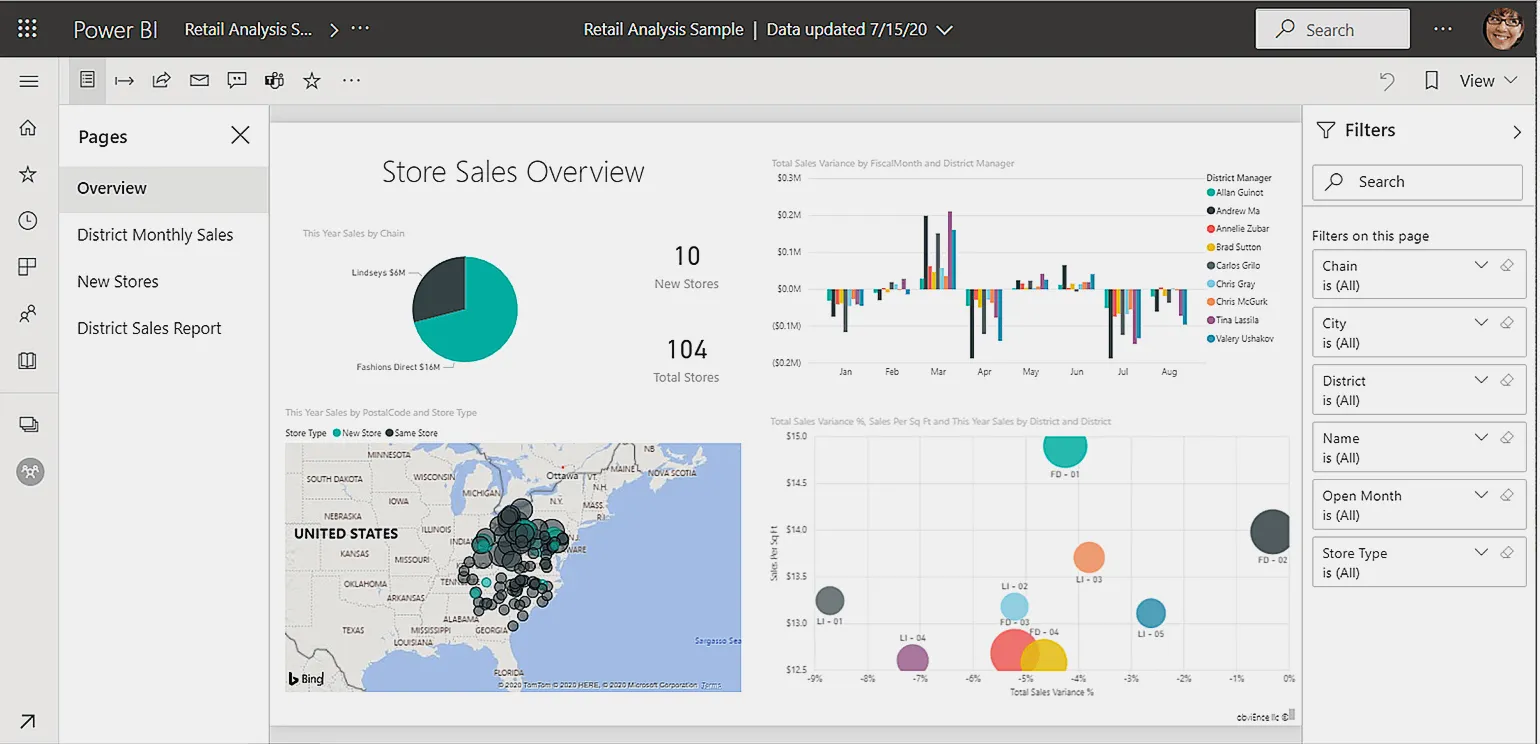
Professionals who use DAX include data analysts, business analysts, financial analysts, and marketers. In the next section, we'll take a closer look at the tasks they solve with DAX, as well as its applications in various areas of data analysis and business reporting. DAX enables the efficient processing and analysis of large volumes of information, making it an indispensable tool for professionals in these fields.
Data Analysis Training and Skill Development
Skillbox offers training programs for those who aspire to become an expert in data analysis. These courses will help you master DAX and other key analytics tools, significantly increasing your skills and competitiveness in the job market.
- "Power BI PRO" — learn business analysis tools and create interactive reports at an advanced level.
- "BI Analyst Profession" — learn to collect, structure, and analyze data, creating dashboards to support management decisions.
- "Data Analyst from Scratch" — gain data analysis skills using various analytical services and BI systems, including Python and SQL.
What are the key tasks solved by DAX: practical examples
DAX (Data Analysis Expressions) is a powerful formula language that enables in-depth data analysis and helps businesses effectively manage information from multiple sources. The main capabilities of DAX include extracting, filtering, and calculating data, which significantly simplifies the process of generating reports and making informed decisions. Using DAX helps improve the quality of business analytics, improving the accuracy and speed of data processing. Integrating DAX into analytical processes allows companies to quickly adapt to market changes and make more informed decisions based on up-to-date data.
DAX (Data Analysis Expressions) is a powerful tool for data analysis and business process optimization. Let's consider several scenarios in which using DAX can significantly improve business performance.
First, DAX allows you to create complex measures and calculations that help you analyze a company's financial performance in more depth. For example, you can easily calculate profit margins, analyze sales dynamics, or forecast future revenue based on historical data.
Second, DAX allows you to automate reports, which significantly saves time and resources. Automated reports ensure that data is up-to-date, allowing managers to make more informed decisions.
Third, DAX improves data visualization. With DAX, you can create clear charts and graphs that help you better understand key performance indicators. This is especially useful for presenting results to management or investors.
Furthermore, DAX supports integration with various data sources, allowing you to combine information from different systems and gain a more complete understanding of your business. This opens up new opportunities for analysis and the identification of hidden trends.
Thus, implementing DAX into business processes can lead to significant efficiency gains, improved analytics, and faster decision-making.
- Financial analysis. DAX is capable of processing huge volumes of financial data, allowing you to combine information from different tables to calculate key metrics such as profit, profitability, and marginality. These metrics are used to create informative reports that aid in strategic planning.
- Sales and marketing analysis. With DAX, companies can track sales dynamics in real time, evaluate the effectiveness of marketing campaigns, and identify the most profitable products or services. This allows them to adapt strategies depending on the market situation.
- Studying customer behavior. DAX helps businesses analyze how customers interact with their products and services. For example, you can determine which products are in highest demand, what attracts customers, and predict future customer needs using forecasting models.
- Inventory and Manufacturing Management. With DAX, companies can calculate inventory turns, forecast product needs, and analyze production line efficiency to optimize operational processes.
- Human Capital Management. DAX is used to analyze employee performance to identify turnover rates and develop effective incentive programs. DAX can also be used to set and calculate key performance indicators (KPIs).
DAX Basics: Understanding Key Concepts and Steps
DAX (Data Analysis Expressions) is a powerful formula language designed for data analysis in tools such as Power BI and SQL Server Analysis Services. Its syntax is similar to Excel formulas, but DAX works with entire columns rather than individual cells. This allows you to perform complex calculations and filters simultaneously, significantly speeding up the data analysis process. Using DAX in business analytics opens up new possibilities for gaining valuable insights and making informed decisions.
To use DAX effectively, it is important to understand several basic concepts: measures, calculated columns, calculated tables, context, and relationships. It is important to pay attention to each of these aspects, as they play a key role in data analysis and reporting. Let's look at each of these concepts in more detail so that you can maximize the capabilities of DAX in your projects.
Measures are calculated expressions designed to aggregate data. With their help, you can create metrics, such as total profit or average sales. These aggregated values can be used for subsequent calculations and visualizations, allowing you to more effectively analyze business metrics and make informed decisions based on data. Optimizing work with measures improves analytical reporting and makes visualizations more informative.
Calculated columns are expressions that perform calculations for each row in a table, generating a new column with the results. For example, this column could automatically calculate the total order amount for each customer, performing the calculation for each row. Using calculated columns significantly simplifies data analysis and increases the efficiency of working with tables, providing quick access to the necessary information and improving decision-making. Optimizing data with calculated columns becomes especially useful in large projects that require processing large volumes of information.
Calculated tables are tables created using DAX formulas. They allow you to efficiently collect and process data for specific analysis. For example, you can create a table containing a list of customers who made repeat purchases in the last month. This greatly simplifies the analysis of customer behavior and helps identify purchasing trends. Using calculated tables allows analysts to explore data more deeply and make more informed business decisions.
Context is important in DAX and determines what data is used to perform calculations. There are two main types of context: row and filter. Row context specifies the current row in a table, allowing calculations to be performed based on the values in that row. Filter context, on the other hand, defines the set of data that is considered when performing calculations, applying filters to data models. Understanding these types of context is key to effectively using DAX to analyze data and build complex calculations.
- Row Context - allows you to apply formulas to the data in the current row. For example, when calculating the "Total Cost" of a product, the formula "Price × Quantity" would be used for each row.
- Filter Context - considers data that meets specified conditions. For example, when calculating "Sales Total" with a month filter, the context will collect data only from rows related to the selected month.
Relationships in databases allow you to effectively combine data from different tables. For example, if you have a customer table and an order table, you can establish a relationship between them using a unique customer ID. This will allow you to analyze orders and calculate the total purchase amount for each customer, which, in turn, will improve your understanding of customer behavior and increase the effectiveness of business analysis. Creating the right relationships between tables ensures data integrity and facilitates the extraction of the necessary information.
The process of working with DAX includes four main stages. The first stage involves defining business requirements and formulating analytical tasks, which allows you to set clear goals for data analysis. The second stage involves designing a data model, where you need to define what data will be used and how it will be related. The third stage involves writing DAX expressions to perform calculations and analyze the data, which allows you to extract the necessary information from the model. The final step involves testing and optimizing DAX expressions to ensure their performance and correctness when working with large volumes of data. Each of these steps plays a vital role in the DAX workflow and helps users get the most out of their data analysis tools.
These steps enable users to get the most out of their data by offering powerful tools for analyzing and visualizing information.
If you're interested in learning more about DAX and its applications, we recommend exploring the training resources on Microsoft Learn and Skillbox. These platforms offer extensive materials to help you master the DAX language and use it in Power BI for data analysis. Don't miss the opportunity to improve your skills and become more effective at working with data by exploring the available courses and tutorials.
If you have any questions about DAX, don't hesitate to contact us in the comments. We are happy to provide the assistance and information you need.
Choosing a program for working with DAX: Power BI, Power Pivot, or Analysis Services?
When it comes to DAX (Data Analysis Expressions), users often wonder which program to use for calculations. DAX is integrated into various analytical solutions from Microsoft, such as Power BI, Analysis Services, and the Power Pivot add-in for Excel. Although the DAX functions in these applications are generally similar, each program has unique features and advantages. Choosing the right tool depends on the specific tasks and needs of the user. Power BI, for example, offers powerful visualization capabilities, while Excel with Power Pivot is suitable for working with large data sets in a familiar environment. Analysis Services is ideal for developing complex data models and deploying them at the enterprise level.
Today, Power BI is one of the most powerful tools for data analysis. It provides users with a variety of data visualization features, as well as an intuitive interface for creating DAX expressions. Unlike other programs, Power BI enables user collaboration through cloud repositories, allowing for real-time changes and syncing across devices. This makes Power BI an ideal solution for team data analysis and increased efficiency in working with information.
Power BI is regularly updated, giving users access to new DAX features faster than is possible in Power Pivot or Analysis Services. According to Microsoft, Power BI is becoming increasingly popular among analysts and business users due to its flexibility and powerful analytical capabilities. This platform makes it easy to visualize data and perform in-depth analysis, making it an indispensable tool for making informed business decisions.
Power Pivot is an excellent solution for users who prefer working with Excel and need simple data analysis scenarios. This powerful add-in allows for simple and convenient data manipulation and basic analytical operations. Power Pivot offers an intuitive interface, making it ideal for those looking to streamline their data workflow without unnecessary complexity. Choosing between Power BI and Power Pivot depends on your analytical needs. If you intend to perform complex analytical tasks and visualize data, Power BI will be the optimal solution thanks to its advanced capabilities. At the same time, Power Pivot is ideal for users who are already familiar with Excel and need a simpler yet effective data analysis tool. Both tools have their advantages, and the right choice depends on your level of requirements and experience working with data. Where and How to Effectively Learn DAX You can learn DAX (Data Analysis Expressions) both independently and through specialized courses. Each of these approaches has its advantages, and your choice should be based on your personal goals and learning preferences. Self-paced learning allows you to schedule your time flexibly and focus on the specific aspects of DAX that interest you most. Courses, on the other hand, offer a structured approach and access to experienced instructors, which can accelerate the learning process and deepen your understanding of the material. Consider both options to choose the DAX learning method that's best for you.
- Official Microsoft Resources. The Microsoft website offers extensive DAX documentation, including training videos, written materials, and step-by-step instructions for using various DAX functions. Examples and detailed syntax descriptions are also available.
- Books and Literature. There are numerous books on DAX and Power BI that offer a deep understanding of the topic. We recommend "The Definitive Guide to DAX" by Marco Russo and Alberto Ferrari, as well as "DAX Formulas for Power Pivot" by Rob Colley.
- Online Forums and Communities. Join Telegram chats such as Power BI Group RU and Power BI Professionals. These platforms allow you to share experiences and get advice from more experienced DAX users.
Learning DAX on your own can take a significant amount of time. If you are looking to master the skills quickly, we recommend considering courses that provide structured training. These courses will help you systematize your knowledge and achieve your desired results in working with DAX faster.
The "Power BI" course from Skillbox offers two months of training and includes mastering key skills for working with this platform. Course participants learn the basics of data visualization, creating interactive reports and dashboards, as well as data analysis methods for making informed decisions. The training is aimed at developing the practical skills necessary for the effective use of Power BI in business.
- Processing data from various sources and setting up relationships between them.
- Working with basic DAX formulas.
- Setting up end-to-end analytics.
- Creating dynamic dashboards in a convenient format.
- Analysis of key indicators.
All skills are developed through practical completion of assignments and tests, which are assessed by specialists. The assignments are designed with real-world scenarios in mind, allowing you to effectively integrate your learning into your portfolio. Hands-on practice is a key element of learning, as it helps solidify theoretical knowledge and prepare you for real-world challenges in your professional life.
DAX Essentials: 4 Key Points to Understand
DAX (Data Analysis Expressions) is a powerful formula language used in Microsoft Power BI, SQL Server Analysis Services, and Power Pivot in Excel. It is designed to simplify data analysis and reporting, enabling users to effectively work with large volumes of information. DAX provides a wide range of functions that assist in complex calculations and data analysis, making it an indispensable tool for analysts and business intelligence professionals. Using DAX promotes a deeper understanding of data and improves the quality of reporting.
DAX, or Data Analysis Expressions, offers users the ability to develop simple and intuitive formulas for data analysis. At the same time, this powerful language supports the creation of complex calculations, making it a versatile tool for deep data analysis and processing. DAX is ideal for both novice and experienced analysts, enabling them to effectively perform analysis and visualize results. Understanding the concept of context is critical in DAX, as filters and data rows significantly impact calculations. There are two main types of context: row context and filter context. Understanding these aspects is the foundation for effectively using DAX in data analysis and reporting. Developing effective DAX formulas requires a deep understanding of how context affects the result, which allows for more accurate and informative analytical solutions. DAX provides an extensive library of functions, including aggregate, logical, and time series functions. This significantly simplifies data analysis and allows users to quickly extract the necessary information. Using DAX in data analytics helps optimize processes and improve the efficiency of working with large volumes of information.
According to Gartner research, over 80% of companies use data analytics tools, highlighting the growing importance of DAX. This expression language, thanks to its integration with Microsoft products, is becoming an indispensable tool for business analysts and data specialists. Using DAX allows you to effectively process and analyze large volumes of information, which facilitates more informed business decisions. In today's data-driven marketplace, mastering DAX is a crucial step for professionals seeking to improve their competitiveness.
For a more in-depth study of DAX, we highly recommend reviewing the official Microsoft documentation. Free Power BI courses on educational platforms such as Coursera and edX are also helpful. This will allow you to gain the necessary knowledge and skills to effectively use DAX in data analysis.
Project Manager: 5 Steps to a Successful Career
Want to become an indispensable project manager? Learn 5 key skills for business success!
Learn more